
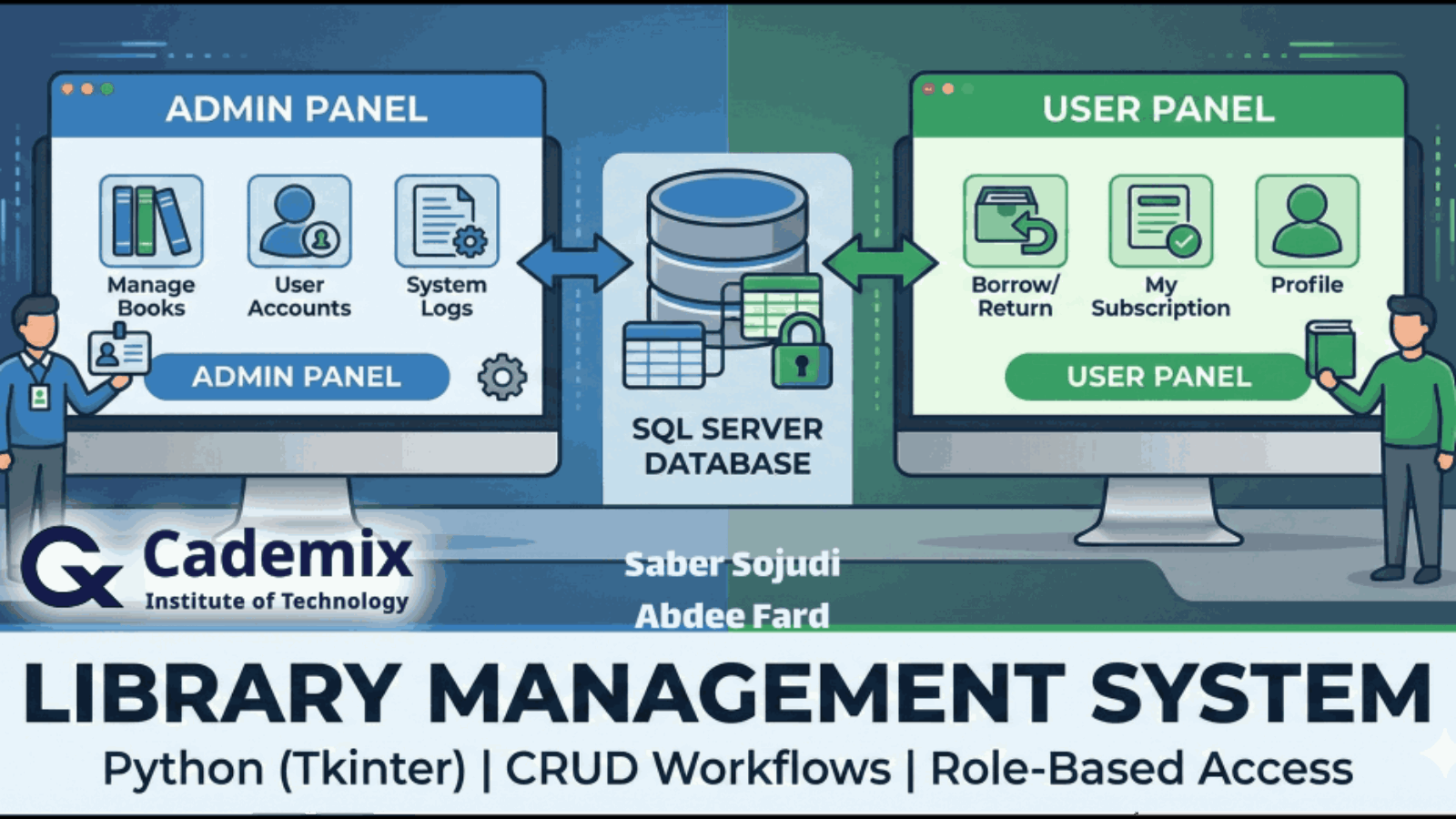
I built a Python/Tkinter desktop application to demonstrate core library-management workflows. The application uses Microsoft SQL Server as its backend and connects via pyodbc through a 64-bit Windows System DSN configured for the SQL ODBC driver stack (ODBC Driver 17). The project is organized around typical CRUD operations for library entities and operational flows such as account management and book circulation. The intended end-to-end flows include database initialization, role-based login (admin and user), user registration, adding books, borrowing and returning books, suspending and releasing users, and renewing subscriptions; these flows are described as intended behavior rather than personally validated execution. During implementation, I addressed practical reliability issues commonly encountered in local SQL Server development, including driver encryption settings (e.g., TrustServerCertificate), safe handling of GO batch separators in SQL scripts, and rerunnable (idempotent) table creation. The design also reflects the realities of schema dependency management, such as foreign key ordering and constraint-driven creation/seeding. The project scope is intentionally limited to a single-machine desktop deployment; it is not a web application and does not include an automated test suite.
Saber Sojudi Abdee Fard
Introduction
I built this Library Management System as a desktop-first, database-backed application to exercise the full path from relational modeling to application integration. The core goal is not a “feature-rich library product,” but a clear demonstration of schema design, referential integrity, and CRUD-style workflows exposed through a Tkinter GUI while persisting state in Microsoft SQL Server.
A deliberate early design choice was to treat local developer setup as part of the system, not an afterthought. The project assumes a Windows 64-bit environment and a SQL Server instance (Express/Developer) reachable via a 64-bit System DSN named SQL ODBC using ODBC Driver 17. For local development, the documentation explicitly calls out the common encryption friction point with Driver 17 and suggests either disabling encryption or enabling encryption while trusting the server certificate, which aligns with the reliability lessons captured in the project snapshot.
At the data layer, the schema is centered around a small set of entities Publisher, Category, Book, Member, Transactions, and User_tbl that together model catalog metadata, membership identity, subscription validity, and circulation events. In the ERD, Book references both Publisher and Category (one-to-many in each direction), and Transactions acts as the operational log linking a Member to a Book with dates for borrowing/returning (including due/return dates). The design also separates member identity (Member) from subscription state (User_tbl) through a one-to-one relationship, which is a simple way to keep “who the user is” distinct from “membership validity.”
This project’s scope is intentionally bounded. It is not a web application, it assumes a single-machine DSN-based setup, and it does not include an automated test suite; the project documentation frames it as an educational implementation rather than a production-hardened system.
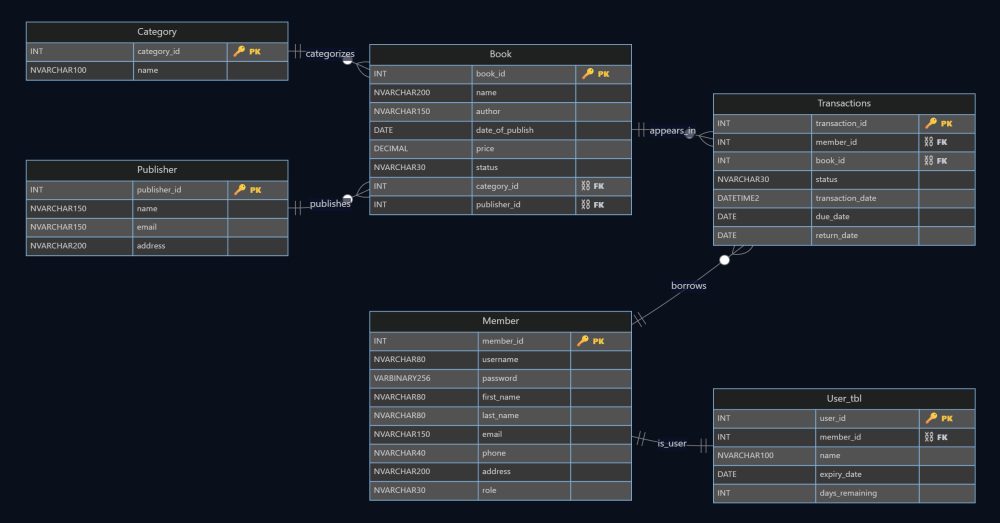
Figure 1 The schema backbone: books are categorized and published, transactions record borrow/return activity, and membership validity is separated into a dedicated subscription table.
Methodology
Database setup and shared utilities
I treated the database as a first-class subsystem rather than an opaque dependency, because most of the application’s correctness depends on consistent schema state and predictable connectivity. The project standardizes connectivity through a Windows 64-bit System DSN named SQL ODBC, and uses pyodbc to open a cursor against a fixed target database (LibraryDB). The connection string is explicit about the common ODBC Driver 17 development friction: encryption can be disabled (Encrypt=no) for local development, or enabled with TrustServerCertificate=yes depending on the developer’s environment and SQL Server configuration. This decision aligns with the project’s “single-machine DSN setup” scope and keeps runtime behavior deterministic across scripts.
To avoid duplicating boilerplate across many standalone Tkinter scripts, I centralized the lowest-level helpers in utils.py. In practice, that file functions as the project’s shared “platform layer”: it owns DB cursor creation, input validation helpers (email/phone), and the password hashing helper used in account creation and bootstrapping.
The schema can be created in two ways, which gives the project a pragmatic “belt and suspenders” setup story:
- Python-driven idempotent schema creation (
table_creation.py) checksinformation_schemaandsys.indexesbefore creating base tables and indexes. If any required table is missing, it creates the full set (publisher, book, category, member, subscription table, and transactions) and then builds secondary indexes to support common lookup paths such as book title, author, and member username. The same script separately applies named foreign key constraints (with cascade behavior) only if they do not already exist, and it bootstraps a default admin account if one does not exist. This “check-then-create” approach makes schema creation re-runnable without failing on already-created objects, which is the project’s main safeguard against re-run failures during iterative development. - SQL file batch execution (
run_sql_folder.py) executes the.sqlfiles in numeric order (e.g.,1-...sql,2-...sql) and explicitly supportsGObatch separators by splitting scripts into batches using a regex. This matters becauseGOis not a T SQL statement; it is a client-side batch delimiter, and without pre-processing it will typically break naïve executors. The runner therefore converts a folder of SQL scripts into reliably executable batches and commits each batch.
A related helper exists in utils.py (insert_data_to_tables) that attempts to seed tables by scanning the current directory for .sql files, splitting on semicolons, and executing statements when the target table is empty (or near-empty). This provides a lightweight seeding mechanism, but it is intentionally less strict than the GO-aware runner; in the article, I will describe it as a convenience seeding helper rather than the primary “authoritative” database migration mechanism.
At the schema level, the database design enforces core invariants in the table definitions and constraints: book.status is constrained to a small enumerated set (“In Stock”, “Out of Stock”, “Borrowed”), member.role is constrained to (“Admin”, “User”), and subscription status is constrained to (“Valid”, “Suspend”). The explicit constraints simplify application logic because invalid states are rejected at the database boundary rather than being “soft rules” in UI code.
Authentication, account lifecycle, and role routing
The application’s entrypoint (login.py) is more than a UI screen it also acts as a bootstrapping coordinator that ensures the database is in a usable state before any authentication decision is made. At startup, initialize_database() calls the schema and index creation routines, provisions a default admin account, attempts to seed data, and then applies foreign key constraints. This sequencing is intentional: it makes first-run setup largely self-contained and reduces “works only after manual SQL setup” failure modes, while still keeping the overall system aligned with a local SQL Server development workflow.
Once initialized, the login flow uses a simple but explicit contract: the user submits a username and password, selects a role from a dropdown (“Admin” or “User”), and the application verifies both credentials and role alignment against the database record. The code fetches the member row by username, hashes the entered password, and compares it to the stored hash. It then enforces a role gate: an admin account cannot enter through the “User” route, and a user account cannot enter through the “Admin” route. This guards the navigation boundary between admin and user panels without relying on hidden UI conventions.
The account creation path is implemented as a separate Tkinter screen (create_account.py) that inserts a new member with role fixed to User. Before insertion, it validates required fields, checks that the password confirmation matches, and uses shared validators for email format and phone number format. It also checks username uniqueness with a query that counts existing rows grouped by username, and it refuses registration if the username is already taken. Successful registration writes the new member record and clears the form fields to avoid accidental duplicate submissions.
Password reset is implemented as a lightweight “forgot password” screen (forgetpassword.py). The flow is intentionally minimal: given a username and a new password (with confirmation), it verifies that the username exists in member, then updates the stored password hash. This keeps credential recovery self-contained inside the same data model as login and avoids separate recovery tables or email workflows, which fits the project’s desktop-scope constraints.
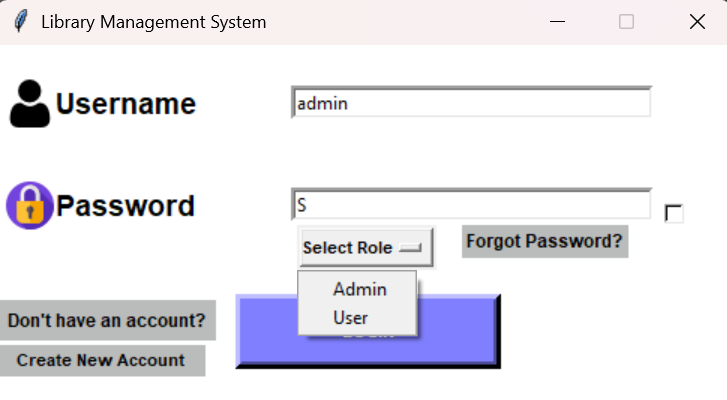
Figure 2 The login boundary: users authenticate with a username/password and explicitly choose Admin vs User, which is checked against the stored role before routing to the relevant panel.
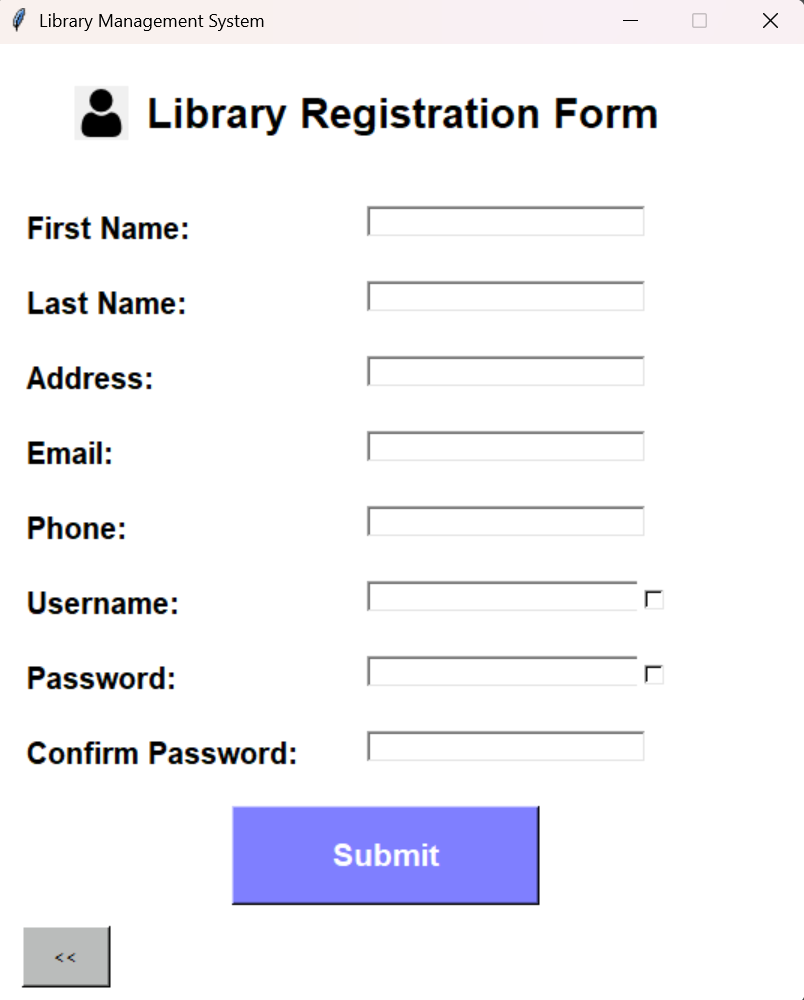
Figure 3 User registration captures member identity fields and applies basic validation before inserting a member record with role set to User.
Role-specific panels and profile management
After authentication, the application routes the user into one of two role-specific control surfaces: an admin panel for operational control and a user panel for day-to-day library usage. I implemented these as distinct Tkinter windows, each acting as a small navigation hub that dispatches into focused, single-purpose screens. This “screen-per-script” structure keeps each workflow isolated and reduces the cognitive load of large, monolithic UI modules.
On the admin side, admin_panel.py provides entry points to the book catalog view, user list view, user suspension view, and the admin’s own profile page, plus a guarded logout action that requires confirmation before returning to the login window. The panel itself does not implement the workflows; it acts as a router that destroys the current window and transfers control to the relevant module. That pattern is consistent across the codebase and is the main way UI state is managed without a central controller.
On the user side, user_panel.py is intentionally narrower: it routes to subscription management, borrowing, returning, and the user profile. It passes a user_id (member_id) across windows as the primary identity token for user-scoped operations. This aligns with the schema design: member_id is the stable key for linking identity to circulation and subscription state, and the UI reuses that same key for most user flows.
Profile views for both roles follow the same implementation model: read from the member table using a parameterized query, then render the result in a ttk.Treeview. Admin profile lookup is username-based, while user profile lookup is member_id-based; both approaches are consistent with how the rest of the UI passes identity around (admins are handled by username at entry, users by id after login). The profile screens also provide an “Edit Profile” action that transitions into a dedicated edit form.
The edit forms (admin_edit_profile.py and user_edit_profile.py) are implemented as partial-update screens: they collect only the fields the user actually filled in and then execute one UPDATE statement per field. This is a pragmatic way to avoid overwriting existing values with empty strings and it makes the update logic easy to reason about. The user edit screen additionally routes email and phone through explicit validators before updating the database. Password changes are stored as a hash in the same field used by login, keeping credential semantics consistent across registration, editing, and recovery.
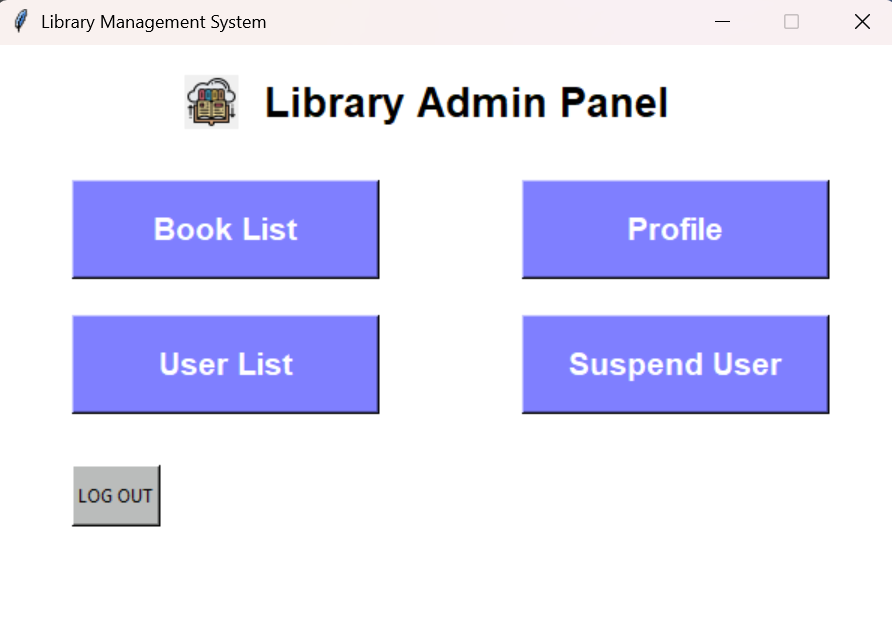
Figure 4 The admin control surface routes into operational workflows (catalog management, user list, and suspension) without embedding the business logic in the panel itself.
Catalog management and circulation workflows
The core “library” behavior in this project is implemented as a set of focused screens that sit directly on top of a small number of database tables: book and publisher for the catalog, category for book categorization, and transactions for circulation history. Rather than hiding SQL behind a separate repository layer, these modules keep the database interaction close to the UI event handlers, with parameterized queries and explicit commits. That choice makes the data flow easy to trace in a learning-oriented codebase: button click → query/update → refreshed view.
On the admin side, booklist.py provides the catalog “truth view” using a join across book, publisher, and category. The query pulls the book’s identity, price, publisher, author, status, and category name(s), and then populates a ttk.Treeview. Because the category table can contain multiple rows per book_id, the code includes a post-processing step that merges categories for the same book into a single display value so the list behaves like a denormalized catalog view without losing the underlying row-level representation. Search is implemented as a set of narrow SQL variants (name, author, publisher, status, category) driven by a radio-button selector, and removal explicitly deletes dependent category rows before deleting the book row to avoid foreign key conflicts.
Adding a book (addbook.py) is implemented as a two-step write that mirrors the schema. The admin enters book metadata plus a publisher name and a category name. The screen first resolves publisher_id by publisher name, inserts a new row into book with an initial status of "In Stock" and a publish date, and then inserts a category row pointing back to the created book_id. In this design, “category” behaves like a book-to-category association table (even though it is named category), which is consistent with how the list view joins categories back onto books.
On the user side, circulation is tracked as an append-only event stream in transactions with a mirrored “current availability” indicator stored in book.status. Borrowing (borrowBook.py) checks the selected row’s inventory status and only proceeds when the book is "In Stock". A successful borrow inserts a "Borrow" transaction for the current member_id and updates the corresponding book.status to "Borrowed". Returning (bookReturn.py) reconstructs the user’s currently borrowed set by counting "Borrow" versus "Return" events per book_id; it displays only those books with exactly one more borrow than return, and a return action records a "Return" transaction and restores the book’s status to "In Stock". The return screen also computes a simple cost estimate as a function of days since the borrow transaction date, which demonstrates how transactional history can drive derived UI metrics.
A few small contracts hold this together cleanly:
- Availability gating: the UI treats
book.statusas the immediate guard for whether a book can be borrowed, using"In Stock"as the only borrowable state. - Event log + snapshot state:
transactionsprovides a history (“Borrow”/“Return”), whilebook.statusprovides the current snapshot for fast display and filtering. - User scoping: user-facing operations consistently act on
member_id(passed into the screens asuser_id) for all transaction writes and reads.
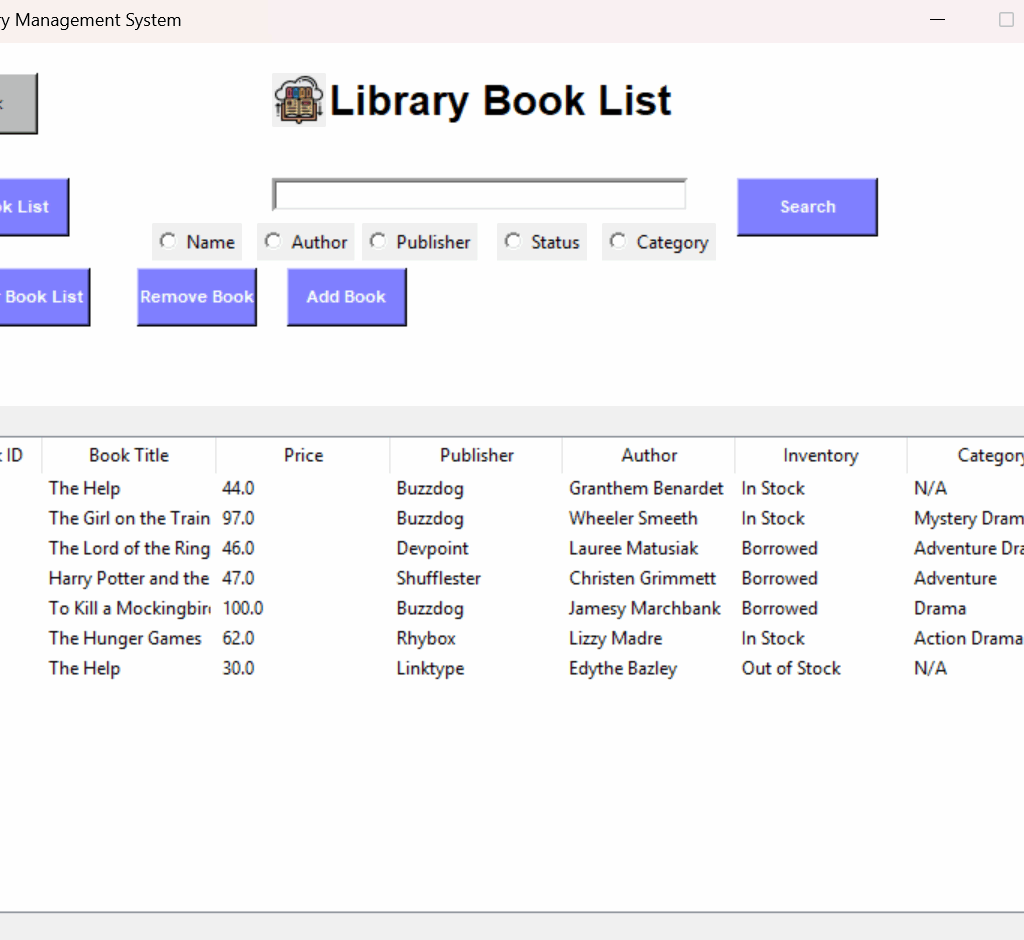
Figure 5 The catalog view surfaces the join of book metadata, publisher, category, and availability status, and it is the main UI surface that reflects the current database state.
Subscription validity and administrative user controls
Beyond catalog and circulation, the project includes a small set of “operations” screens that make membership state explicit and controllable. I kept this logic close to the database tables that represent it: user_tbl stores subscription validity and an expiration date, while member stores identity and role. The UI surfaces these as two complementary control planes: users can extend their own validity period, and admins can inspect, remove, or suspend accounts.
The user-facing subscription screen (subscription.py) treats expire_date as the canonical definition of remaining time. It fetches the user’s current expiration date from user_tbl, computes remaining days relative to date.today(), and displays that countdown prominently. Renewal is implemented as an additive operation: pressing a 3-month, 6-month, or 1-year button adds a relativedelta(months=...) offset to the existing expiration date and writes it back with an UPDATE on the current member_id. This design is intentionally simple: it preserves history in the sense that renewals are always cumulative, and it avoids hard resets that could unintentionally shorten a membership.
On the admin side, userList.py provides an inspection and maintenance view over library accounts by joining member with user_tbl and listing both identity fields and the current status value. From there, the admin can (a) load the full list of valid/suspended users, (b) suspend a selected user by setting user_tbl.status to 'Suspend', and (c) remove a selected user entirely. Removal is implemented as an explicit dependency-ordered delete: the code deletes the user’s transactions first, then the associated user_tbl record, and finally the member record, and then refreshes the listing. Even in a small project, this ordering matters because it aligns with foreign-key dependencies and prevents the most common “cannot delete because it is referenced” failure mode.
Suspended-user management is separated into its own screen (suspendedUsers.py) rather than being an overloaded state inside the main user list. That module filters the join to only users with status 'Suspend', displays them in a table, and provides a “Release User” operation that restores user_tbl.status back to 'Valid'. This split keeps the administrative workflow clearer: “review all users” versus “review only suspended users,” each with its own narrow actions.
Key implementation notes
- Documentation and system intent:
README.md(environment assumptions, DSN requirements, intended workflows, and setup scripts). - Schema and relationships:
erd/erd diagram.pdfand the Mermaid-based ERD definition embedded inerd/erd lib.html. - ERD tooling used in the repo: the single-file “ERD Maker” HTML described in
erd/README.md. - DB connection and shared helpers:
utils.py(ODBC Driver 17 connection string, cursor factory, MD5 hashing, input validation, lightweight seed helper). - Idempotent schema + indexes + constraints + admin bootstrap:
table_creation.py(existence checks viainformation_schemaandsys.indexes; named FK constraints; default admin provisioning). - Deterministic SQL script execution with
GOsupport:run_sql_folder.py(numeric ordering, batch splitting, per-batch commits). - Bootstrapping + login routing:
login.py(initialize_database(),login(), role dropdown gate, panel dispatch). - Registration workflow:
create_account.py(submit(), uniqueness check, validators, role assignment toUser). - Credential reset workflow:
forgetpassword.py(submit(), username lookup, password update). - Admin navigation hub:
admin_panel.py(dispatch to book list, profile, user list, suspension; confirm-before-logout). - User navigation hub:
user_panel.py(dispatch to subscription, borrow, return, profile; identity passed asmember_id). - Profile read paths:
admin_profile.py(username →member),user_profile.py(member_id →member), both rendered inttk.Treeview. - Profile partial updates:
admin_edit_profile.py,user_edit_profile.py(update only non-empty fields; user flow validates email/phone). - Admin catalog view, search, and deletion semantics:
booklist.py(join-based listing, category aggregation for display, search modes, dependent-delete ordering). - Admin book creation path:
addbook.py(publisher lookup, insert intobook, then associate category). - User borrow flow:
borrowBook.py(status gate, insert"Borrow"transaction, updatebook.status). - User return flow + “currently borrowed” reconstruction:
bookReturn.py(borrow/return counting, insert"Return"transaction, restore status). - User renewal flow:
subscription.py(remaining-days computation fromexpire_date, additive renewal usingrelativedelta, update-by-member_id). - Admin user inventory + suspension + deletion ordering:
userList.py(join-based listing, status updates, dependency-ordered deletes). - Suspended-only view + release operation:
suspendedUsers.py(filtered listing by status, restore to'Valid'). - Bootstrapped, re-runnable initialization:
login.py,table_creation.py,run_sql_folder.py,utils.py. - Catalog and joins + display shaping:
booklist.py,addbook.py. - Circulation eventing and snapshot updates:
borrowBook.py,bookReturn.py. - Subscription and admin governance controls:
subscription.py,userList.py,suspendedUsers.py.
Results
Operational checkpoints derived from the implementation
Because I did not personally execute the full end-to-end flows, I treat “results” here as the observable outcomes the implementation is designed to produce, based on the documented intent and the concrete code paths.
On first run, the application’s entry flow is designed to converge the environment into a usable state by creating the schema, adding indexes and foreign keys, and provisioning a default admin user if one does not already exist. That work is intentionally re-runnable: table creation and constraint application are guarded by existence checks to avoid failing on subsequent runs.
From there, the UI is structured so each workflow has a clear “database side effect” that can be verified by inspecting either (a) the UI tables (Treeviews) or (b) the underlying SQL Server tables:
- Registration inserts a new
memberrow with role set toUser, after username uniqueness and basic validation checks. - Login validates credentials and role alignment, then routes to the correct panel.
- Adding a book inserts into
bookand associates at least one category entry, after resolving the publisher relationship. - Borrowing records a
"Borrow"event intransactionsand updatesbook.statusto"Borrowed"(only when status is"In Stock"). - Returning records a
"Return"event and restoresbook.statusto"In Stock", while deriving the “currently borrowed” set from borrow/return event counts. - Subscription renewal updates
user_tbl.expire_dateby adding a fixed offset (3/6/12 months) to the current value. - Suspension and release toggle
user_tbl.statusbetween'Suspend'and'Valid', and administrative deletion performs dependency-ordered deletes to avoid foreign-key conflicts.
Catalog and circulation state coherence
A key operational result of the design is that the system maintains two complementary views of circulation:
- a durable event log (
transactions) that records borrow/return history per member and book, and - a current snapshot (
book.status) that makes availability immediately filterable and enforceable at the UI boundary.
The borrow and return screens treat this split consistently: borrowing is gated by the snapshot state, while returning reconstructs “still borrowed” books from the event stream and then writes both a new event and an updated snapshot.
In the UI, the book list view is the most direct “state surface” for these outcomes because it combines book metadata with availability status and category associations in one table.
Membership visibility and administrative control outcomes
Membership validity is designed to be both user-visible and admin-enforceable:
- For users, remaining validity is computed from
expire_daterelative to the current date, and renewals are cumulative (additive) rather than resetting the expiry. - For admins, account operability is controlled by explicit status transitions (
Valid↔︎Suspend) and is visible in list views scoped to all users or suspended users only.
What “success” means for this project
For this build, I consider the system successful when the following properties hold in a repeatable local setup:
- The schema can be created (and re-created) without manual intervention and without failing on re-run.
- Role routing is explicit and enforced at login, so admin and user control surfaces remain separated by design.
- Circulation produces consistent outcomes across
transactionsandbook.status, so history and current availability agree. - Admin actions (suspend/release/delete) perform predictable state transitions without violating referential integrity.