
GA4 setup guide cover: setting up and configuring Google Analytics 4

Estimated Reading Time: 17 minutes
GA4 setup guide cover: setting up and configuring Google Analytics 4

GA4 Setup: Complete & Easy Google Analytics 4 Configuration Guide

Introduction: Why GA4 Setup Matters

Google Analytics 4, commonly known as GA4, is Google’s current analytics platform for measuring how people interact with websites and apps. Unlike Universal Analytics, GA4 is built around events rather than a primarily session-based reporting model. A page view, scroll, outbound click, file download, form interaction, or purchase can be represented as an event with additional parameters that describe the interaction. This approach gives marketers greater flexibility, but it also means that a newly created property is not automatically configured around every business objective.

A website can successfully collect visitors and engagement data while still failing to measure the actions that matter most to the organization. A properly planned GA4 setup therefore requires more than installing a tracking tag. It requires a logical structure, reliable data collection, meaningful events, appropriate key events, privacy controls, and connections with other marketing platforms.

GA4 Fundamentals Before You Start

Understand the GA4 Account Structure

Before starting a GA4 setup, it is important to understand the relationship between an Analytics account, a property, and a data stream. The account is the top-level container used to organize access and properties, while a property generally represents a website, app, or related measurement environment. Within a property, data streams provide the actual sources from which Analytics receives information. For a website, the relevant stream is normally a Web data stream.

This hierarchy matters because configuration decisions are made at different levels. Access permissions, reporting settings, data collection, events, and integrations are not all controlled from the same screen. Google currently recommends creating the appropriate Analytics account and property first, selecting the reporting time zone and currency carefully, and then adding the web data stream that will collect website activity.

Understand GA4 Events and Parameters

Events are the central measurement unit in GA4. Instead of treating every interaction only as part of a session, GA4 records individual actions and can attach parameters that provide additional context. For example, a page view can contain the page location and referrer, while an e-commerce purchase can include information such as transaction value and items. Some events are collected automatically, while Enhanced Measurement can collect additional website interactions without requiring custom development for every basic action.

This event-based structure makes GA4 configuration more flexible, but it also creates a responsibility for marketers: they must decide which actions are meaningful and whether the automatically collected events are sufficient for the organization’s objectives. Google states that Enhanced Measurement can be enabled from the web data stream and can be adjusted by turning individual measurement options on or off.

Define GA4 Key Events for Business Goals

The correct events depend on the business model rather than on a universal checklist. A common mistake is to mark every available event as important simply because the interface makes it possible. A better approach is to identify the actions that indicate genuine progress toward the organization’s goals and then ensure that those events are implemented accurately before using them for analysis or advertising optimization — a discipline closely related to the lead-nurturing principles covered in our guide on how CRM enhances the trust quadrant of the content matrix

Step-by-Step GA4 Setup

This section is the practical core of this GA4 setup guide, walking through every stage of a GA4 setup in the order it should actually be done.

Step 1: Create a GA4 Account and Property

The first operational stage of a GA4 setup is creating or selecting the correct Analytics account and then creating the appropriate property. Google Analytics currently directs new users to Analytics administration, where an account can be created if one does not already exist. After selecting the correct account, the property should be given a clear name and configured with the appropriate reporting time zone and currency. These settings are not cosmetic because time-based reporting and monetary calculations depend on them.

Google also asks for business information and intended use, which can influence the default reports shown within the property. For the exact current steps and screens, refer to Google’s official Analytics setup documentation.

Step 2: Add a GA4 Web Data Stream

After creating the property, the next stage of the GA4 setup is adding a Web data stream for the website. In Analytics administration, the user selects Data Streams and chooses Web, then enters the website URL and a descriptive stream name. The resulting stream provides the Google tag or Measurement ID required for data collection. Enhanced Measurement should normally be reviewed at this stage because it can automatically capture useful interactions such as page views, scrolls, outbound clicks, site search, video engagement, and file downloads depending on the enabled settings.

Enhanced Measurement should normally be reviewed at this stage because it can automatically capture useful interactions such as page views, scrolls, outbound clicks, site search, video engagement, and file downloads depending on the enabled settings, as described in Google’s Enhanced Measurement documentation.

Step 3: Install the Google Tag

Once the web data stream exists, the website needs a Google tag so that information can reach the GA4 property. The exact installation method depends on the website platform and the resources available. A CMS may provide a field for entering the Google tag ID, while another website may require manual installation or Google Tag Manager. Google currently documents both direct Google tag installation and Tag Manager-based implementation.

When installing directly, the Google tag should be placed correctly across the website so that relevant pages can send data. When using a tag-management system, the configuration should be published rather than merely saved. One of the most common technical problems is assuming that a tag has been installed when it has only been created inside a management interface. This GA4 setup step is not complete until the live website actually sends data to the intended property.

Step 4: Verify GA4 Data in Realtime

Verification should happen immediately after installation instead of waiting until the following day to discover a configuration problem. Open the website and interact with several pages or elements, then use the Realtime report in GA4 to determine whether activity is being received. Google notes that data collection can take some time to begin, so a short delay does not necessarily indicate a failure.

If no data appears after an appropriate waiting period, investigate the Measurement ID, installation method, publishing status, browser or site restrictions, and whether the live pages actually contain the tag. Google also provides troubleshooting guidance for situations in which a Google tag is missing, incorrectly installed, or associated with the wrong ID. Verification is particularly important because a visually correct Analytics interface does not prove that the website is sending complete or accurate data.

Google also provides troubleshooting guidance for situations in which a Google tag is missing, incorrectly installed, or associated with the wrong ID.

Step 5: Configure GA4 Key Events

After confirming that events are being collected, the next stage of the GA4 setup is to configure the events that represent important outcomes. For an e-commerce website, a purchase may be the most obvious business outcome, while a lead-generation website may focus on form submissions, appointment confirmations, or qualified enquiries. A publishing website might place more emphasis on subscriptions or meaningful content engagement.

The important point is to distinguish between activity and outcomes. A page view can demonstrate that a visitor arrived, but it does not necessarily demonstrate that the visitor completed a valuable action. During this stage of GA4 setup, marketers should document each important event, its trigger, its expected parameters, and the business reason for treating it as a key event. This documentation makes future troubleshooting easier and reduces the risk of configuring events simply because they happen to appear in the interface.

Step 6: Configure GA4 Data Retention

Data retention is an important configuration that can be overlooked because it does not prevent the basic Analytics property from collecting traffic. However, retention settings influence how long certain user- and event-level data can remain available for analysis in areas such as Explorations. The appropriate setting depends on the organization’s analytical needs, privacy requirements, and the options available for its Analytics property.

A business that intends to compare detailed user behavior over longer periods should review the retention configuration early rather than discovering the limitation after historical event-level information is no longer available for a particular analysis. It is also important to distinguish between retention settings and the existence of aggregate reports; they are not the same thing. During a professional GA4 configuration, data retention should therefore be treated as a deliberate governance decision rather than an optional advanced setting.

Step 7: Implement Consent and Privacy Controls

Privacy and consent should be considered part of the measurement architecture rather than an afterthought. Websites serving users in jurisdictions with consent requirements may need a consent-management mechanism that communicates visitor choices and controls the behavior of relevant tags. Google’s Consent Mode provides a way for Google tags to adjust their behavior according to user consent choices, but the implementation must still be aligned with the site’s legal and organizational requirements.

A marketer should therefore avoid assuming that installing GA4 automatically makes a website compliant with every privacy law. The correct approach for this stage of GA4 setup is to understand what information is collected, how consent is obtained, which tags depend on consent, and how the technical implementation reflects those choices. Google recommends consulting appropriate legal resources when designing consent mechanisms, while its developer documentation explains the technical role of Consent Mode.

Step 8: Link GA4 With Google Ads

Connecting GA4 with Google Ads extends the measurement chain from website behavior into paid advertising analysis. When the appropriate accounts are linked and relevant conversion actions are configured, Analytics information can be used within the advertising ecosystem. This creates an opportunity to connect campaign activity with on-site outcomes instead of evaluating advertising only through impressions or clicks.

However, the connection itself does not guarantee that every conversion will immediately appear in every report. The underlying event must be implemented correctly, the relevant permissions must be available, and the conversion configuration must match the intended business outcome. Google also documents troubleshooting procedures for situations in which Analytics data or conversion information does not appear in Google Ads after linking. Therefore, linking platforms should be considered an integration stage after the core GA4 setup and measurement quality have already been established.

Step 9: Connect GA4 With Search Console

Search Console and GA4 answer different parts of the organic-search measurement question, which is why connecting them can be useful. Search Console provides search-related information such as queries, clicks, impressions, and search performance, while Analytics provides information about what users do after arriving at the website. When the properties are correctly connected, marketers can use the available reports to relate organic search activity to landing-page behavior and key events.

Google requires appropriate permissions for the integration, including the necessary Analytics and Search Console access. The website data being measured should also correspond to the same set of pages. This integration is especially valuable for digital marketers because ranking or receiving clicks is not the same as generating meaningful engagement. A complete SEO analysis should therefore consider both search visibility and what happens after a visitor reaches the site.

GA4 Configuration Quality Control

Avoid Missing or Incomplete Tracking

A GA4 property can appear active while still containing important measurement gaps. If the Google tag is installed on only some pages, user journeys may become fragmented. If different pages use different identifiers, the resulting data may not represent the intended website consistently. If a form, purchase, or other important action has no correctly configured event, the reports may show traffic without showing the outcome that management actually cares about.

Google identifies several common causes of missing data, including an incorrectly installed Google tag, an incorrect ID, an unpublished Tag Manager configuration, and other implementation problems. For this reason, quality control after any GA4 setup should include testing representative pages and important user journeys rather than checking only whether the Realtime report displays one active user. A professional GA4 implementation is measured by the reliability of its business data, not simply by whether the tracking code exists.

Prevent Duplicate GA4 Tracking

Duplicate tracking is another technical issue that can distort analytics results. It can occur when a website has more than one implementation sending the same page view or event, for example when a Google tag is installed directly while another system also sends the same measurement. The result can be inflated page views, sessions, or events, making campaign and engagement analysis unreliable.

This is particularly important for WordPress and other CMS environments where several plugins may offer Analytics integration. A clean GA4 setup should therefore include an inventory of every tool that can send Google Analytics data. Before adding a new plugin or tag, the marketer should determine whether an existing implementation is already active. Testing should then confirm that important events are firing the expected number of times. Accurate measurement depends not only on collecting data but also on ensuring that each interaction is counted in the intended way.

Configure Internal Traffic and Unwanted Referrals

Internal traffic and unwanted referrals can also affect the quality of reports, and reviewing them should be part of every serious GA4 setup. Employees, developers, agencies, and repeated testing activity can create visits that do not represent normal customers. Similarly, certain external services can appear as referral sources when a user’s journey passes through another domain, potentially complicating attribution.

GA4 provides configuration options for internal traffic and unwanted referrals, while cross-domain measurement can be used when a genuine customer journey spans multiple domains. Google explains that cross-domain measurement is designed to maintain more accurate user measurement when people move between related domains. This is particularly relevant for websites that use separate checkout, booking, payment, or application domains. During a detailed GA4 configuration, marketers should map the actual customer journey and determine whether additional domain settings are necessary instead of assuming that one website domain represents the entire digital experience.

GA4 Reports and Practical Analysis

Use Acquisition Reports to Understand Traffic

Once the technical foundation of the GA4 setup has been verified, GA4 reports can be used to answer practical marketing questions. Acquisition reporting helps marketers understand where users come from and how different channels contribute to website activity. However, traffic volume alone should not become the primary measure of marketing performance.

A channel that generates many visits may produce fewer meaningful business outcomes than another channel with a smaller audience. This is why acquisition analysis becomes more useful when it is connected to events and key events. A marketer can compare traffic sources with engagement and conversion behavior, identify landing pages that support campaign objectives, and investigate differences between channels. The exact reports and dimensions available can change as Google updates the Analytics interface, so users should always verify current menu names and reporting behavior in Google’s documentation rather than relying permanently on screenshots from older GA4 tutorials.

Use Engagement and Explore for Deeper Analysis

Engagement reporting can help marketers understand which pages and interactions are associated with user activity, while the Explore area provides additional analytical methods for questions that standard reports do not answer directly. For example, a funnel exploration can be designed around a sequence such as product view, add to cart, checkout, and purchase. A path exploration can help investigate the sequence of pages or events that users follow.

These analyses become useful only when the underlying events have been implemented consistently as part of a careful GA4 setup. A beautifully designed exploration cannot repair incomplete tracking. For students and digital marketers learning GA4, this is an important distinction: learning where every report is located is less valuable than learning how to formulate a measurement question and then determine whether the property collects the data needed to answer it. That approach turns GA4 setup into a foundation for practical marketing analysis.

GA4 Key Events by Business Model

Business ModelRepresentative Key EventsMain Measurement Purpose
E-commercepurchase, begin_checkout, add_payment_infoMeasure sales and checkout progression
Lead Generationgenerate_lead, form submission, appointment confirmationMeasure enquiries and lead actions
Content / Publishingnewsletter sign-up, meaningful video engagementMeasure audience engagement and subscriptions
SaaS / Applicationssign_up, trial start, feature activationMeasure activation and product adoption
Educationcourse enrollment, lesson completionMeasure registrations and learning progress

The table above should be treated as a starting framework for your own GA4 setup rather than a mandatory event list. Event names should correspond to what the website or application actually sends, and important transactions should be implemented at the point where the business outcome is genuinely confirmed.

Final GA4 Setup Checklist

Check the Property and Data Stream

Before considering a GA4 setup complete, confirm that the correct Google Analytics account and property have been selected, the website uses the intended Web data stream, the reporting time zone and currency are appropriate, and the Google tag ID corresponds to the intended stream. These basic checks prevent a surprisingly large number of implementation problems because an otherwise correct configuration can still send information to the wrong property.

Confirming the live website is also essential because changes made inside Analytics do not automatically guarantee that the website is sending the expected information. If the website uses a CMS, review whether its native Analytics integration, a plugin, or Google Tag Manager is responsible for implementation. There should be a clear answer to the question: “Which system is currently sending the Google tag?” Documentation of that answer makes future maintenance significantly easier.

Check Events and Key Events

Next, test the important events that represent the organization’s goals. A purchase should correspond to a genuine transaction, a lead should correspond to the intended form or action, and other important events should fire under clearly defined conditions. Test both positive and negative scenarios where appropriate.

For example, determine whether an event fires once when it should, whether refreshing a confirmation page can cause an unintended duplicate, and whether the event contains the parameters required for reporting. Then review which events have been designated as key events. The goal of this stage of GA4 setup is not to maximize the number of key events but to make the measurement model reflect real business priorities. A small set of reliable business events can be more useful than a large collection of loosely defined interactions that nobody uses for decision-making.

Check Privacy, Integrations, and Reporting

The final quality-control stage of any GA4 setup should cover retention, consent, internal traffic, unwanted referrals, cross-domain measurement where necessary, and integrations with Google Ads and Search Console. These settings influence how the collected information can be interpreted and used.

Search Console can add organic-search context, while Google Ads can connect advertising activity with Analytics outcomes when the relevant conversion configuration is in place. Cross-domain measurement should be considered when the customer journey genuinely moves between related domains. Privacy and consent settings should reflect the site’s actual requirements and implementation. After these checks, allow sufficient time for the relevant reports to populate and then compare the Analytics data with known website activity or another trusted source. A measurement system should be tested against reality before it becomes the basis for important marketing decisions.

Conclusion: Building a Reliable GA4 Measurement System

GA4 setup is more than placing an analytics tag on a website. A reliable implementation begins with a clear account and property structure, continues through the correct Web data stream and Google tag, and then moves into event collection, verification, key-event definition, data retention, consent, and integrations with other marketing platforms.

This sequence is the practical path from an empty Analytics environment to a usable measurement system. The most important principle behind any GA4 setup is that analytics quality depends on deliberate configuration. A website can have thousands of visitors and still provide little useful information if important business actions are not measured correctly. By documenting the measurement plan, testing events, reviewing privacy settings, controlling unwanted data, and connecting GA4 with relevant marketing platforms, digital marketers can turn website activity into information that supports campaign analysis, SEO evaluation, customer-journey analysis, and information-based marketing decisions.

Frequently Asked Questions About GA4 Setup

What is GA4 setup?

GA4 setup is the process of creating and configuring a Google Analytics 4 property so that a website or application can collect, organize, and analyze user interaction data. It normally includes creating the property, adding a data stream, installing the Google tag, verifying data collection, configuring important events and key events, reviewing retention and consent settings, and connecting relevant Google products.

How long does GA4 take to start collecting data?

Google states that data collection can take some time after installation, and its current GA4 setup documentation says that it may take up to approximately 30 minutes for collection to begin in some installation scenarios. Realtime reporting can then be used to check whether activity is arriving.

Is Google Tag Manager required for GA4?

No. Google supports direct Google tag installation as well as Google Tag Manager-based implementation for a GA4 setup. The appropriate method depends on the website platform, technical resources, and tracking requirements.

What is the difference between an event and a key event in GA4?

An event represents an interaction recorded by Analytics, while a key event is an event that the organization has identified as particularly important to its business objectives. Not every event needs to be a key event.

Should Enhanced Measurement be enabled?

For many websites, Enhanced Measurement provides useful baseline interactions without requiring additional code. Google recommends enabling it when creating a web data stream, while also allowing individual measurement options to be adjusted later.

Why should GA4 be connected to Google Ads?

The connection can help organizations use Analytics measurement alongside advertising activity and, when properly configured, use relevant Analytics key-event data as conversion information for Google Ads. The integration should be tested rather than assumed to work automatically.

Why connect GA4 to Search Console?

The integration combines organic-search context with Analytics behavior. Google explains that the connection can provide reports involving search queries and Search Console metrics while allowing marketers to understand what happens after users reach the website.

Recommended External Sources

The following official Google resources support the steps covered in this GA4 setup guide and are worth bookmarking for future reference:

  • Google Analytics Help — Set up Analytics for a website or app. Google Analytics official setup documentation
  • Google Analytics Help — Enhanced Measurement events. Google Analytics Enhanced Measurement documentation
  • Google Analytics Help — Search Console integration. Google Analytics and Search Console integration
  • Google Analytics Help — Troubleshoot Google tag setup. GA4 tag troubleshooting documentation
  • Google for Developers — Analytics developer documentation and Consent Mode. Google Analytics developer documentation
  • Google Analytics Help — Cross-domain measurement. GA4 cross-domain measurement documentation

Suggested Images for Publication

Image 1 — GA4 Architecture Diagram Placement: after the introduction. ALT: GA4 setup architecture showing account, property, data stream, events, key events, and reports

Image 2 — GA4 Setup Process Placement: before the Step-by-Step section. ALT: GA4 setup process from creating a property to connecting Google Ads and Search Console

Image 3 — GA4 Account and Property Structure Placement: under “Understand the GA4 Account Structure.” ALT: Google Analytics 4 account property and web data stream structure

Image 4 — GA4 Event and Key Event Flow Placement: under “Define GA4 Key Events for Business Goals.” ALT: GA4 events and key events measurement flow for digital marketing

Image 5 — GA4 and Google Ads Integration Placement: under “Link GA4 With Google Ads.” ALT: GA4 and Google Ads integration for measuring marketing conversions

Image 6 — GA4 and Search Console Integration Placement: under “Connect GA4 With Search Console.” ALT: GA4 Search Console integration for organic search and user behavior analysis

Image 7 — GA4 Final Configuration Checklist Placement: immediately before the conclusion. ALT: GA4 setup checklist for tracking events key events privacy and integrations
Estimated Reading Time: 11 minutes

SOCIAL MEDIA AD PLATFORMS COMPARED

Meta, TikTok, LinkedIn, and X: Audience, Cost, and Campaign Fit

A data-informed comparison of the four major paid social advertising platforms

September 2026

cover4 compare web 1

Introduction Summary

A clear paid social platform comparison is the starting point for almost every paid social decision, because choosing where to run a campaign is at least as consequential as any decision made about targeting, creative, or budget within a single platform — each major network differs substantially in audience size, audience composition, typical advertising cost, and the campaign objectives it tends to reward. This paid social platform comparison covers the four platforms most commonly considered by advertisers running mixed-objective campaigns — Meta (Facebook and Instagram), TikTok, LinkedIn, and X (formerly Twitter) — across audience scale and demographics, typical cost benchmarks (CPM and CPC), ad format strengths, and the type of campaign each platform tends to suit best.

Cost figures in paid social advertising vary considerably by industry, targeting, creative quality, and time of year, and different industry trackers report somewhat different numbers depending on their sample and methodology; this guide therefore presents figures as illustrative ranges compiled from multiple 2025–2026 industry benchmark sources rather than as fixed prices, and readers planning an actual budget should treat them as a starting point for testing rather than a guarantee.

This is the guide to reach for when the decision comes down to Meta vs TikTok vs LinkedIn ads (or X) for a specific campaign, since each comparison below is built around exactly that kind of head-to-head choice. Readers who only need the short version can jump straight to the campaign-objective table in Section 4, but working through the full paid social platform comparison first will make that table’s recommendations easier to apply correctly.

Table of Contents

Introduction Summary

1. Platform Overview at a Glance

2. Advertising Cost Benchmarks

3. Ad Formats and Targeting Capabilities

3.1 Meta (Facebook and Instagram)

3.2 TikTok

3.3 LinkedIn

3.4 X (Twitter)

4. Choosing a Platform by Campaign Objective

5. Conclusion

References and Further Reading

1. Platform Overview at a Glance

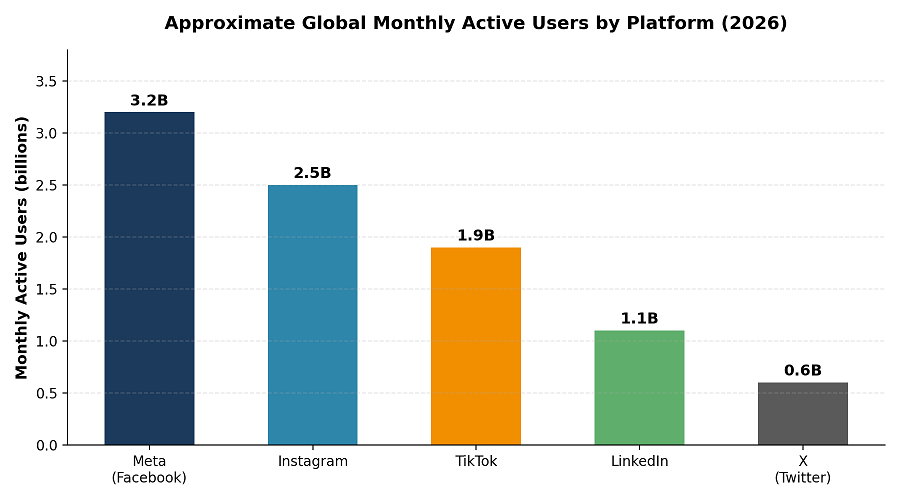
Before comparing platforms on cost and format, it helps to see the scale each one operates at. The four platforms compared here differ by more than an order of magnitude in monthly active users, and that scale gap is one of the first filters advertisers should apply in any paid social platform comparison: a platform with a smaller global footprint can still be the right choice if its audience composition matches the campaign’s target customer more precisely than a larger, more general platform would. Global user figures throughout this paid social platform comparison are aggregated from DataReportal’s Digital 2026 Global Overview, cross-checked against platform-reported figures where available.

compare social media

Figure 1. Approximate global monthly active users by platform, 2026 (Meta figures shown separately for Facebook and Instagram, which are typically bought as a combined placement group inside Meta Ads Manager).

PlatformApprox. Global MAU (2026)Core Audience SkewPrimary Ad Strength
Meta (Facebook + Instagram)Facebook ≈3.2B / Instagram ≈2.2–3BBroad, all ages; Instagram skews 18–34Broadest reach, mature targeting & automation, strong e-commerce tools
TikTok≈1.7–2.0BYoungest major platform; ≈66% aged 18–34, female-leaning (≈56%)Short-form video discovery, high engagement, strong for awareness and trend-driven products
LinkedIn≈1.0–1.3B membersWorking professionals, decision-makers, B2BHighest-quality B2B leads, job-title and firmographic targeting
X (Twitter)≈0.56–0.66BSkews male, news/tech/finance-oriented, older millennial and Gen XReal-time conversation, news-adjacent and trending-topic relevance

Table 1. Illustrative platform snapshot compiled from DataReportal, Sprout Social, and Hootsuite aggregated reporting, 2026. Figures vary by tracker and reporting date.

2. Paid Social Platform Comparison: Advertising Cost Benchmarks

Cost per 1,000 impressions (CPM) and cost per click (CPC) are the two most commonly cited paid social benchmarks, and both vary by industry, audience competitiveness, creative quality, campaign objective, and time of year — a retail campaign during a holiday shopping period will typically see materially higher costs than the same campaign in a slower month, purely from increased advertiser competition for the same inventory. With that caveat, independent trackers converge on a consistent ranking across platforms even when their absolute numbers differ.

ن2 1

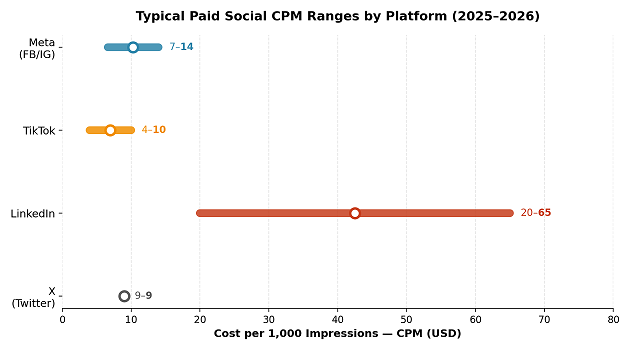
Figure 2. Typical CPM ranges by platform, compiled from Madgicx, Hootsuite, Gupta Media, and Synter benchmark reports, 2025–2026. Bars show the commonly reported low-to-high range; individual accounts can fall outside these bands depending on targeting and industry.

PlatformTypical CPM (per 1,000 impressions)Typical CPC (per click)
Meta (Facebook + Instagram)≈$6.60 – $14≈$0.44 – $1.10
TikTok≈$4 – $10≈$0.30 – $1.20
LinkedIn≈$20 – $65≈$2 – $6
X (Twitter)≈$9 – $10 (typical range)≈$1.00 – $1.30

Table 2. Illustrative cost benchmark ranges compiled from multiple 2025–2026 industry sources (Madgicx, Hootsuite, WebFX, Gupta Media Social CPM Tracker, Synter). Because methodologies differ across trackers, treat these as directional ranges rather than a single authoritative figure.

The consistent pattern across trackers is that LinkedIn carries the highest cost per impression and per click of the four platforms by a wide margin, which reflects its narrower, higher-value professional audience rather than any deficiency in performance — LinkedIn’s premium pricing is generally offset, for B2B advertisers, by a much higher rate of qualified leads per impression than a broad consumer platform can offer. TikTok is consistently reported as the least expensive major platform on a cost-per-impression basis, which combined with its very high average daily time-on-app makes it attractive for awareness and discovery objectives, provided the creative is built natively for the platform rather than repurposed from another channel.

3. Ad Formats and Targeting Capabilities

Cost and audience scale are only two dimensions of a full paid social platform comparison; ad format and targeting depth are just as decisive for whether a campaign actually performs once it launches. The platform-by-platform paid social platform comparison below draws on aggregated benchmark reporting, including the Hootsuite social advertising benchmark report, to outline what each platform’s ad manager actually supports and which campaign types it rewards.

Format and Targeting: A Paid Social Platform Comparison

3.1 Meta (Facebook and Instagram)

Meta’s Ads Manager is the most mature paid social advertising system in this comparison, combining Facebook and Instagram inventory (and, increasingly, Threads) into a single buying interface. It supports the widest range of ad formats among the platforms compared here — single image, carousel, video, Stories, Reels, and dynamic product ads driven by a business’s own product catalog — and its targeting system, built on years of accumulated behavioral and interest data, remains the most granular for reaching narrowly defined consumer segments. Meta is generally the strongest default choice for e-commerce and direct-response campaigns because of its mature conversion-tracking infrastructure (the Meta Pixel and Conversions API) and its automated, machine-learning-driven bidding tools. Advertisers running their own paid social platform comparison should treat Meta’s Ads Manager documentation as the most reliable primary source for current format specs and policy requirements.

3.2 TIKTOK

TikTok Ads Manager is built almost entirely around short-form vertical video, and its defining characteristic as an advertising platform is that ads which look and feel like organic TikTok content consistently outperform ads that look like traditional advertising. Its targeting is less granular than Meta’s on interest and demographic data but benefits from an unusually strong content-recommendation algorithm, which can surface an ad to a highly receptive audience purely from early engagement signals. TikTok tends to suit awareness, discovery, and trend-driven consumer campaigns particularly well, and increasingly supports direct-response and shopping formats through TikTok Shop integration. In any paid social platform comparison, TikTok is worth testing early for low-cost reach — advertisers can confirm current bidding options and creative specs directly in TikTok’s Ads Manager help center

3.3 LinkedIn

LinkedIn’s advertising platform is built around professional and firmographic targeting unavailable anywhere else at the same precision — job title, seniority, company size, industry, and skills — which is why it remains the standard choice for business-to-business lead generation and recruitment advertising despite its materially higher cost per impression and per click. Ad formats include Sponsored Content (native feed ads), Message Ads (sent directly to a recipient’s LinkedIn inbox), and Lead Gen Forms, which pre-fill a user’s profile information into a form to reduce friction for B2B lead capture. LinkedIn is rarely the right platform for low-cost, high-volume consumer awareness campaigns, but is frequently the highest-ROI platform available for campaigns specifically targeting professionals or decision-makers within an industry or company size band. Any paid social platform comparison built around B2B goals should start with LinkedIn Marketing Solutions to confirm current targeting fields and minimum campaign budgets.

3.4 X (Twitter)

X’s advertising strength is proximity to real-time conversation: trending topics, live events, and news cycles create moments where an ad placed alongside relevant conversation can achieve unusually high relevance. Ad formats include Promoted Posts, Follower campaigns, and Amplify video placements alongside premium content. X’s audience skews toward technology, finance, media, and news-engaged users, and toward a male and older-millennial-to-Gen-X demographic relative to Instagram or TikTok. It is generally best suited to campaigns tied to a specific cultural or news moment, technology and B2B software audiences that overlap with its user base, or brand-awareness campaigns for products with a natural connection to current events or public conversation, rather than as a default first platform for broad direct-response campaigns. It is included in this paid social platform comparison mainly for that narrower, highly engaged niche rather than for scale — current ad specs are listed on X’s advertising site

4. Paid Social Platform Comparison by Campaign Objective

Rather than treating platform choice as a single either/or decision, most mature social advertising programs run different platforms for different objectives, using the comparison below as a starting filter.

Campaign GoalStrongest Platform FitWhy
Broad consumer awareness at low costTikTok, then MetaLowest CPM range and high daily engagement time among the platforms compared
E-commerce sales / direct responseMeta (Facebook + Instagram)Most mature conversion tracking, catalog ads, and automated bidding
B2B lead generationLinkedInUnmatched firmographic and job-title targeting despite higher cost
Trend-driven or Gen Z-focused productsTikTokYoungest audience skew and native short-video discovery
Tech, finance, or news-adjacent audiencesX (Twitter)Audience concentration in these verticals and real-time relevance
Recruitment / employer brandingLinkedInDirect access to job seekers and passive candidates by role and seniority

5. Conclusion

No single platform is objectively “best” for paid social advertising; each of the four compared here occupies a different position on the trade-off between audience scale, audience specificity, cost, and format strength. Meta remains the broadest, most automation-mature default for consumer and e-commerce campaigns; TikTok offers the lowest typical cost per impression and the strongest native short-video discovery, particularly for younger audiences; LinkedIn commands a clear cost premium but remains the only platform with genuine firmographic precision for B2B; and X offers a narrower but highly engaged audience concentrated around news, technology, and real-time conversation.

The practical implication for campaign planning, consistent with the funnel-based framework in this guide’s companion strategy article on CRM and content alignment, is that platform selection should follow directly from the audience and objective defined at the start of planning, and that the strongest-performing social media programs typically combine more than one platform, matched deliberately to the stage of the funnel and the audience each is meant to serve.

Final Takeaways from This Paid Social Platform Comparison

If this paid social platform comparison leads to one decision, it should be to stop treating platform choice as a single, permanent commitment. Revisit the comparison at least once or twice a year, since audience composition, ad formats, and cost benchmarks on every platform in this guide shift as each company updates its ad products and as user behavior evolves. A paid social platform comparison done once during initial planning and never repeated tends to age quickly, particularly for fast-moving platforms like TikTok and X.

6. A Practical Framework for Running Your Own Paid Social Platform Comparison

The benchmark figures in this guide are a useful starting filter, but every account differs enough from industry averages that a short, structured test is the only reliable way to complete a paid social platform comparison for a specific product and audience. The following framework outlines how to run that test without overspending on any single platform before the data is in.

Step 1 — Match the shortlist to the objective. Use the campaign-objective table in Section 4 to narrow the paid social platform comparison down to two, or at most three, platforms before spending any budget. Testing all four platforms at once for every campaign dilutes both budget and learnings.

Step 2 — Hold budget and duration constant. Run each shortlisted platform for the same number of days, with the same daily budget and the same conversion goal, so the resulting paid social platform comparison reflects platform performance rather than differences in test conditions.

Step 3 — Build native creative for each platform. Reusing the same creative asset across all platforms undermines the comparison, since a video edited for TikTok’s native feel will typically underperform on TikTok if it was originally cut for Meta, and vice versa. Budget separate creative time into any paid social platform comparison test plan from the outset.

7. Frequently Asked Questions

What is the most important metric in a paid social platform comparison?

There is no single metric that settles a paid social platform comparison on its own. CPM and CPC establish relative cost, but cost per qualified lead or cost per acquisition is usually the more decisive figure, since a platform with a higher CPM can still deliver a lower overall cost per result if its targeting is more precise for the campaign’s specific audience.

How often should a paid social platform comparison be repeated?

A full paid social platform comparison is worth revisiting roughly every six to twelve months, or sooner after a platform announces a major ad-product change, since cost benchmarks and format availability shift regularly enough to change which platform is the better fit.

Can a small budget still run a meaningful paid social platform comparison?

Yes, provided the test is scoped down rather than spread thin. A small-budget paid social platform comparison should test only two platforms rather than all four, run for at least a week per platform, and hold the same conversion goal across both tests so the results are actually comparable

References and Further Reading

DataReportal. (2026). Digital 2026: Global Overview Report. Retrieved from https://datareportal.com/

Hootsuite Blog. (2026). Social media advertising: Costs, tips for 2026. Retrieved from https://blog.hootsuite.com/social-ads-tools/

Madgicx. (2026). A Complete Social Network Advertising Costs Guide. Retrieved from https://madgicx.com/blog/social-network-advertising-cost

Madgicx. (2026). Social Media Advertising Cost: Your Complete 2026 Guide. Retrieved from https://madgicx.com/blog/social-media-advertising-cost

WebFX. How Much Does Social Media Advertising Cost? Retrieved from https://www.webfx.com/how-much-does-social-media-advertising-cost.html

Synter. (2026). Meta Ads CPM Benchmark, H1 2026. Retrieved from https://syntermedia.ai/benchmarks/2026-h1/meta-ads/cpm

Sprout Social. Social media demographics guide. Retrieved from https://sproutsocial.com/insights/

LinkedIn Marketing Solutions. Advertising products overview. Retrieved from https://business.linkedin.com/marketing-solutions

Note: Audience sizes and advertising cost benchmarks change frequently and are reported differently by different trackers depending on methodology and sample. Readers should verify current figures against each platform’s own advertising resources and recent industry benchmark reports before finalizing a media budget.

Secretary Sales Person Cold Calling US vs Europe: Understanding the Legal and Cultural Divide

Cold Calling US vs Europe: Understanding the Legal and Cultural Divide

Estimated Reading Time: 5 minutes

Cold calling US vs Europe presents two fundamentally different approaches to B2B sales. While American markets favor volume-driven, opt-out strategies supported by flexible regulations, European markets demand strict GDPR compliance and relationship-based selling. This comprehensive guide examines how legal frameworks, cultural expectations, and customer mindsets shape successful cold calling strategies across these regions.

By Seyed Mohsen Hashemipour, Cademix Institute of Technology, Austria


Secretary Sales Person Cold Calling US vs Europe: Understanding the Legal and Cultural Divide

In the B2B sales landscape, cold calling remains a powerful lead generation tool. However, international expansion reveals a critical challenge: strategies that succeed in one region may fail—or worse, trigger legal consequences—in another.

Introduction: The Global Challenge of Cold Calling

This article provides an in-depth comparison between the fast-paced, transaction-focused United States and the privacy-centric European Union. Our goal is to offer sales teams a practical roadmap for optimizing their approach when comparing cold calling US vs Europe markets.


1. Legal Landscape: The Foundation of Cold Calling Differences

Understanding the legal differences between cold calling US vs Europe is essential. Compliance isn’t just about avoiding fines—it’s your entry ticket to the market.

1.1. United States: The Opt-Out Philosophy

American telephone sales operate under a “permitted unless prohibited” framework, primarily governed by the Telephone Consumer Protection Act (TCPA).

TCPA Regulations:

  • Heavily regulates auto-dialers and pre-recorded messages
  • Penalties: $500-$1,500 per violation
  • Human-to-human calls face fewer restrictions
  • Enforcement primarily through class action lawsuits

Do Not Call (DNC) Registry:

  • Opt-out system: contact permitted until explicitly forbidden
  • Companies must scrub lists against DNC every 31 days
  • Violations carry significant penalties

B2B Advantage in the US: Business-to-business cold calling enjoys broad exemptions from TCPA and DNC restrictions. However, companies must respect internal opt-out requests and comply with stricter state laws in California, Florida, and other jurisdictions.

1.2. Europe: GDPR’s Privacy Fortress

When comparing cold calling US vs Europe, European regulations represent a fundamentally different philosophy rooted in privacy rights.

GDPR (General Data Protection Regulation):

  • Governs collection, storage, and use of personal data
  • Requires legitimate interest or explicit consent
  • Demands documented justification for each contact
  • Forces transparency in data sourcing

The Opt-In Principle: Most European countries, especially for B2C, prohibit unsolicited contact without prior permission. This transforms traditional cold calling into warm outreach requiring pre-qualification.

Financial Deterrents: GDPR violations carry fines up to €20 million or 4% of annual global turnover—the strongest deterrent against aggressive tactics in the cold calling US vs Europe comparison.

B2B Variations Across Europe:

  • Germany & France: Often require prior consent even for business contacts
  • UK & Netherlands: More flexible, but require data source disclosure and immediate opt-out options
  • Nordic Countries: Strict interpretation with high formality requirements

2. Cultural Mindset: Beyond Legal Compliance

The cold calling US vs Europe distinction extends beyond laws into cultural expectations that determine campaign success.

2.1. American Business Culture: Direct and ROI-Focused

US decision-makers value speed, clarity, and measurable outcomes.

Key Characteristics:

  • Speed: Value propositions must land within 30 seconds
  • Energy: Dynamic, confident delivery expected
  • Results-Oriented: Focus on immediate pain points and solutions
  • ROI-Driven: Financial benefits take center stage
  • Flexible Formality: Quick rapport-building, even with executives
  • Action-Based: Goal is scheduling next steps, not relationship building

2.2. European Business Culture: Trust-Based and Relationship-Centric

In markets like Germany, Switzerland, and Scandinavia, relationships precede transactions.

Key Characteristics:

  • Formality: Correct titles and surnames required
  • Trust-Building: Company history and references matter
  • Legitimacy Assessment: Cold calls serve as vetting opportunities
  • Research-Informed: Claims require substantiation
  • Consultative Approach: Listen more than pitch
  • Patience: Decisions take longer, require multiple touchpoints

3. Strategic Framework: Adapting Your Sales Funnel

Success in cold calling US vs Europe requires region-specific funnel design.

3.1. Winning Strategy for US Markets

Volume-Driven Approach:

  • Leverage B2B exemptions for higher call volumes
  • Implement automated sequences and multichannel outreach
  • Use parallel dialing and CRM automation

Script Optimization:

  • Lead with quantifiable ROI within first 15 seconds
  • Use pattern interrupts to bypass gatekeepers
  • Focus on pain points with immediate solutions
  • Include clear call-to-action for next steps

Execution Tactics:

  • Industry-specific language to establish credibility
  • Reference recent news or company developments
  • Offer comparative case studies
  • Push for calendar commitment

3.2. Winning Strategy for European Markets

Compliance-First Framework:

  • Document legitimate interest for each prospect
  • Maintain detailed records of consent and opt-outs
  • Establish clear data processing agreements
  • Regular GDPR compliance audits

Social Selling Prerequisites:

  • LinkedIn engagement before calling
  • Research recent company news and challenges
  • Identify mutual connections
  • Build credibility through content sharing

Consultative Positioning:

  • Open with demonstrated research
  • Position as advisor, not vendor
  • Ask diagnostic questions
  • Provide educational value upfront
  • Respect cultural timing (avoid lunch hours and end-of-day)
  • Use local language when possible

4. Comparative Analysis: Cold Calling US vs Europe

FactorUnited StatesEurope
Primary LawsTCPA, DNC RegistryGDPR, ePrivacy Directive
Legal PhilosophyOpt-outOpt-in
B2B RegulationsLargely exemptVaries by country, often restricted
Financial RiskModerate (lawsuit-driven)Severe (up to 4% global revenue)
Call VolumeHigh volume viableLow volume, high research
Conversation StyleDirect, energeticFormal, consultative
Decision SpeedFast (days/weeks)Slow (weeks/months)
Selling ToleranceHigh for hard sellingLow, requires soft approach
Gatekeeper NavigationPattern interrupts workFormal protocols required

5. Implementation Roadmap for Global Teams

For US Market Entry:

  1. Verify DNC compliance systems
  2. Develop ROI-focused value propositions
  3. Build high-volume call sequences
  4. Train on pattern interrupts and objection handling
  5. Implement fast follow-up automation

For European Market Entry:

  1. Conduct GDPR compliance audit
  2. Document legitimate interest framework
  3. Establish LinkedIn social selling program
  4. Develop consultative discovery scripts
  5. Create country-specific compliance protocols
  6. Train on cultural formality requirements

6. Measuring Success: Different KPIs for Different Markets

US Success Metrics:

  • Calls per day/representative
  • Connection rate
  • Meeting conversion rate
  • Sales cycle length (should be short)
  • Cost per lead

European Success Metrics:

  • Quality of pre-call research
  • Compliance documentation completeness
  • Trust indicators (return calls, referrals)
  • Relationship depth before opportunity
  • Long-term partnership conversion

Conclusion: Mastering the Cold Calling US vs Europe Divide

The comparison of cold calling US vs Europe reveals two opposing philosophies: American speed and efficiency versus European privacy and credibility. Success doesn’t require choosing one approach—it demands strategic adaptation.

In US markets, higher volume and faster execution are legally viable and culturally accepted. In European markets, survival depends on GDPR compliance, thorough research, and trust-building. Aggressive, untargeted cold calling in Europe carries risks that far outweigh potential rewards.

Your Global Cold Calling Framework:

The US Pillar (Opt-Out):

  • Volume-based prospecting
  • Automated follow-up sequences
  • ROI-focused messaging
  • Rapid qualification

The European Pillar (Opt-In):

  • Social selling foundation
  • Compliance-documented outreach
  • Consultative engagement
  • Relationship nurturing

Sales teams that adapt their cold calling US vs Europe strategies to local laws and cultural norms will avoid costly fines while building sustainable, credible partnerships that drive long-term revenue growth.


Resources for Implementation

  • EU GDPR Official Resources: European Commission data protection guidelines
  • US TCPA & DNC Information: Federal Trade Commission compliance resources
  • LinkedIn Social Selling: B2B credibility and European lead generation
  • Compliance Publications: Compliance Week, IAPP resources
  • Sales Methodology: “The Challenger Sale,” “SPIN Selling”

Author Bio: Seyed Mohsen Hashemipour specializes in international B2B sales strategy at Cademix Institute of Technology, Vienna, Austria, with expertise in cross-border cold calling compliance and cultural adaptation.


Techniker im Bauwesen in Österreich

Techniker im Bauwesen in Österreich: 7 Aufgaben, Karriere und Gehalt

Estimated Reading Time: 7 minutes

Einleitung

Techniker im Bauwesen in Österreich ist ein gefragtes Berufsprofil auf dem österreichischen Arbeitsmarkt. Der Bausektor gehört zu den wichtigsten wirtschaftlichen Bereichen des Landes und bietet stabile Beschäftigungsmöglichkeiten. Aufgrund der kontinuierlichen Entwicklung von Infrastrukturprojekten, Wohnbau, Straßenbau und Verkehrsnetzen steigt der Bedarf an qualifizierten Fachkräften kontinuierlich an. Ein Techniker im Bauwesen übernimmt dabei eine zentrale Rolle, weil er zwischen Planung, Organisation und praktischer Umsetzung vermittelt.

Die österreichische Bauwirtschaft verzeichnet seit Jahren ein konstantes Wachstum. Laut aktuellen Statistiken trägt die Branche etwa 7% zum Bruttoinlandsprodukt bei und beschäftigt über 400.000 Menschen. Diese Entwicklung schafft einen dauerhaften Bedarf an Fachkräften, insbesondere im Bereich der technischen Baubegleitung. Wer sich für eine Karriere als Techniker im Bauwesen in Österreich interessiert, findet derzeit sehr gute Zukunftsperspektiven und vielfältige Einsatzmöglichkeiten in einem innovativen und zukunftsorientierten Arbeitsumfeld.Author: Hamed Salimian

Techniker im Bauwesen in Österreich
Techniker im Bauwesen in Österreich auf einer Baustelle bei der Qualitätskontrolle

Berufsbild und Aufgaben eines Technikers im Bauwesen

Ein Techniker im Bauwesen in Österreich arbeitet an der entscheidenden Schnittstelle zwischen technischer Planung und praktischer Bauausführung. Während Bauingenieure oft für komplexe Berechnungen, statische Analysen und strategische Projektentwicklung verantwortlich sind, kümmert sich der Techniker um die technische Begleitung, Bauüberwachung und Koordination auf der Baustelle. Diese Position erfordert sowohl fundiertes technisches Wissen als auch ausgeprägte organisatorische Fähigkeiten und exzellente Kommunikationskompetenz.

Die Rolle des Technikers ist besonders wichtig, weil er als Bindeglied zwischen verschiedenen Projektbeteiligten fungiert. Er muss die Sprache der Architekten, Ingenieure, Bauleiter und Handwerker gleichermaßen verstehen und zwischen diesen Gruppen effektiv vermitteln können. Dabei trägt er maßgeblich dazu bei, dass Missverständnisse vermieden werden und alle Beteiligten auf dem gleichen Informationsstand sind.

Detaillierte Aufgabenbereiche

Zu den typischen Aufgaben eines Technikers im Bauwesen in Österreich gehören die Unterstützung bei der Erstellung und Prüfung von Bauplänen, die kontinuierliche Kontrolle von Bauabläufen, die sorgfältige Dokumentation des Baufortschritts sowie die umfassende Überprüfung von Sicherheits- und Qualitätsstandards. Darüber hinaus helfen viele Techniker aktiv bei der präzisen Mengenermittlung und strategischen Materialplanung mit.

Im Detail umfasst dies die Erstellung von Aufmaßen, die Koordination von Lieferanten und Subunternehmern, die Überwachung von Fristen und Budgets sowie die Sicherstellung der Einhaltung aller relevanten Bauvorschriften und Normen. Ein Techniker im Bauwesen in Österreich muss auch in der Lage sein, technische Probleme schnell zu erkennen und pragmatische Lösungen zu entwickeln, bevor kleine Schwierigkeiten zu größeren Projektverzögerungen führen.

  1. Erstellung, Prüfung und Anpassung technischer Unterlagen und Ausführungspläne
  2. Kontinuierliche Baustellenüberwachung und systematische Qualitätskontrolle
  3. Detaillierte Materialermittlung, Mengenberechnung und Kostenkontrolle
  4. Effektive Koordination mit Bauleitern, Ingenieuren, Architekten und ausführenden Firmen
  5. Umfassende Dokumentation, regelmäßige Berichterstattung und Fotodokumentation
  6. Überwachung der Einhaltung von Arbeitssicherheitsvorschriften und Umweltschutzrichtlinien
  7. Technische Abnahmen und Mängelmanagement
  8. Unterstützung bei Vergabeverfahren und Ausschreibungen

Wichtige Einsatzbereiche und Spezialisierungsmöglichkeiten

Ein Techniker im Bauwesen in Österreich kann in verschiedenen Fachbereichen tätig sein, die jeweils spezifische Anforderungen und Kenntnisse erfordern.

Hochbau

Im Hochbau konzentriert sich die Arbeit vor allem auf Wohngebäude, Mehrfamilienhäuser, Bürohäuser, Einkaufszentren und Industrieanlagen. Hier sind Kenntnisse in Bereichen wie Statik, Wärmedämmung, Brandschutz und moderne Bautechniken besonders wichtig. Der Techniker im Bauwesen in Österreich im Hochbau überwacht die Errichtung von Rohbauten, koordiniert verschiedene Gewerke und stellt sicher, dass alle bauphysikalischen Anforderungen erfüllt werden.

Tiefbau

Im Tiefbau stehen Straßen, Autobahnen, Brücken, Tunnel, Kanalisationssysteme und Leitungsnetze im Mittelpunkt. Diese Projekte erfordern spezielle Kenntnisse in Bodenmechanik, Vermessung, Entwässerung und Verkehrsplanung. Besonders in Österreich haben Infrastruktur und Verkehrsbau eine große Bedeutung, da kontinuierlich in die Modernisierung und Erweiterung von Autobahnen, Eisenbahnverbindungen und öffentlichen Verkehrsprojekten investiert wird.

Ingenieurbau

Der Ingenieurbau umfasst besonders anspruchsvolle Bauwerke wie große Brücken, Staudämme, Kraftwerke und komplexe Industrieanlagen. Ein Techniker im Bauwesen in Österreich in diesem Bereich arbeitet oft an langfristigen Großprojekten mit hohen technischen Anforderungen und muss eng mit spezialisierten Ingenieuren zusammenarbeiten.

Sanierung und Denkmalpflege

Ein wachsender Bereich ist die Sanierung von Altbauten und die Arbeit mit denkmalgeschützten Gebäuden. Hier sind besondere Kenntnisse über historische Bautechniken, Materialien und spezielle Sanierungsverfahren erforderlich. Österreich verfügt über einen reichen Bestand an historischer Bausubstanz, was diesen Bereich besonders relevant macht.

Ausbildung und Qualifikationen

Für den erfolgreichen Einstieg als Techniker im Bauwesen in Österreich gibt es mehrere bewährte Bildungswege, die unterschiedliche Schwerpunkte setzen und verschiedene Zielgruppen ansprechen.

HTL für Bautechnik

Die Höhere Technische Lehranstalt (HTL) für Bautechnik ist der klassische und am weitesten verbreitete Ausbildungsweg in Österreich. Diese fünfjährige Ausbildung bietet eine praxisnahe und zugleich theoretisch fundierte Ausbildung, die Schüler direkt nach der Matura ins Berufsleben führt. Die HTL vermittelt umfassende Kenntnisse in Baukonstruktion, Statik, Baustoffkunde, CAD-Technik, Projektmanagement und Baurecht.

Absolventen einer HTL sind besonders geschätzt, weil sie bereits während der Schulzeit durch Praktika erste Berufserfahrung sammeln und mit modernen Softwaretools vertraut werden. Nach dem Abschluss können sie direkt als Techniker im Bauwesen in Österreich arbeiten oder ein weiterführendes Studium beginnen.

Fachschule und Kolleg

Für Personen, die bereits eine andere Ausbildung abgeschlossen haben oder einen schnelleren Einstieg suchen, bieten sich Fachschulen oder Kollegs an. Diese Ausbildungsformen dauern zwischen zwei und vier Jahren und konzentrieren sich auf praktische Fähigkeiten und direkt anwendbares Wissen. Ein Kolleg richtet sich speziell an Personen mit Matura, die eine kompakte, intensive Fachausbildung absolvieren möchten.

Hochschulstudium

Ein Studium im Bauingenieurwesen an einer Fachhochschule oder Universität bietet die umfassendste akademische Ausbildung. Studierende erwerben tiefgehende theoretische Kenntnisse in Statik, Massivbau, Stahlbau, Geotechnik und Projektmanagement. Viele Programme beinhalten auch Praktika und Projektarbeiten mit realen Bauvorhaben. Absolventen können als Techniker im Bauwesen in Österreich mit erweiterten Verantwortungsbereichen arbeiten oder direkt in Ingenieurfunktionen einsteigen.

Lehre und duales System

Eine weitere Möglichkeit ist die Lehre zum Bautechnischen Zeichner oder in verwandten Berufen, kombiniert mit weiterführenden Ausbildungen. Dieser Weg eignet sich besonders für praktisch orientierte Personen, die früh ins Berufsleben einsteigen und parallel lernen möchten.

Detaillierte Informationen zu Ausbildungswegen und Lehrberufen finden Sie auf der Website der Wirtschaftskammer Österreich (WKO).

Notwendige Fachkenntnisse und Softwarekompetenzen

Ein moderner Techniker im Bauwesen in Österreich benötigt eine breite Palette an fachlichen und digitalen Kompetenzen, um den Anforderungen des Berufs gerecht zu werden.

CAD und BIM

Die Beherrschung von CAD-Software (Computer-Aided Design) wie AutoCAD, Revit oder ArchiCAD ist unverzichtbar. Zunehmend wichtig wird auch BIM (Building Information Modeling), ein innovativer Ansatz zur digitalen Planung und Verwaltung von Bauwerken. BIM ermöglicht die dreidimensionale Darstellung von Gebäuden mit allen relevanten Informationen und erleichtert die Zusammenarbeit zwischen allen Projektbeteiligten erheblich.

Projektsoftware

Kenntnisse in Projektmanagement-Software wie MS Project, Primavera oder speziellen Baumanagement-Programmen sind sehr hilfreich. Diese Tools unterstützen bei der Terminplanung, Ressourcenverwaltung und Kostenkontrolle.

Vermessung und GIS

Grundkenntnisse in Vermessungstechnik und geografischen Informationssystemen (GIS) werden zunehmend wichtiger, besonders im Tiefbau und bei Infrastrukturprojekten.

Mehr zu digitalen Kompetenzen im Bauwesen finden Sie in unserem Beitrag über Smart Infrastructure und IoT-Monitoring.

Karrierechancen und Gehaltsentwicklung

Der österreichische Arbeitsmarkt zeigt eine konstant hohe und wachsende Nachfrage nach qualifizierten Fachkräften im Bauwesen. Viele Unternehmen – von kleinen regionalen Baufirmen bis zu großen internationalen Baukonzernen – suchen kontinuierlich erfahrene Mitarbeiter für Bauleitung, Projektkoordination und technische Überwachung.

Karrierewege

Ein Techniker im Bauwesen in Österreich kann sich im Laufe der Karriere in verschiedene Richtungen entwickeln:

  • Bauleiter: Übernahme der Gesamtverantwortung für einzelne Bauprojekte
  • Projekttechniker: Spezialisierung auf technische Projektbegleitung
  • Kalkulator: Fokus auf Kostenschätzung und Angebotserstellung
  • Spezialist für Infrastrukturprojekte: Expertise in komplexen Tiefbauprojekten
  • BIM-Manager: Verantwortung für digitale Planungsprozesse
  • Abteilungsleiter: Führung von Teams und Abteilungen
  • Selbständigkeit: Gründung eines eigenen Ingenieurbüros oder Bauunternehmens

Gehaltsstruktur

Das monatliche Bruttogehalt für einen Techniker im Bauwesen in Österreich variiert je nach Erfahrung, Verantwortungsbereich, Unternehmensgröße und Region:

  • Berufseinsteiger: 2.500 bis 3.200 Euro brutto monatlich
  • Mit 3-5 Jahren Erfahrung: 3.200 bis 3.800 Euro
  • Mit 5-10 Jahren Erfahrung: 3.800 bis 4.500 Euro
  • Senior-Techniker/Bauleiter: 4.500 bis 6.000 Euro und mehr

Besonders in größeren Bauunternehmen, bei Generalunternehmern oder bei komplexen Infrastrukturprojekten sind attraktive Gehälter und zusätzliche Benefits wie Firmenfahrzeug, Bonuszahlungen oder flexible Arbeitsmodelle realistisch. Auch die regionale Komponente spielt eine Rolle: In Wien und den westlichen Bundesländern liegen die Gehälter tendenziell höher als in ländlichen Regionen.

Wichtige Kompetenzen und persönliche Eigenschaften

Neben der fachlichen Qualifikation sind bestimmte persönliche Eigenschaften und Soft Skills entscheidend für den Erfolg als Techniker im Bauwesen in Österreich:

  • Technisches Verständnis: Fähigkeit, komplexe technische Zusammenhänge zu erfassen und zu erklären
  • CAD- und Software-Kenntnisse: Sicherer Umgang mit modernen Planungs- und Dokumentationstools
  • Organisationstalent: Koordination mehrerer Aufgaben, Termine und Projektbeteiligter gleichzeitig
  • Team- und Kommunikationsfähigkeit: Effektive Zusammenarbeit mit verschiedenen Gewerken und Hierarchieebenen
  • Präzision und Verantwortungsbewusstsein: Genauigkeit bei Messungen, Berechnungen und Dokumentation
  • Problemlösungskompetenz: Schnelle und pragmatische Lösungsfindung bei unerwarteten Herausforderungen
  • Stressresistenz: Ruhe bewahren bei Zeitdruck und unvorhergesehenen Komplikationen
  • Wirtschaftliches Denken: Kostenb ewusstsein und Verständnis für betriebswirtschaftliche Zusammenhänge
  • Flexibilität: Anpassungsfähigkeit an wechselnde Arbeitsorte, Projekte und Anforderungen

Herausforderungen im Berufsalltag

Der Beruf des Technikers im Bauwesen in Österreich bringt auch spezifische Herausforderungen mit sich, die bewältigt werden müssen:

Zeitdruck und Termine

Bauprojekte unterliegen oft strengen Zeitplänen und Vertragsstrafen bei Verzögerungen. Techniker müssen in der Lage sein, auch unter Druck präzise zu arbeiten und realistische Lösungen zu finden, wenn Termine gefährdet sind.

Wetterbedingungen

Besonders im Tiefbau und bei Außenarbeiten können Witterungsverhältnisse die Arbeit erheblich beeinflussen. Ein Techniker im Bauwesen in Österreich muss flexibel reagieren und alternative Zeitpläne entwickeln können.

Koordination verschiedener Gewerke

Die gleichzeitige Koordination von Maurern, Elektrikern, Installateuren, Statikern und anderen Fachleuten erfordert diplomatisches Geschick und klare Kommunikation. Konflikte müssen schnell und konstruktiv gelöst werden.

Rechtliche und normative Anforderungen

Die Einhaltung von Bauvorschriften, ÖNORMEN, EU-Richtlinien und Sicherheitsstandards erfordert kontinuierliche Weiterbildung und aktuelles Wissen. Änderungen in Gesetzen und Normen müssen zeitnah umgesetzt werden.

Zukunftstrends und Digitalisierung

Die Baubranche befindet sich in einem tiefgreifenden Wandel, der auch die Rolle des Technikers im Bauwesen in Österreich verändert und erweitert:

Building Information Modeling (BIM)

BIM wird zunehmend zum Standard, besonders bei öffentlichen Aufträgen. Die dreidimensionale, datenbasierte Planung ermöglicht bessere Koordination, weniger Fehler und effizientere Abläufe. Techniker, die BIM beherrschen, haben deutliche Wettbewerbsvorteile.

IoT und Smart Construction

Sensoren auf Baustellen erfassen Daten zu Materialfeuchtigkeit, Temperaturen, Belastungen und Arbeitsfortschritt in Echtzeit. Diese Informationen helfen, Probleme frühzeitig zu erkennen und Prozesse zu optimi…

Smart Infrastructure Bridge Monitoring

5 entscheidende Vorteile von Smart Infrastructure und IoT-Sensoren

Estimated Reading Time: 4 minutes

Einführung: Smart Infrastructure und die Zukunft der Bauwerksüberwachung

von Hamed Salimian

Die moderne Bauindustrie steht heute vor großen Herausforderungen. Brücken, Straßen und andere wichtige Bauwerke müssen über viele Jahrzehnte sicher, effizient und nachhaltig betrieben werden. Gleichzeitig steigen die Anforderungen an Sicherheit, Wartung und Kostenkontrolle. Genau hier gewinnt das Konzept der Smart Infrastructure zunehmend an Bedeutung.

Durch den Einsatz moderner Technologien wie IoT‑Sensoren, drahtlosen Messsystemen und datenbasierter Analyse können Ingenieure den Zustand von Bauwerken heute nahezu in Echtzeit überwachen. Diese Technologien ermöglichen es, strukturelle Veränderungen frühzeitig zu erkennen, Wartungsmaßnahmen gezielt zu planen und die Lebensdauer von Infrastruktur deutlich zu verlängern.

In diesem Artikel beschreibt Hamed Salimian, wie intelligente Sensorsysteme und digitale Überwachungstechnologien die Überwachung von Brücken und Straßen verändern. Der Beitrag gibt einen Überblick über die wichtigsten Technologien im Bereich Structural Health Monitoring, Predictive Maintenance und Digital Twin Systeme und zeigt, wie Smart Infrastructure zur Sicherheit, Effizienz und Nachhaltigkeit moderner Infrastruktur beiträgt.

Die Entwicklung moderner Städte hängt stark von zuverlässigen Verkehrsinfrastrukturen ab. Brücken, Straßen und Tunnel bilden das Rückgrat der Mobilität und der wirtschaftlichen Entwicklung. Gleichzeitig stehen viele Länder vor einem wachsenden Problem: alternde Infrastruktur, steigende Verkehrsbelastung und begrenzte Wartungsbudgets. In diesem Kontext gewinnt das Konzept der „Smart Infrastructure“ zunehmend an Bedeutung. Durch den Einsatz von IoT‑Sensoren (Internet of Things) können Bauwerke kontinuierlich überwacht und potenzielle Schäden frühzeitig erkannt werden.

Smart Infrastructure Bridge Monitoring
Sensorbasierte Überwachung einer Brücke in einer Smart Infrastructure

Was bedeutet Smart Infrastructure?

Der Begriff Smart Infrastructure beschreibt die Integration digitaler Technologien in physische Infrastrukturen wie Brücken, Straßen, Tunnel oder Eisenbahnsysteme. Sensoren, Datenplattformen und intelligente Analysesysteme ermöglichen es, den Zustand von Bauwerken in Echtzeit zu überwachen.

Das Internet der Dinge (IoT) als Basis .

Ein zentraler Bestandteil dieser Entwicklung ist das Internet der Dinge. IoT-Sensoren sammeln kontinuierlich Daten über Belastung, Vibration و Temperatur.zentraler Bestandteil dieser Entwicklung ist das Internet der Dinge. IoT‑Sensoren sammeln kontinuierlich Daten über Belastung, Vibration, Temperatur, Feuchtigkeit oder strukturelle Veränderungen. Diese Daten werden anschließend an zentrale Systeme übertragen, wo sie analysiert und ausgewertet werden.

IoT‑Sensoren in der Brückenüberwachung

Brücken gehören zu den sensibelsten Bauwerken der Verkehrsinfrastruktur. Traditionell erfolgt ihre Inspektion in regelmäßigen Abständen durch Ingenieure. Diese Methode ist jedoch zeitaufwendig, teuer und erkennt Schäden häufig erst spät.

IoT‑basierte Monitoring‑Systeme ermöglichen eine kontinuierliche Zustandsüberwachung. Sensoren messen beispielsweise:

• strukturelle Belastung und Deformation

• Schwingungen und dynamische Kräfte

• Temperaturveränderungen im Material

• Rissbildung im Beton oder Stahl

Durch diese Daten können Ingenieure frühzeitig erkennen, ob sich ein strukturelles Problem entwickelt. Moderne Algorithmen analysieren die Messwerte automatisch und warnen bei kritischen Veränderungen.
Weitere Informationen zur Forschung an intelligenten Sensorsystemen finden Sie beim Fraunhofer-Institut für Physikalische Messtechnik IPM.

Straßenüberwachung durch intelligente Sensorik

Auch Straßennetze profitieren zunehmend von intelligenten Sensorsystemen. IoT‑Technologien ermöglichen eine präzise Analyse der Verkehrsdichte, der Straßenzustände und der Belastung durch Fahrzeuge.

Sensoren können beispielsweise:

• Verkehrsströme in Echtzeit messen

• Straßenschäden oder Schlaglöcher erkennen

• Temperatur und Feuchtigkeit im Asphalt überwachen

• Winterdienst und Wartungsmaßnahmen optimieren

Diese Daten helfen Städten und Verkehrsbehörden, Wartungsmaßnahmen effizient zu planen und die Lebensdauer von Straßen deutlich zu verlängern.

Vorteile intelligenter Infrastruktur

Die Integration von IoT‑Technologien in die Bauinfrastruktur bietet zahlreiche Vorteile. Einer der wichtigsten Aspekte ist die Verbesserung der Sicherheit. Frühzeitige Warnsysteme können strukturelle Schäden erkennen, bevor sie zu gefährlichen Situationen führen.

Darüber hinaus ermöglicht Smart Infrastructure eine effizientere Nutzung von Wartungsbudgets. Statt regelmäßiger, aber oft unnötiger Inspektionen können Maßnahmen gezielt dort durchgeführt werden, wo tatsächlich Probleme auftreten.

Weitere Vorteile sind:

• höhere Lebensdauer von Infrastrukturprojekten

• reduzierte Wartungskosten

• verbesserte Verkehrssicherheit

• datengestützte Entscheidungsprozesse im Infrastrukturmanagement
Die Bedeutung von Monitoring-Systemen für die Sicherheit wird auch vom TÜV Rheinland hervorgehoben.

Die Rolle von Datenanalyse und künstlicher Intelligenz

Ein weiterer wichtiger Bestandteil moderner Infrastrukturüberwachung ist die Datenanalyse. Die von IoT‑Sensoren generierten Datenmengen sind enorm und erfordern intelligente Auswertungssysteme.

Künstliche Intelligenz und Machine‑Learning‑Algorithmen können Muster in den Sensordaten erkennen und potenzielle Schäden prognostizieren. Dadurch wird ein Übergang von reaktiver Wartung zu sogenannter „predictive maintenance“ möglich.

Predictive Maintenance bedeutet, dass Wartungsmaßnahmen auf Grundlage von Datenprognosen durchgeführt werden, bevor ein Schaden tatsächlich eintritt.

Herausforderungen bei der Implementierung

Trotz der zahlreichen Vorteile stehen viele Infrastrukturbetreiber noch vor Herausforderungen bei der Einführung von Smart Infrastructure. Zu den wichtigsten Herausforderungen gehören:

• hohe Anfangsinvestitionen für Sensorsysteme

• Integration in bestehende Infrastruktur

• Datensicherheit und Datenschutz

• Standardisierung von Technologien

Dennoch zeigen zahlreiche Pilotprojekte weltweit, dass intelligente Infrastruktursysteme langfristig wirtschaftliche und sicherheitstechnische Vorteile bieten.

Zukunftsperspektiven für intelligente Verkehrsinfrastruktur

Die Digitalisierung der Infrastruktur wird in den kommenden Jahren weiter an Bedeutung gewinnen. Technologien wie Digital Twins, künstliche Intelligenz und fortschrittliche Sensorsysteme werden die Planung, Überwachung und Wartung von Bauwerken grundlegend verändern.

In Zukunft könnten digitale Zwillinge von Brücken oder Straßennetzen entstehen, die den realen Zustand eines Bauwerks in Echtzeit abbilden. Ingenieure könnten dadurch potenzielle Risiken simulieren und Wartungsstrategien optimieren.

Fazit: Die Zukunft der Bauinfrastruktur

Smart Infrastructure und IoT‑Sensoren eröffnen neue Möglichkeiten für das moderne Infrastrukturmanagement. Durch kontinuierliche Überwachung, datenbasierte Analysen und vorausschauende Wartung können Brücken und Straßen sicherer, langlebiger und effizienter betrieben werden.

Angesichts zunehmender Verkehrsbelastung und alternder Infrastruktur stellt die Integration intelligenter Technologien einen entscheidenden Schritt dar, um die Zukunft der Verkehrssysteme nachhaltig zu gestalten.

Häufig gestellte Fragen (FAQ)

1. Was sind die Hauptvorteile von Smart Infrastructure?

Die Hauptvorteile liegen in der verbesserten Sicherheit, der Verlängerung der Lebensdauer von Bauwerken und der Kostenoptimierung bei der Wartung.

2. Wie funktionieren IoT-Sensoren an Brücken?

Die Sensoren erfassen physikalische Parameter wie Schwingungen oder Dehnungen und senden diese Daten drahtlos an eine Zentrale zur Analyse.

Möchten Sie mehr über moderne Bautechnologien erfahren? Besuchen Sie unsere Seite über Weiterbildung für Ingenieure.Student Accommodation in Germany: A Comprehensive Guide for International Students

Counselling Work Experience: Pathways, Skills, and Career Development in Europe

Estimated Reading Time: 2 minutes

Counselling Work Experience: A Comprehensive Guide for International Professionals

Work experience in counselling is a critical component for building a successful career in mental health, social services, and human resources. For international professionals seeking to work in Europe, understanding the specific requirements, skills, and pathways is essential.

Why Counselling Work Experience Matters

Gaining practical experience in counselling allows professionals to develop empathy, active listening skills, and the ability to support individuals through challenging life transitions. In Europe, where mental health awareness is growing, there is an increasing demand for qualified counsellors who can provide culturally sensitive support.

Key Skills Developed Through Counselling Experience

  • Active Listening: The ability to fully concentrate on what is being said rather than just passively hearing the message of the other person.
  • Empathy: Understanding and sharing the feelings of another person.
  • Boundary Setting: Maintaining professional boundaries while providing support.
  • Cultural Competence: Understanding and respecting diverse cultural backgrounds and perspectives.

Pathways to Gaining Counselling Experience in Europe

There are several ways to gain counselling work experience in Europe:

  1. Internships: Many organizations offer internships in counselling centers, schools, and community health services.
  2. Volunteer Work: Volunteering at helplines, crisis centers, or community organizations can provide valuable hands-on experience.
  3. Supervised Practice: Working under the supervision of a licensed counsellor or psychologist.
  4. Training Programs: Enrolling in certified counselling training programs that include practical components.

Regulatory Considerations

Different European countries have varying regulations regarding counselling practice. It is important to check the specific requirements in the country where you intend to work. For example, in Germany, counselling roles may require specific certifications or degrees, while in Austria, there might be different licensing requirements.

Language Requirements

Proficiency in the local language (e.g., German, French, Italian) is often crucial for effective counselling. Additionally, English-speaking counselling services are available in many European cities, catering to expatriates and international students.

Conclusion

Building a career in counselling requires dedication, continuous learning, and practical experience. By understanding the pathways and requirements, international professionals can successfully navigate the European job market and make a meaningful impact in the lives of others.

,

Heating, Ventilation, and Air Conditioning (HVAC) Careers in Europe

Estimated Reading Time: < 1 minute

The Growing Demand for HVAC Professionals

As climate control becomes critical for comfort and energy efficiency, HVAC technicians are in high demand across Europe. From residential installations to large-scale commercial systems, these professionals ensure optimal indoor environments while minimizing energy consumption.

Key Responsibilities

  • Installing, maintaining, and repairing heating, cooling, and ventilation systems.
  • Conducting energy audits and recommending upgrades.
  • Ensuring compliance with environmental regulations regarding refrigerants.
  • Diagnosing system faults using diagnostic tools and software.

Certification and Licensing

The F-Gas Certificate is mandatory in the EU for anyone handling fluorinated greenhouse gases. It comes in three categories: small appliances, stationary equipment, and split systems. Additional certifications may be required for working with boilers, heat pumps, or smart thermostats. Countries like Germany require Heizungsbaumeister qualifications for independent contractors.

Emerging Technologies

Heat pumps are replacing traditional gas boilers due to decarbonization policies. Smart HVAC systems with IoT connectivity allow remote monitoring and predictive maintenance. Technicians skilled in these areas command premium rates.

Salary Expectations

HVAC technicians earn €35,000 to €60,000 annually. Specialized roles in cleanrooms, data centers, or industrial plants offer higher compensation. Freelance technicians can earn significantly more during peak seasons.

Environmental Impact

HVAC professionals play a key role in reducing carbon footprints by optimizing system efficiency and transitioning to low-GWP refrigerants. Staying updated on EU Ecodesign directives is essential for career longevity.

Conclusion

HVAC careers offer a blend of technical challenge, environmental contribution, and financial reward. With continuous learning and certification, technicians can build successful careers in this dynamic field.

Construction Skills Training for Carpenters in Europe: Mastering Wood and Beyond

Estimated Reading Time: 1 minute

The Art and Science of Carpentry in Modern Construction

Carpenters are essential to the construction industry, responsible for framing, roofing, flooring, and custom woodwork. As sustainable building practices gain prominence, carpenters are adapting to new materials and methods while preserving traditional craftsmanship.

Essential Skills for Carpenters

  • Reading Blueprints: Interpreting architectural plans to ensure accurate construction.
  • Tool Mastery: Proficiency with hand tools, power saws, nail guns, and CNC machines.
  • Material Knowledge: Understanding properties of timber, composites, and engineered wood products.
  • Measurement and Precision: Ensuring structures are level, plumb, and square.

Training and Apprenticeships

Most European countries offer structured apprenticeship programs. In Germany, the Zimmerer (roofer/carpenter) or Schreiner (joiner) training lasts three years. The UK provides Level 2 and 3 Diplomas in Joinery and Carpentry. France uses CAP Menuisier-Bâtiment for window and door specialists. These programs combine classroom learning with paid on-site experience.

Sustainable Carpentry Practices

Green building standards like LEED and BREEAM encourage the use of sustainably sourced timber, recycled materials, and energy-efficient designs. Carpenters trained in passive house construction and cross-laminated timber (CLT) are highly sought after.

Specializations

Carpenters can specialize in formwork (concrete shaping), cabinetry, restoration of historic buildings, or prefabricated modular construction. Each specialization offers unique challenges and rewards.

Salary and Job Outlook

Carpenters earn €30,000 to €55,000 annually. Self-employed craftsmen can earn more by taking on private contracts. The housing boom in urban areas and renovation projects in older cities drive consistent demand.

Conclusion

Carpentry remains a respected and viable career path, blending creativity with technical skill. With proper training and a focus on sustainability, carpenters can thrive in Europe’s evolving construction landscape.