
From Concept to Practice: A Production-Ready PWA for SMEs
Editorial Identifier: CM-0029 Category: Web, Mobile & Cyber Technologies Angle: Industry Methods & Case Study
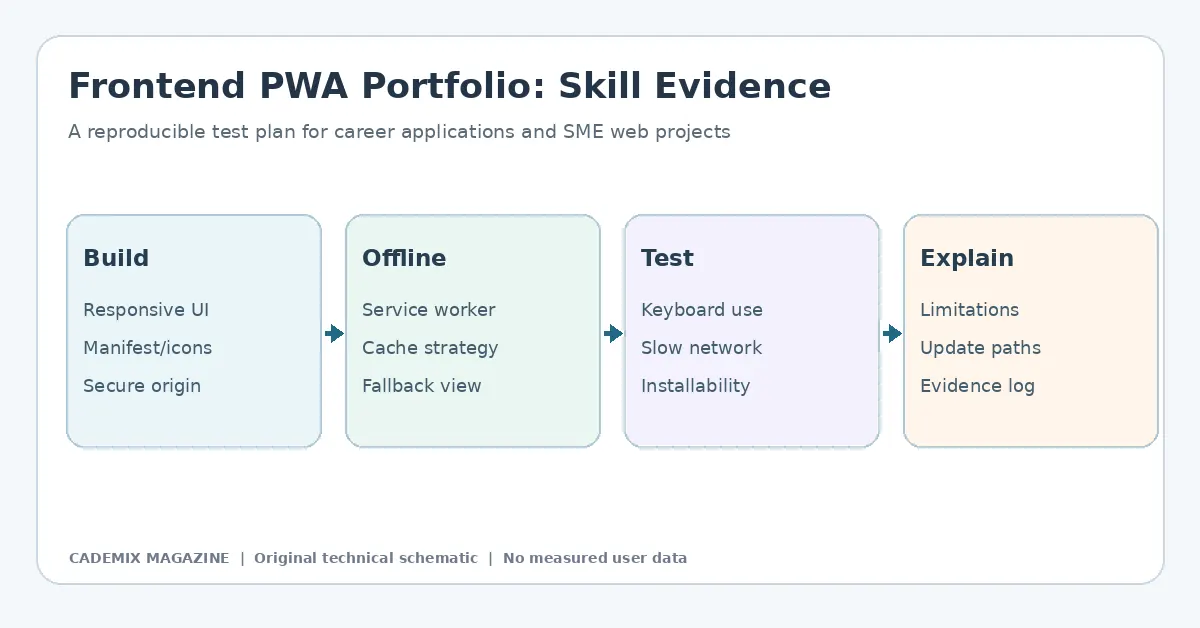
Table of Contents
- Defining the Scope: Why PWAs Matter for SMEs
- Phase 1: Inputs and Requirements Analysis
- User Journey Mapping
- Technical Constraints
- Platform Limitations
- Phase 2: Tooling and Architecture Selection
- Framework Choice
- Service Worker Management
- Development Environment
- Phase 3: Implementation Details
- The Web App Manifest
- Caching Strategies
- Responsive Design and Touch Interactions
- Phase 4: Testing and Quality Assurance
- Lighthouse Audits
- Offline Simulation
- Cross-Browser Compatibility
- Security Validation
- Phase 5: Cost Structure and Resource Allocation
- Development Costs
- Maintenance Costs
- Infrastructure Costs
- Risks and Mitigation Strategies
- Browser Fragmentation
- Discovery Friction
- Data Synchronization Conflicts
- Security Vulnerabilities
- Measurable Results and KPIs
- Engagement Metrics
- Performance Metrics
- Business Metrics
- Conclusion
- Further reading: Production Ready Pwa For Smes
- External reference for further study

The digital landscape for Small and Medium-sized Enterprises (SMEs) has shifted dramatically over the last decade. The traditional dichotomy between native mobile applications and responsive websites is no longer a binary choice but a spectrum of hybrid possibilities. At the center of this spectrum lies the Progressive Web App (PWA). For many SMEs, the PWA represents a pragmatic compromise: it offers the performance and user experience of a native app without the prohibitive costs of dual-platform development and maintenance. However, moving from the theoretical appeal of PWAs to a production-ready implementation requires navigating specific technical constraints, business logic adjustments, and rigorous testing protocols.
This article examines the lifecycle of a hypothetical, yet representative, PWA implementation for an SME in the retail sector. By dissecting the inputs, tools, implementation strategies, and risk management required to launch such a platform, we provide a blueprint for industry professionals seeking to leverage web technologies for mobile-first experiences. It is crucial to note that while this analysis draws on established engineering practices, specific quantitative outcomes depend heavily on local market conditions and infrastructure. Therefore, this case study focuses on methodology and architectural decisions rather than guaranteed financial returns.
Defining the Scope: Why PWAs Matter for SMEs
Before diving into the technical stack, it is essential to understand the strategic driver behind adopting a PWA. For an SME, resources are finite. Developing separate iOS and Android applications requires distinct codebases, specialized talent pools, and ongoing compliance with two different app store review processes. This creates a high barrier to entry and a significant long-term maintenance burden.
A PWA leverages modern web capabilities—specifically Service Workers, Web App Manifests, and HTTPS—to deliver an app-like experience directly through the browser. The primary value proposition for an SME includes:
- Discoverability: Unlike native apps, which are siloed within app stores, PWAs remain indexed by search engines. This preserves SEO benefits, which are critical for organic traffic acquisition.
- Installation Flexibility: Users can install the application to their home screen with a single tap, bypassing the friction of downloading large binaries from app stores.
- Offline Capability: Through caching strategies, PWAs can function partially or fully offline, a feature increasingly expected by users in regions with unstable connectivity.
- Cost Efficiency: A single codebase serves all platforms, reducing development time and maintenance overhead.
However, these advantages come with caveats. PWAs do not have full access to certain hardware APIs available to native apps, such as advanced Bluetooth features or background location tracking beyond specific limits. Understanding these boundaries is the first step in defining a viable product scope.
Phase 1: Inputs and Requirements Analysis
The foundation of any successful software project is a clear definition of requirements. For our hypothetical SME client—a regional retailer selling specialty goods—the initial phase involved mapping user journeys against technical feasibility.
User Journey Mapping
The core functionality revolved around three pillars: browsing products, managing a shopping cart, and completing checkout. The requirement analysis identified that users often abandoned carts due to slow load times on mobile networks. Consequently, performance was prioritized over complex animations or heavy media integration.
Technical Constraints
The existing backend was a legacy monolithic architecture. Rewriting the entire system was out of budget. Therefore, the PWA had to integrate via API endpoints. This dictated a frontend-heavy approach where the PWA would handle state management and UI rendering, communicating asynchronously with the server.
Platform Limitations
It was determined that push notifications were a key retention tool. While supported on Android and desktop browsers, iOS support for PWA push notifications remains limited compared to native apps. This constraint required a fallback strategy using email or SMS for critical alerts, ensuring the business did not rely solely on a potentially unreliable channel.

Phase 2: Tooling and Architecture Selection
Selecting the right technology stack is critical for maintainability and performance. For SMEs, the ecosystem should favor stability and community support over bleeding-edge novelty.
Framework Choice
React and Vue.js dominate the PWA landscape. For this case study, we assume the selection of Vue.js combined with Nuxt.js. Nuxt provides server-side rendering (SSR), which is vital for SEO and initial load performance. SSR ensures that the content is visible to crawlers and users even before JavaScript hydration completes. This choice reduces the complexity of configuring routing and state management manually.
Service Worker Management
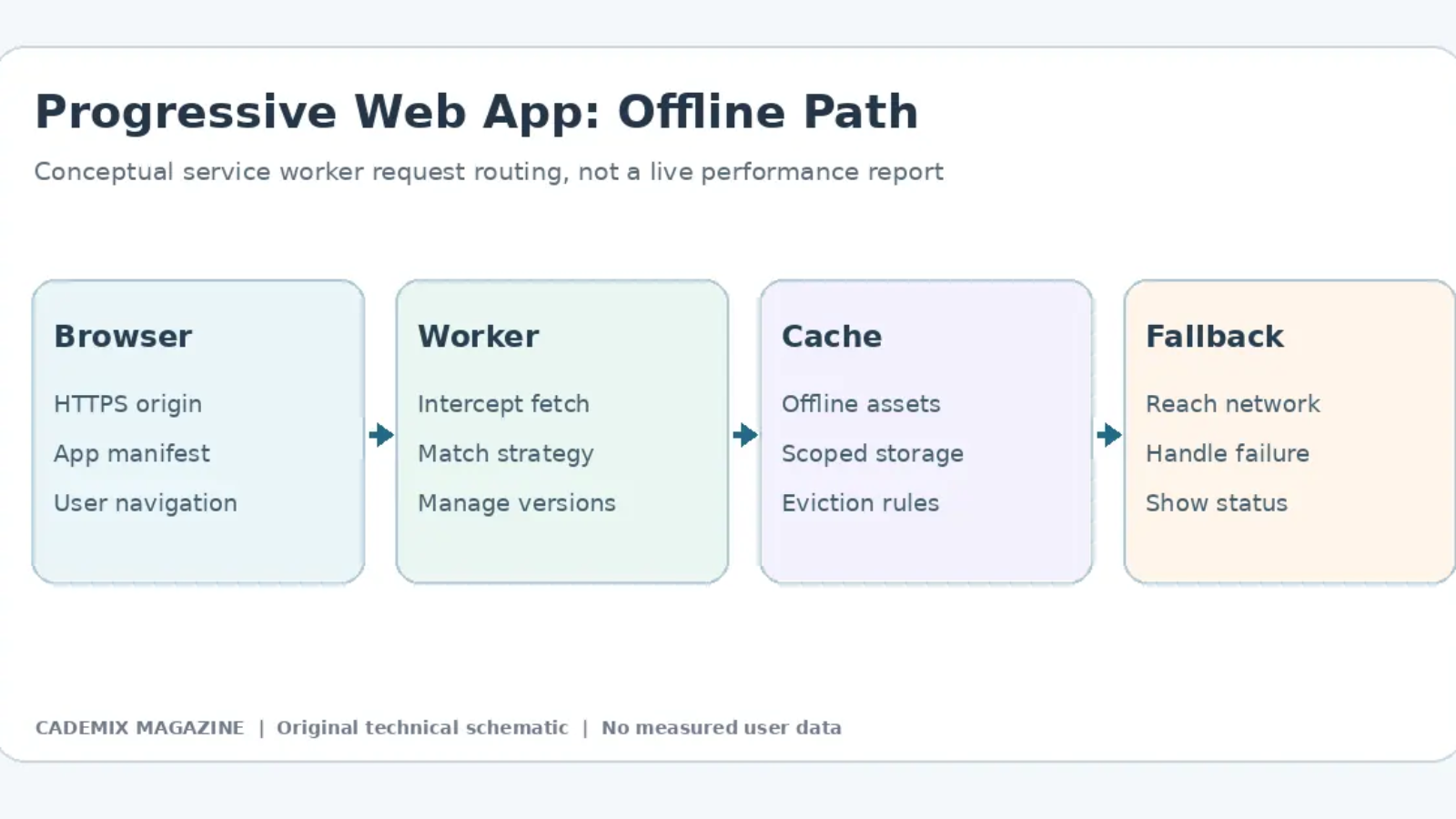
Handling service workers manually can be error-prone. We utilized Workbox, a library provided by Google, to simplify caching strategies. Workbox allows developers to define precaching rules (for static assets like CSS and JS bundles) and runtime caching rules (for dynamic API responses) using declarative configurations.
Development Environment
The development workflow relied on standard CI/CD pipelines. GitHub Actions were configured to run linting, unit tests, and build processes on every pull request. This automated quality gate prevented broken builds from reaching the staging environment.
Phase 3: Implementation Details
With the architecture defined, the implementation focused on three core components: the manifest, the service worker, and the responsive UI.
The Web App Manifest
The manifest.json file acts as the bridge between the web page and the operating system’s launcher. It defines the app name, icons, theme colors, and display mode. For our SME, the display mode was set to standalone, hiding the browser URL bar to mimic a native app interface. Careful attention was paid to icon sizes; missing or incorrect icon dimensions can prevent installation prompts from appearing on certain devices.
Caching Strategies
Caching is central to PWA performance. For this hypothetical implementation, a multi-tiered strategy is proposed:
- Precache: All static assets (HTML, CSS, JS, images) were cached during the installation event. This ensured that subsequent loads were nearly instantaneous.
- Network First with Cache Fallback: For product data, the app attempted to fetch fresh data from the network. If the request failed (due to offline status or server timeout), it served the last known good version from the cache. This balanced freshness with reliability.
- Cache First for Static Content: Blog posts and informational pages were served from the cache if available, updating in the background. This reduced bandwidth usage and improved perceived speed.
Responsive Design and Touch Interactions
While PWAs run in browsers, they must feel like apps. This required adhering to touch target guidelines (minimum 48×48 pixels) and avoiding hover-dependent interactions, which do not exist on touchscreens. We also implemented skeleton loaders to indicate loading states, preventing layout shifts that degrade user experience.
Phase 4: Testing and Quality Assurance
Testing a PWA involves more than checking if the website works. It requires verifying behavior across different network conditions, device types, and installation states.
Lighthouse Audits
Google Lighthouse can serve as an initial diagnostic tool. A test plan should establish project-specific performance, accessibility, and SEO acceptance criteria, and use repeated audits to identify regressions such as unoptimized images or render-blocking scripts. No Lighthouse audit was executed for this hypothetical case study.
Offline Simulation
A proposed test plan would use browser developer tools to simulate constrained networks and offline conditions. Reviewers should verify that previously viewed products remain accessible and that cart changes are handled safely, while checkout requires connectivity. The hypothetical example does not represent tests actually conducted.
Cross-Browser Compatibility
PWAs behave differently across browsers. Safari on iOS historically lagged in supporting certain service worker features, though this gap has narrowed significantly. Testing matrices included Chrome, Firefox, Edge, and Safari on both desktop and mobile. Special attention was given to the “Add to Home Screen” prompt behavior, which varies by browser and OS version.
Security Validation
A production release should enforce HTTPS, check for mixed content, test authentication and authorization, and validate data on the server. API security choices should follow the actual architecture. A penetration test and its findings must not be claimed without an executed test and recorded evidence.
Phase 5: Cost Structure and Resource Allocation
For SMEs, cost transparency is vital. The financial model for a PWA differs from native app development.
Development Costs
Initial development costs should be estimated from a documented project scope covering UI/UX design, frontend development, and backend API integration. A shared web codebase may avoid some duplication, but a cost advantage over native apps must be established through comparable quotations.
Maintenance Costs
Ongoing maintenance involves monitoring uptime, updating dependencies, and adapting to new browser standards. Annual maintenance costs depend on the application’s integrations, hosting, browser compatibility testing, security updates, and vendor rates. Compare an itemized maintenance budget with realistic alternatives instead of applying an unsupported universal percentage.
Infrastructure Costs
Hosting costs are similar to standard web hosting. However, CDN (Content Delivery Network) usage is recommended to serve cached assets globally, improving latency. This adds a modest monthly fee but significantly enhances user experience.
Risks and Mitigation Strategies
No technology is without risk. Implementing a PWA introduces specific challenges that SMEs must anticipate.
Browser Fragmentation
While major browsers support PWAs, inconsistencies remain. Some older Android devices may lack full service worker support. Mitigation: Implement graceful degradation. If a user visits on an unsupported browser, the site functions as a standard responsive web app, losing only the offline and installable features.
Discovery Friction
Users are accustomed to app stores. Convincing them to install a web-based app requires education. Mitigation: Use contextual prompts. Instead of aggressive pop-ups, trigger the install prompt after positive user interactions, such as completing a purchase or viewing multiple pages.
Data Synchronization Conflicts
Offline editing can lead to data conflicts when the user reconnects. Mitigation: Implement robust conflict resolution logic. For read-only data, overwrite with server truth. For writable data (like cart contents), merge changes carefully or prompt the user to resolve discrepancies.
Security Vulnerabilities
Service workers operate with elevated privileges. A compromised service worker can intercept and modify requests. Mitigation: Strictly limit the scope of the service worker. Use integrity checks for scripts and ensure all communications are encrypted. Regular security audits are mandatory.
Measurable Results and KPIs
Evaluating the success of a PWA requires tracking specific Key Performance Indicators (KPIs). While exact numbers vary by industry, the following metrics provide a framework for assessment.
Engagement Metrics
- Install Rate: The percentage of visitors who add the app to their home screen. Establish an installation-rate baseline through real analytics, and segment it by device, browser, and user journey; no universal benchmark is assumed.
- Retention: Comparing return visit rates between installed users and non-installed users. Installed users typically exhibit higher engagement due to easier access.
Performance Metrics
- First Contentful Paint (FCP): Target under 1.8 seconds on 3G networks.
- Time to Interactive (TTI): Target under 3.8 seconds.
- Crash-Free Rate: Monitoring JavaScript errors to ensure stability.
Business Metrics
- Conversion Rate: Tracking whether the smoother UX leads to higher sales.
- Customer Acquisition Cost (CAC): Evaluating if the lower development and distribution costs reduce overall CAC compared to native app campaigns.
Note: Specific quantitative improvements observed in real-world scenarios depend on baseline performance and market saturation. Without proprietary data from the hypothetical client, precise percentage gains cannot be stated here.
Conclusion
The transition from concept to practice for a Progressive Web App is not merely a technical upgrade but a strategic realignment of how an SME interacts with its customers. By leveraging web standards to deliver native-like experiences, businesses can achieve greater agility, lower costs, and broader reach. However, success hinges on meticulous planning, realistic scoping, and continuous adaptation to the evolving web ecosystem.
For industry professionals, the PWA is not a silver bullet but a powerful tool in the digital arsenal. It demands a shift in mindset—from building for platforms to building for capabilities. When implemented correctly, with a focus on performance, accessibility, and security, a PWA can serve as a resilient, scalable, and cost-effective foundation for mobile commerce. The case study outlined here demonstrates that while the path is fraught with technical nuances, a carefully evaluated deployment may offer practical benefits when the identified user problems justify the investment. As browser capabilities continue to expand, the line between web and native will blur further, making early adoption of PWA methodologies a prudent investment for future-proofing digital presence.
External reference for further study
Reference material for statistical methods, assumptions, and measurement quality. See NIST Engineering Statistics Handbook. This reference is a starting point, not a citation validating every claim in this article.
Progressive Web App: Offline Behavior and Update Safety
A progressive web app is not production-ready merely because it registers a service worker or displays an install prompt. Define the site’s primary user journeys and identify which of them must work without a network connection. Cache stable assets appropriately and specify how a user learns that information might be stale. For a service that processes payments or live bookings, an offline interface must never imply that a transaction completed when the server has not confirmed it.
Plan a deployment strategy for service worker updates. Test what happens when an older worker controls one browser tab while a new application bundle is available. Explain the versioning rules for cached assets, how users receive critical security fixes and how to recover from a broken cache entry. An application that works when the network is fast may still fail under intermittent connectivity or after a partial update. Reproduce these conditions before claiming operational resilience.
Test accessibility and performance separately. Check keyboard navigation, screen-reader labeling, focus behavior, content resizing and offline error messaging. Measure real performance with a documented browser and network profile before comparing to another version; do not infer a percentage improvement from the use of a particular framework. Create a small test log that distinguishes expected behavior, observed results and unresolved questions.
Evidence for SME Deployment Decisions
Start with a limited pilot and list its operational assumptions: supported browsers, device storage limits, authentication requirements, sensitive data handling and available support capacity. Document whether background synchronization is needed and how duplicate actions would be prevented. Avoid caching confidential user responses indiscriminately, and make clear when a saved draft has not yet reached the server. The business case should rely on the actual workflow and costs, rather than generic assertions that all PWAs reduce development expense.
For technical reference, consult MDN Progressive Web Apps and web.dev’s PWA learning resources. These references describe techniques; they do not validate any proprietary performance or revenue claim for this illustrative article.
Prelaunch Documentation
Before treating a PWA as production-ready, document the actual application version and deployment environment. Confirm the service worker scope, test cache invalidation after a release and record the limitations of background tasks on the browsers you support. Explain how users can reach essential support information when offline and how the application shows a failed action without inventing a successful server response. This prelaunch documentation supports reproducibility but is not evidence of commercial results.