
From Concept to Practice: A Secure Login Migration for Passkeys and Passwordless Authentication
Editorial Identifier: CM-0026 Category: Web, Mobile & Cyber Technologies Angle: Industry Methods & Case Study
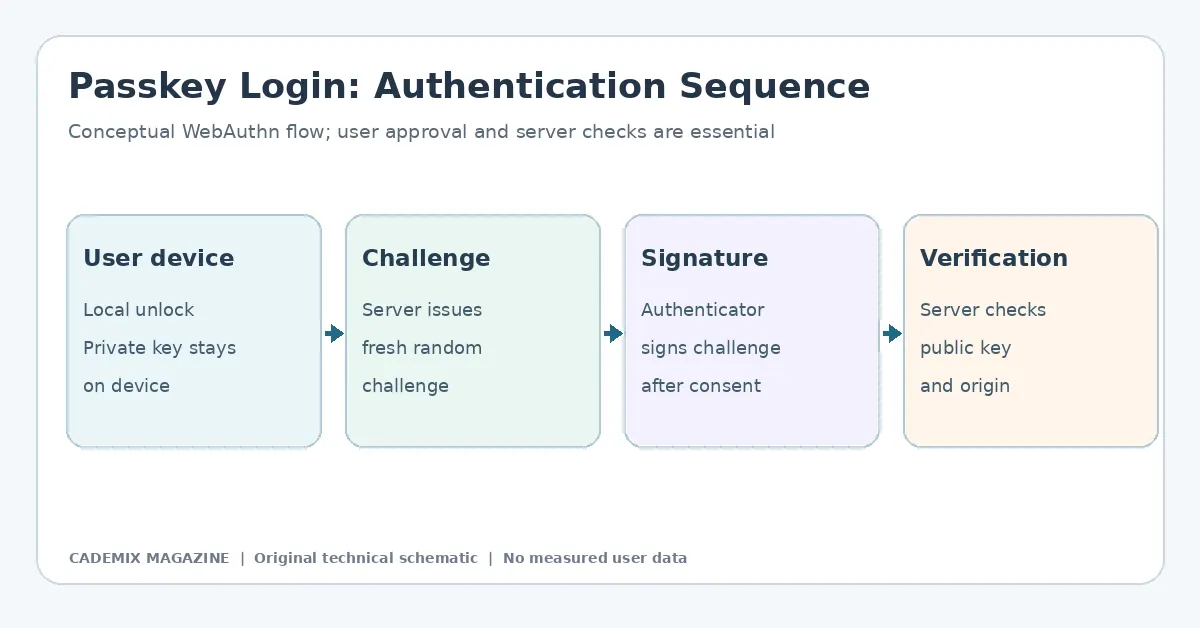
Table of Contents
- The Strategic Imperative: Why Migrate Now?
- Phase 1: Inputs and Infrastructure Assessment
- Technical Inventory
- Security Policy Alignment
- User Experience Baseline
- Phase 2: Proposed Methodology and Architecture Design
- The WebAuthn Standard Implementation
- Database Schema Changes
- Registration Flow Design
- Phase 3: Implementation and Tooling
- Recommended Libraries
- Testing Environments
- Phase 4: Risk Management and Mitigation Strategies
- Loss of Device Access
- Browser and OS Fragmentation
- Phishing Resistance Limitations
- Data Privacy Concerns
- Phase 5: Cost Analysis and Resource Allocation
- Development Costs
- Infrastructure Costs
- Training and Change Management
- Phase 6: Measurable Results and KPIs
- Adoption Rate
- Authentication Latency
- Support Ticket Volume
- Security Incident Reduction
- Hypothetical Example: The Mid-Sized SaaS Provider
- Conclusion
- Further reading: Secure Login Migration For Passkeys
- External reference for further study
The digital identity landscape is undergoing a tectonic shift. For decades, the username-and-password paradigm has served as the gatekeeper of online services, despite its inherent vulnerabilities to phishing, credential stuffing, and human error. As enterprises and small-to-medium enterprises (SMEs) grapple with rising cyber threats and user friction, the industry is pivoting toward passwordless authentication, specifically leveraging passkeys based on the FIDO2/WebAuthn standards.
This article examines the practical migration from traditional password-based login systems to a hybrid model incorporating passkeys. Rather than presenting a theoretical ideal, we dissect the operational realities, technical inputs, implementation strategies, and risk management protocols required to execute this transition successfully. The focus is on actionable methods for industry professionals tasked with modernizing authentication infrastructure without disrupting business continuity or compromising security posture.
The Strategic Imperative: Why Migrate Now?
The decision to migrate away from passwords is rarely driven by novelty alone; it is a response to measurable inefficiencies and security gaps. Traditional authentication mechanisms suffer from three critical weaknesses: reuse, complexity fatigue, and susceptibility to social engineering. When users are forced to manage dozens of complex credentials, they resort to predictable patterns or reuse across platforms, creating a single point of failure that attackers can exploit at scale.
Passkeys use public-key cryptography: the relying-party server stores public keys rather than reusable password secrets. Depending on the authenticator, private keys may be device-bound or securely synchronized by a credential provider. This reduces the risk that a breach of the service’s credential database exposes reusable authentication secrets, although other account and recovery risks remain. Furthermore, many users can authorize login by unlocking a device rather than entering a password; the effects on login time and support demand must be measured for the specific deployment.
However, the transition is not a “flip-the-switch” event. It requires a phased approach that respects legacy dependencies while building future-proof infrastructure. Understanding the distinction between research questions—such as “What is the adoption rate of passkeys in enterprise environments?”—and established general explanations—such as “WebAuthn uses public-key cryptography”—is crucial for setting realistic project scopes.
Phase 1: Inputs and Infrastructure Assessment
Before writing code, organizations must conduct a rigorous audit of their current authentication stack. This phase defines the boundaries of the migration and identifies potential blockers.
Technical Inventory
The first input is a comprehensive map of existing identity providers (IdPs), application servers, and client interfaces. Key questions include: * Which applications rely on session tokens derived from password hashes? * Are there third-party integrations that assume email/password flows? * What is the distribution of client devices among the user base? (e.g., iOS, Android, Windows, macOS).
Passkey support varies by operating system and browser version. While major platforms now support WebAuthn, older enterprise hardware or specific kiosk modes may lack the necessary secure enclaves. An inventory of these edge cases is mandatory to determine if a fallback mechanism is required.
Security Policy Alignment
Organizations must review their internal security policies regarding multi-factor authentication (MFA). In many jurisdictions and industries, regulations mandate MFA for sensitive data access. Passkeys inherently provide strong second-factor authentication because they require possession of the device and knowledge of the unlock method (biometrics/PIN). However, compliance teams must verify that replacing SMS OTPs or TOTP apps with passkeys meets specific regulatory definitions of “strong authentication.”
Note: Specific regulatory guarantees vary by region and industry sector. Legal counsel should validate compliance mappings before deployment.
User Experience Baseline
Establishing a baseline for current login metrics is essential for measuring success later. Metrics such as average login duration, password reset request frequency, and account lockout rates provide the quantitative context needed to justify the investment. Without these inputs, the ROI of the migration remains anecdotal.
Phase 2: Proposed Methodology and Architecture Design
The core methodology for this migration involves implementing a Hybrid Authentication Model. This approach allows users to register passkeys while retaining password functionality as a fallback during the transition period. This mitigates the risk of total service disruption if passkey registration fails or if users encounter device compatibility issues.
The WebAuthn Standard Implementation
At the heart of passkey technology is the WebAuthn API, which enables websites to create and use public-key credentials. The architecture typically consists of three components: 1. Relying Party (RP): The web application requesting authentication. 2. Authenticator: The user’s device (laptop, smartphone, or security key) that generates and stores the key pair. 3. Client Platform: The browser or OS interface that mediates communication between the RP and the Authenticator.
Database Schema Changes
A critical technical detail often overlooked is the modification of the user database schema. Traditional systems store salted password hashes. Passkey systems require storing public keys associated with unique credential IDs.
The proposed schema extension includes:
* user_id: Primary key linking to the main user record.
* credential_id: Unique identifier generated by the authenticator.
* public_key: The COSE-encoded public key.
* sign_count: Counter to prevent replay attacks.
* rp_id: Identifier for the relying party domain.
* attestation_type: Metadata about how the key was created (e.g., platform vs. roaming).
It is vital to ensure that these fields are indexed correctly to allow fast lookups during the authentication challenge-response process. Performance degradation during high-concurrency login events can negate the UX benefits of faster authentication.
Registration Flow Design
The registration flow must be intuitive yet secure. Users should be prompted to create a passkey after successful initial login via password. The interface should clearly explain why this step is beneficial (“Secure your account with Face ID/Touch ID”).
Technically, the registration process involves:
1. Client requests a challenge from the server.
2. Server generates a random nonce and returns it along with RP information.
3. Client invokes navigator.credentials.create().
4. Authenticator generates key pair and signs the attestation object.
5. Client sends the attestation object back to the server.
6. Server verifies the signature and stores the public key.
Developers must handle errors gracefully. If the user cancels the biometric prompt or if the device lacks a secure enclave, the system should revert to the standard password flow without locking the user out.
Phase 3: Implementation and Tooling
Implementation requires selecting appropriate libraries and tools that abstract the complexity of cryptographic operations. Rolling custom crypto implementations is strongly discouraged due to the high risk of vulnerability.
Recommended Libraries
For backend services, libraries such as SimpleWebAuthn (Node.js), WebAuthn.io helpers, or native SDKs provided by cloud identity providers (like Auth0, Okta, or Azure AD B2C) are standard choices. These libraries handle the parsing of CBOR-encoded data, validation of attestation formats, and management of challenge lifecycles.
On the frontend, integration with the browser’s native WebAuthn API is straightforward but requires careful handling of promise resolutions and timeouts. Modern JavaScript frameworks (React, Vue, Angular) have community-supported hooks and components that simplify the UI state management for passkey prompts.
Testing Environments
Testing passkey functionality presents unique challenges because it relies on hardware-specific features. Emulators often fail to replicate the true behavior of secure enclaves. Therefore, the testing strategy must include: * Unit Tests: Mocking the WebAuthn API responses to test server-side logic. * Integration Tests: Using real devices (iOS, Android, Windows Hello) to verify end-to-end flows. * Cross-Browser Compatibility: Ensuring consistent behavior across Chrome, Safari, Firefox, and Edge.
Automated testing pipelines should include regression tests for both password and passkey paths to ensure that changes in one do not break the other.
Phase 4: Risk Management and Mitigation Strategies
No migration is without risk. Identifying potential failure points early allows for proactive mitigation.
Loss of Device Access
If a user loses their primary device containing the passkey, they cannot log in using that method. To mitigate this, organizations must implement robust recovery mechanisms. Options include: * Secondary Passkeys: Allowing users to register multiple devices (e.g., phone and laptop). * Recovery Codes: One-time use codes generated during setup, stored securely by the user. * Admin-Assisted Reset: A verified customer support workflow that resets credentials after strict identity verification.
Browser and OS Fragmentation
While passkey support is widespread, it is not universal. Older browsers or corporate machines with disabled WebAuthn APIs will fail to initiate the flow. The system must detect capability support (window.PublicKeyCredential) and conditionally display the passkey option. If unsupported, the UI should default to password login seamlessly, avoiding confusing error messages.
Phishing Resistance Limitations
Passkeys are resistant to phishing because the origin domain is cryptographically bound to the credential. However, this protection only holds if the user initiates the login from the correct URL. If a user is tricked into visiting a malicious site that mimics the legitimate one, the browser will block the passkey usage because the domain does not match. This is a feature, not a bug, but it requires clear user education. Support teams must be prepared to explain why a login failed on a suspicious link rather than treating it as a technical glitch.
Data Privacy Concerns
Storing public keys and metadata raises privacy considerations. Organizations must update their privacy policies to reflect the collection of biometric-related metadata (though the biometric data itself stays on-device). Transparency builds trust, especially in sectors like healthcare or finance where data sensitivity is paramount.
Phase 5: Cost Analysis and Resource Allocation
Budgeting for a passkey migration extends beyond software licensing. Costs are distributed across development, infrastructure, training, and support.
Development Costs
Engineering time is the primary expense. Tasks include schema migration, API endpoint creation, frontend integration, and extensive QA. For an SME, this might represent 2-4 sprints of full-stack development effort. Larger enterprises may require dedicated identity teams working over several months.
Infrastructure Costs
Cloud identity providers often charge per active user or per authentication event. Migrating to a managed passkey solution may increase monthly recurring costs compared to self-hosted password databases. Conversely, reducing password reset tickets can lower operational support costs. A balanced analysis shows that while upfront infrastructure costs rise, long-term operational savings from reduced helpdesk load often offset them.
Training and Change Management
IT staff and customer support agents need training on troubleshooting passkey issues. Unlike password resets, which follow a standard script, passkey failures may involve device-specific settings, OS updates, or browser configurations. Investing in comprehensive internal documentation and training sessions is critical to maintaining service levels during rollout.
Phase 6: Measurable Results and KPIs
To evaluate the success of the migration, organizations must track specific Key Performance Indicators (KPIs) pre- and post-implementation.
Adoption Rate
The percentage of active users who have registered at least one passkey. An appropriate initial enrollment target depends on the workforce, technical compatibility and available support; no universal adoption percentage is assumed. Low adoption may indicate poor UX design or lack of user education.
Authentication Latency
Average time taken to complete a login. Passkeys typically reduce this metric significantly compared to typing passwords and waiting for SMS codes. Monitoring latency helps identify performance bottlenecks in the WebAuthn handshake process.
Support Ticket Volume
Tracking the number of tickets related to “login issues,” “password reset,” or “account lockout.” A successful migration should show a downward trend in password-related tickets, even if new categories like “passkey setup help” emerge temporarily.
Security Incident Reduction
While difficult to attribute solely to passkeys, monitoring attempts at credential stuffing or phishing against the login portal can provide indirect evidence of improved security posture. Any reduction in blocked login attempts from known malicious IPs suggests stronger defenses.
Hypothetical Example: The Mid-Sized SaaS Provider
Consider a hypothetical mid-sized Software-as-a-Service (SaaS) provider planning a phased passkey rollout. The following is a proposed process, not a completed client implementation or a source of measured results.
Preparation: Assess authentication infrastructure and supported devices; establish recovery safeguards and an initial baseline for login failures and support demand. Internal pilot: Test WebAuthn support with volunteer employees and record actual usability problems, including device loss and cross-device workflows. Limited beta: Invite a controlled group of users and compare their experience with the baseline. Communicate that device unlocking is used to approve authentication, not to send biometric data to the website. Gradual expansion: Increase eligibility only after reviewing security incidents, support-ticket themes, accessibility barriers, and recovery performance. General availability: Offer passkeys more broadly, while monitoring fallback use and ensuring that account recovery does not bypass the intended security controls.
The project must collect its own adoption rates, support costs, and security outcomes. No numerical improvement should be presented until the measurement methods and actual results are documented.
Conclusion
The migration from passwords to passkeys represents a fundamental upgrade in digital security and user experience. It is not merely a technical swap but a strategic transformation of how identity is managed. By adopting a hybrid methodology, rigorously assessing infrastructure inputs, managing risks through robust recovery plans, and measuring success through clear KPIs, organizations can navigate this transition effectively.
For SMEs and industry professionals, the path forward is clear: start with an audit, build with standard-compliant tools, test extensively on real devices, and communicate openly with users. The era of the password is ending, not with a bang, but with a biometric scan. Those who prepare for this shift today will secure their platforms—and their users’ trust—for tomorrow.
External reference for further study
Foundational application-security risk guidance. See OWASP Top Ten. This reference is a starting point, not a citation validating every claim in this article.
Passkey Migration: Security and Account Recovery
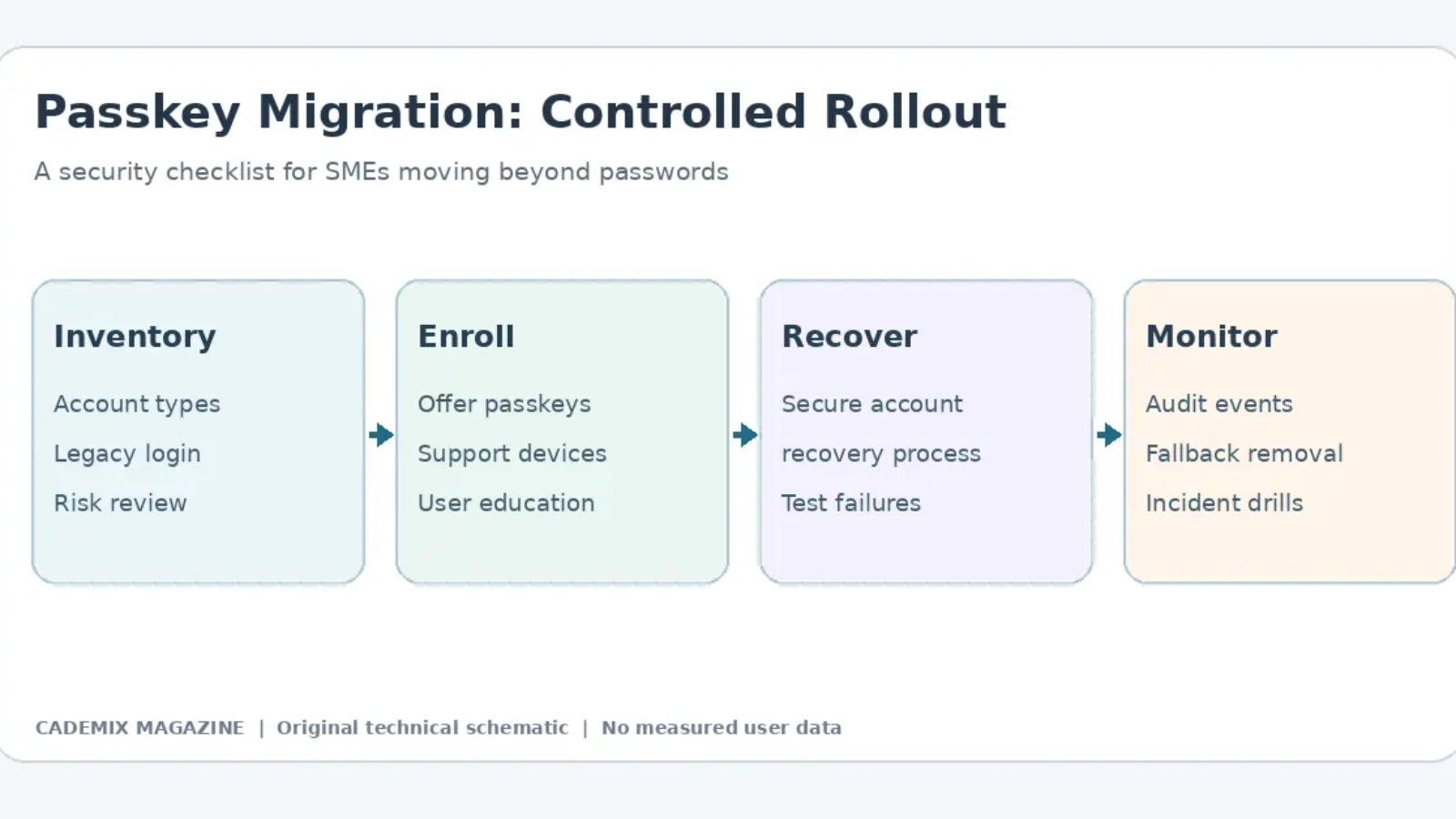
A passkey migration should be evaluated as an authentication lifecycle, not merely a replacement of a password field. Inventory the account classes, recovery options, authentication factors and users who might rely on shared or older devices. Before enrolling anyone, map the difference between first registration, subsequent sign-in, loss of a device and account recovery. A phishing-resistant credential cannot compensate for an insecure recovery process that allows an attacker to take over an account using weaker identity checks.
For a demonstration, use a controlled test environment with synthetic users. Record a registration challenge, the browser’s origin checks, user authorization on the device and the server-side verification of the signed response. Confirm that challenge reuse fails and that the relying party identifier matches the intended website. Passwordless authentication is not the same as eliminating every account-security risk; session theft, compromised devices and administrative access remain relevant.
Introduce passkeys alongside carefully tested fallback paths before removing existing sign-in methods. Provide clear instructions for account recovery, accessibility needs and users without compatible devices. A gradual rollout should be measured with real enrollment and support records. Do not present a 20–40 percent adoption rate as an industry benchmark unless a suitable source and cohort can be shown. An organization-specific target should be revised when staff feedback or operational incidents reveal obstacles.
Verification and Documentation for the Rollout
Write a compact migration checklist covering enrollment, recovery, authenticated device changes, high-risk account controls, logging and administrator intervention. Test failed challenges, repeated enrollment attempts, lost devices, invalid origins and confusing sign-in error messages. Preserve a clear incident response path when a user’s device is stolen or the device account is compromised. Technical staff should ensure that private keys are not collected by the server as part of the normal WebAuthn process.
For primary technical specifications consult the W3C Web Authentication specification and the MDN Web Authentication API documentation. Check the current specification and actual browser support before asserting a feature is available for all users. Regulatory compliance still needs a jurisdiction- and use-case-specific assessment, rather than a generic claim that passkeys satisfy every strong-authentication requirement.