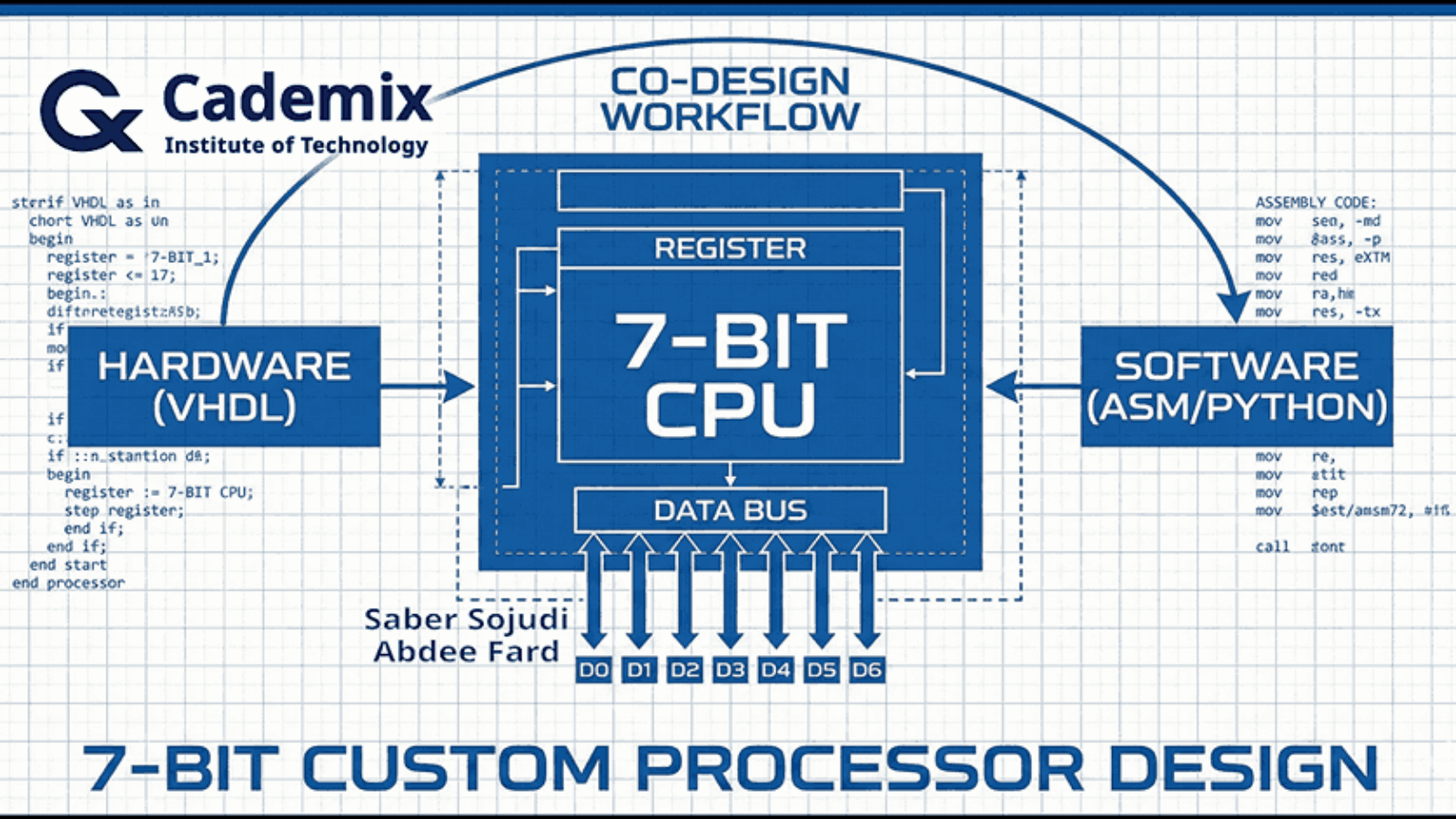
Blueprint-style overview of the 7-bit processor co-design workflow linking VHDL hardware, ASM/Python software, and the CPU datapath

A Practical 7-Bit Processor with a Python Assembler

Estimated Reading Time: 16 minutes

I built a compact 7-bit processor to explore hardware–software co-design end-to-end: defining a minimal instruction set, implementing the datapath and control in VHDL, and closing the loop with a small assembler that produces ROM-ready binaries. The design focuses on a small core of operations LOAD, ADD, SUB, and JNZ with an extended MULTIPLY instruction implemented using a shift-and-add approach to keep the hardware simple. Internally, the processor is decomposed into familiar blocks (ALU, register file, program counter, instruction register, ROM, and multiplexers), with a control unit described as an ASM-style state machine that sequences fetch, decode, and execute. A four-register file (R0–R3) and a zero flag provide the minimum state and condition mechanism needed for basic control flow. To integrate software with the hardware model, I use a Python-based assembler that converts assembly-like inputs into the binary encodings expected by ROM initialization. The project is intended to be validated in simulation by observing program counter progression, register updates, and ALU outputs under representative instruction sequences.
Saber Sojudi Abdee Fard

Introduction

I designed this project to practice hardware–software co-design in a setting small enough to reason about completely. The core idea is straightforward: define a minimal instruction set, implement a complete processor around that ISA in VHDL, and connect it to a simple software tool a Python assembler that produces the exact 7-bit encodings the hardware expects. The result is an offline simulation workflow where I can iterate on both sides of the boundary: instruction semantics in hardware and program encoding in software.

The processor is intentionally constrained. Both data and instruction representations are 7 bits wide, and the ISA is limited to a small set of operations: LOAD, ADD, SUB, JNZ, and an extended MULTIPLY. Memory is ROM-based, and the goal is correctness and clarity in simulation rather than breadth of CPU features or performance. Within that scope, the design targets a complete “compile -> encode -> load -> simulate -> inspect” loop: compiling and simulating the VHDL modules, translating an assembly-like program through Conversion.py, loading the produced binary into Memory.vhd, and then validating behavior by inspecting the program counter, register updates, and ALU outputs in the simulator.

This article explains the system the way I worked with it: as a set of contracts between modules and between software and hardware. I focus on the architectural decomposition (datapath and control), the encoding boundary enforced by the assembler, and what constitutes a successful run in simulation. I also call out the explicit non-goals such as advanced control-flow features, richer memory models, or microarchitectural optimizations because the constraints are part of what makes the design teachable.

Methodology

Architecture overview

I implemented the processor as a small set of composable VHDL building blocks connected around a single 7-bit internal bus. The top-level entity (Processor) exposes CLK and RESET inputs and exports the four general-purpose register values (R0out–R3out) specifically to make simulation inspection straightforward.

Inside Processor.vhd, the datapath is wired as follows:

  • A ROM (Memory) outputs a 7-bit word (MData) addressed by the program counter output (PC_OUT).
  • Two 4-to-1 multiplexers (MUX4x1) select ALU operands from the four register outputs (ROUT0–ROUT3). Each mux is driven by a 2-bit selector (S0 for operand A, S1 for operand B).
  • The ALU computes a 7-bit result (ALURes) based on a 2-bit command (CMD).
  • A 2-to-1 “bus mux” (MUX2x1) selects what drives the shared internal bus (BUSout): either ROM data (MData) or the ALU result (ALURes), controlled by BUS_Sel.
  • The shared bus is then assigned to a single internal input (RIN <= BUSout) that feeds every state-holding element: the four registers, the instruction register (IR), and the program counter (PC) load their next value from RIN when their respective load control is asserted.

This wiring creates a clean contract boundary: computation happens in the ALU, storage happens in registers/IR/PC, and the only way values move is by selecting a source onto the bus and latching it into a destination on the next clock edge.

A control unit (control_unit) sits beside the datapath. It consumes the current instruction (ROUTIR, the instruction register output) and per-register zero indicators (ZR0–ZR3), and it drives all load/select signals: LD0–LD3, LDIR, LDPC, INC, BUS_Sel, plus the ALU command (CMD) and the two operand selectors (Sel0, Sel1).
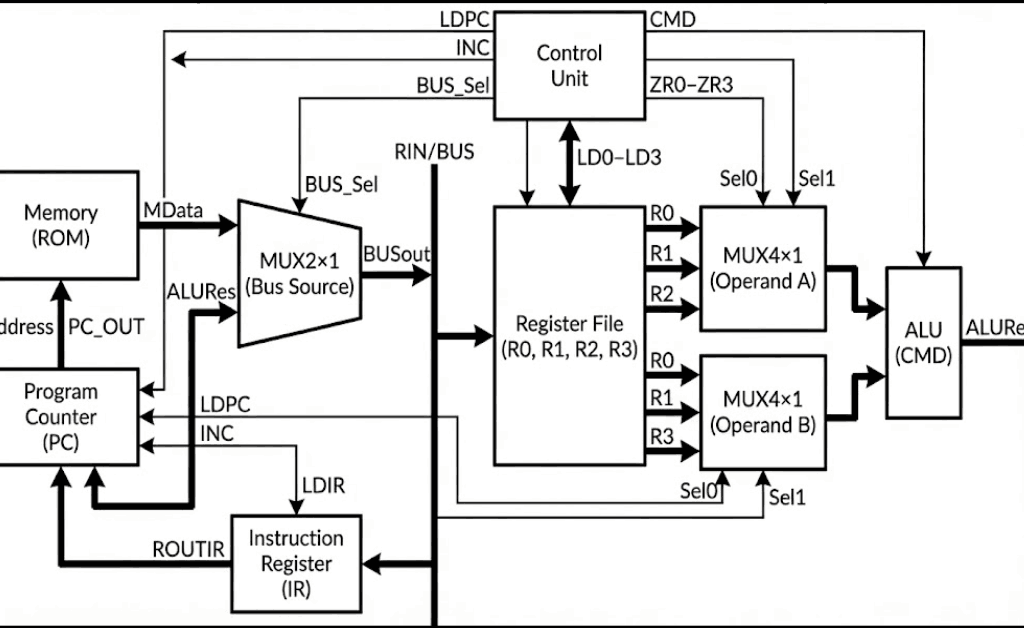
Block diagram of the 7-bit CPU showing ROM, PC, shared RIN/BUS, register file, operand muxes, ALU, and control-unit signals

Figure 1 — The ROM, register file, and ALU are connected through a single bus-source mux that drives a shared internal bus (RIN), while the control unit sequences selects and load-enables for fetch and execute.

Control unit and instruction sequencing

I implemented the controller as an explicit enumerated-state machine in control_unit.vhd. The control unit decodes two fields from the 7-bit instruction:

  • y <= ROUTIR(6 downto 4) as a 3-bit opcode.
  • x <= ROUTIR(3 downto 2) as a 2-bit register selector (converted to an integer Reg_num for indexing the zero-flag vector).

The control flow uses these states (as defined in the state type): S0, S1, D, S2, S3, S4, S5, S6, S7, and S8. Operationally, they map to a compact fetch–decode–execute loop:

  • Fetch (S0): the controller asserts LDIR <= 1 while selecting ROM data onto the bus (BUS_Sel <= 0). In the same state it asserts INC <= 1 to advance the PC. Conceptually, this state is responsible for “IR <- M[PC]” and “PC <- PC + 1”.
  • Stabilize (S1): the controller deasserts INC and LDIR and transitions to decode.
  • Decode (D): the controller either halts, dispatches to an execute state based on y, or evaluates a conditional branch using the selected register’s zero flag.
    • A literal all-ones instruction (ROUTIR = "1111111") is treated as halt and transitions into S2, which self-loops.
    • If y = "000", it dispatches to Load (S3).
    • If y = "001", it dispatches to Add (S4).
    • If y = "010", it dispatches to Sub (S5).
    • If y = "100", it dispatches to Multiply (S8).
    • Otherwise, it treats the instruction as a conditional PC control operation that consults ZR(Reg_num) and chooses between S6 (load the PC) and S7 (skip).

The execute states drive the datapath in a very direct way:

  • Load (S3) asserts exactly one of LD0–LD3 based on x, keeps the bus sourcing from ROM (BUS_Sel <= 0), and asserts INC <= 1 before returning to fetch. This matches a “load immediate/data word from ROM and step past it” pattern.
  • Add/Sub/Multiply (S4, S5, S8) select registers into the two ALU operand muxes (Sel0, Sel1), set CMD to the operation code ("00" for add, "01" for sub, "10" for multiply), switch the bus to the ALU result (BUS_Sel <= 1), and assert one of LD0–LD3 to latch the result back into a register. In the current implementation, both operand selectors are derived from the same instruction field (x and ROUTIR(3 downto 2)), so both Sel0 and Sel1 are driven from the same two-bit slice.
  • PC load (S6) asserts LDPC <= 1 while selecting ROM data onto the bus (BUS_Sel <= 0) and returns to fetch. In combination with the top-level wiring (ROM addressed by PC_OUT, bus sourcing from MData), this implements an indirect jump target read: the PC loads the 7-bit word currently stored at the ROM address.
  • PC skip (S7) asserts INC <= 1 and returns to fetch. This acts as the complementary behavior to S6: when the condition is not met, the controller advances past the jump operand word.

That last pair (S6/S7) is a key contract in the design: conditional control flow is implemented by placing a jump target word in ROM immediately after the branch instruction, then either loading the PC from that word (taken) or incrementing past it (not taken). This keeps the instruction format small while still enabling label-based control flow at the assembly level.

Datapath components and local contracts

I structured the datapath around a small number of synchronous state-holding elements (registers, program counter, instruction register) and purely combinational plumbing (multiplexers and the ALU). The shared internal bus (RIN) is the only write-back path: every storage element loads from the same 7-bit value when its load-enable is asserted. That design choice keeps the movement of data explicit each cycle is “pick a source onto the bus, then latch it into one destination” which makes it straightforward to debug in simulation.

Register file and zero flags (Reg.vhd)

Each general-purpose register is implemented as a simple rising-edge latch with a load enable. The register stores a 7-bit vector (res) and continuously computes a per-register zero flag ZR. In this implementation, ZR is asserted high when the register content is exactly 0000000, and deasserted otherwise. Because the zero flag is derived from the stored register value (not the ALU result), conditional control flow is defined in terms of “what is currently in the selected register,” which is a clean contract for a small ISA.

A practical implication of this choice is that the condition mechanism is transparent to inspection: in simulation, I can interpret the branch condition by looking at the register value and its corresponding ZR* signal without needing an additional flag register.

Program counter semantics (PC.vhd)

The program counter is another 7-bit state element with three control inputs: CLR (asynchronous clear), LD (load from the bus), and INC (increment). The implementation uses a single internal accumulator (“inBUS” inside the clocked process) that can be loaded and incremented in the same cycle. If both LD and INC are asserted on a rising clock edge, the update order is “load, then increment,” which gives a well-defined behavior for any state machine that wants “PC <- operand + 1” rather than forcing two cycles.

In the top-level wiring, CLR is driven from the processor’s reset line (mapped through the RST signal), and the fetch phase relies on INC to advance sequentially through ROM addresses.

Instruction register (IR.vhd)

The instruction register is a minimal latch: on a rising clock edge, if LD is high, it captures the current bus value into an internal signal and exposes it as ROUT. There is no decode logic here by design; the controller consumes the raw 7-bit instruction word. This separation keeps “instruction storage” distinct from “instruction interpretation,” which is useful when iterating on encodings during co-design.

Combinational multiplexers (MUX2x1.vhd, MUX4x1.vhd)

I used two mux types:

  • A 2-to-1 mux selects the shared-bus source. In the current design, S=0 selects ROM data and S=1 selects the ALU result. This switch is effectively the “read vs compute” gate for the entire machine.
  • A 4-to-1 mux selects ALU operands from the four register outputs. The selector is two bits wide, built by concatenating the select lines inside the mux and mapping "00", "01", "10", "11" to R0, R1, R2, R3.

Both muxes are purely combinational. That means the timing contract is simple: control signals must be stable in time for the selected value to propagate to the bus (or ALU inputs) before the next rising edge, where it can be latched by the destination element.

ALU behavior and truncation (ALU.vhd)

The ALU accepts two 7-bit operands and a 2-bit CMD:

  • "00" performs unsigned addition.
  • "01" performs unsigned subtraction.
  • "10" performs multiplication via a shift-and-add loop.

Internally, both inputs are resized to 14 bits to allow intermediate growth during addition/subtraction/multiplication, and the multiplication iterates over the bits of IN1: for each set bit IN1(i), the ALU adds IN2 shifted left by i into an accumulator. This is a direct, minimal-hardware way to express multiplication in behavioral VHDL.

The key architectural contract is at the output: the ALU always returns only the lower 7 bits of the 14-bit intermediate result. In other words, arithmetic is effectively performed modulo (2^7) at the architectural boundary. That choice is consistent with the project’s 7-bit scope, but it also means overflow is handled by truncation rather than saturation or flagging.
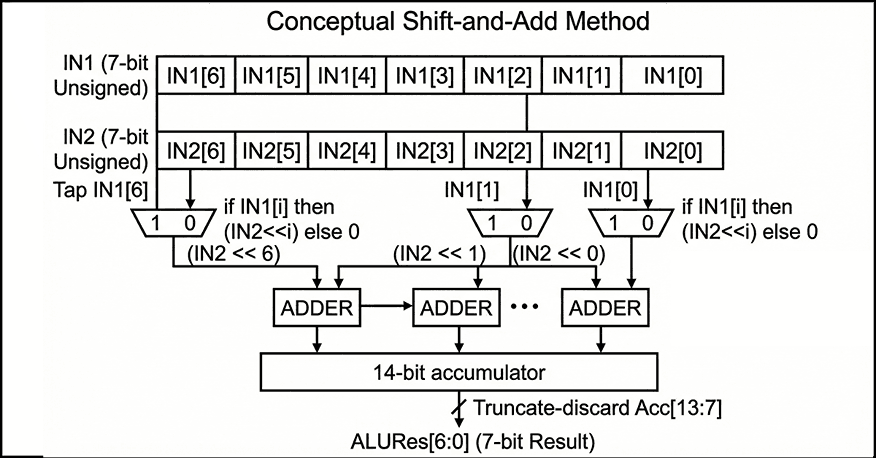
shift add multiply

Figure 2 — Conceptual shift-and-add multiplication accumulates (IN2 << i) for each set bit IN1[i] into a 14-bit sum, then returns only the lower 7 bits as ALURes[6:0].

ROM and “program as VHDL” workflow (Memory.vhd)

The memory is implemented as a 128-entry ROM (instruction(127 downto 0)), addressed by the 7-bit program counter. The output is a direct combinational lookup: Data <= instruction(to_integer(unsigned(address))). The ROM contents are currently defined by assigning specific indices inside the VHDL architecture. This matches your intended workflow: use the Python assembler to generate 7-bit binary instruction words and then paste those encodings into Memory.vhd to run them in simulation.

The file also includes multiple annotated program variants. One example sequence is commented as an “add 7 with 4” demonstration, and another is structured as a small loop intended to exercise conditional branching and repeated arithmetic. A third variant (commented out) is positioned as a “hardware focus” multiplication path, contrasting with the loop-based approach. From an engineering perspective, keeping these snippets inline makes the simulation loop fast, but it also means “program loading” is manual and tightly coupled to the ROM source code rather than being a separate artifact (e.g., a memory initialization file).

Figure placement: A code figure that shows a short ROM snippet (a few consecutive instruction(i) <= "......."; lines) is useful here to make the “assembler output -> ROM initialization” boundary concrete.

Assembler and the hardware–software boundary

To make the processor usable as a co-design exercise rather than a pure hardware artifact, I included a small Python assembler (Assembler/Conversion.py) that translates assembly-like lines into binary strings that can be loaded into the ROM. The intent, as documented in the repository, is to run the conversion step first, then paste the produced encodings into Memory.vhd, and finally validate behavior in simulation by inspecting the program counter, register values, and ALU outputs.

The current assembler implementation is deliberately minimal: it tokenizes each line by removing commas and splitting on whitespace, looks up an opcode mnemonic in a small table, and then encodes operands by type. Register operands (R0–R3) are encoded as 2-bit binary values, while any non-register operand is encoded as a 4-bit binary value. Each instruction line is therefore built by concatenating a fixed-width opcode field with one or more fixed-width operand fields, producing a binary string per line.

This assembler is also where the most important integration contract lives: the binary it emits must match the instruction word format the VHDL control unit expects. The README states the processor operates on 7-bit-wide instructions and provides an example encoding (ADD R1, R2 -> 0100010). In the current Conversion.py, however, the opcode table is 2 bits wide and only covers Load, ADD, SUB, and JNZ, with no explicit MULTIPLY support. In practice, that means the assembler represents the intended direction (software producing ROM-ready bits), but the exact bit-level encoding contract is something the project has to pin down consistently between README, assembler, and the VHDL decode logic. That “tight loop” of adjusting encodings until the fetch/decode/execute behavior matches expectations is part of the educational value of the co-design workflow.

Two targeted questions so I can describe the integration contract precisely in Section 6 (Results) and avoid guessing:

Key implementation notes

  • Source grounding: the narrative is based on README.md and the project snapshot you provided.
  • Entry points: hardware at src/Processor.vhd (top-level integration); software at Assembler/Conversion.py (assembly-to-binary conversion).
  • Core modules: src/ALU.vhd, src/control_unit.vhd, src/Memory.vhd, src/PC.vhd, src/IR.vhd, src/Reg.vhd, src/MUX2x1.vhd, src/MUX4x1.vhd.
  • Top-level integration: src/Processor.vhd instantiates and wires Reg, PC, IR, ALU, MUX4x1 (twice), MUX2x1, Memory, and control_unit, with a single internal bus (RIN <= BUSout) feeding all loadable elements.
  • Control surface: src/control_unit.vhd outputs LD0..LD3, LDIR, LDPC, INC, BUS_Sel, plus CMD, Sel0, and Sel1, and consumes ROUTIR and the per-register zero signals ZR0..ZR3.
  • Halt sentinel: the controller treats 1111111 as a dedicated halt instruction and transitions into a terminal self-loop state.
  • Reg.vhd: rising-edge storage with LD; ZR=1 iff the stored 7-bit value is 0000000.
  • PC.vhd: 7-bit counter with CLR (async clear), LD (load from bus), and INC (increment); supports “load then increment” if both asserted.
  • IR.vhd: rising-edge instruction latch controlled by LD.
  • MUX2x1.vhd: bus-source selector between ROM (I0) and ALU (I1) with a single select bit.
  • MUX4x1.vhd: operand selector over R0–R3 driven by two select bits.
  • ALU.vhd: unsigned add/sub; multiply implemented via shift-and-add; output is truncated to the low 7 bits.
  • Memory.vhd: 128×7 ROM as an internal array with explicit per-address assignments; output is a combinational lookup addressed by PC.
  • Assembler entry point: assemble(assembly_code) consumes a multi-line string and returns a list of binary strings, one per parsed instruction line.
  • Assembler tokenization: commas are stripped (line.replace(",", "")), then tokens are split on whitespace; empty lines are ignored.
  • Assembler encoding: registers (R*) become 2-bit fields; non-register operands become 4-bit fields; the opcode is taken from opcode_table.
  • Assembler opcode coverage: Load, ADD, SUB, JNZ are defined; other instructions (including MULTIPLY) are not represented in the table.
  • Hardware inspection points: Processor exports R0out–R3out explicitly, which makes it practical to validate instruction effects without adding extra debug modules.
  • Software-to-hardware boundary: assemble(...) emits binary strings from assembly-like lines; in the validated workflow these are used to populate the ROM in Memory.vhd.
  • Intended ISA surface: the README presents LOAD/ADD/SUB/JNZ plus an extended MULTIPLY, and frames validation as monitoring ALU output, register values, and program counter progression during simulation.
  • Documentation positioning: the README positions the project explicitly as a simulation-driven, educational processor build with a minimal ISA and a Python conversion step.
  • Encoding contract hotspot: the assembler’s opcode table and assemble(...) are the natural enforcement point for a single instruction-format contract once the bit layout is finalized.

Results

Because I did not build a dedicated VHDL testbench, validation for this project is based on interactive simulation: compiling the full design, loading a short program into the ROM, and then stepping the clock while inspecting the program counter, instruction register, control signals, ALU result, and the four register outputs. This approach matches the project’s educational scope: the primary outcome is a working hardware–software loop where I can translate assembly into binary, paste those encodings into the ROM, and observe the machine executing fetch–decode–execute in a waveform viewer.

Validation checkpoints

In practice, “success” in simulation is visible as a small set of repeatable checkpoints:

  • Fetch discipline: on each instruction boundary, the instruction register captures the ROM output while the program counter advances, yielding a stable next instruction word and a monotonic PC sequence.
  • Load path correctness: a LOAD sequence routes ROM data onto the internal bus and latches it into the selected register, so the register output changes exactly on the intended clock edge.
  • ALU path correctness: ADD and SUB route the ALU result onto the bus and latch it back into a register; the ALU output changes combinationally with operand selection, while architectural state changes only on clock edges.
  • Multiply behavior: the MULTIPLY operation produces a deterministic product consistent with a shift-and-add implementation, with the architectural output constrained to 7 bits (i.e., truncation on overflow) as part of the 7-bit design scope.
  • Conditional control flow observability: conditional branching is validated by correlating (a) the selected register value, (b) its zero flag, and (c) whether the PC is loaded from ROM or advanced past the next word. This makes the branch mechanism debuggable even without a testbench, because the condition and the control effect are both visible.

Artifacts produced

The durable artifacts from a run are simple but useful: (1) binary instruction words produced by the Python assembler and (2) waveform traces in the simulator that show the PC/IR/control/ALU/register timeline for a program. The repository also contains simulator-side artifacts (e.g., waveform databases) under src/, which is consistent with an interactive debug workflow rather than a scripted regression setup.

Discussion

This project’s strongest property is that it forces a clean interface between hardware intent and software representation. The processor design is small enough that I can reason about every signal transition, but complete enough to exercise real co-design constraints: instruction encoding decisions affect decode logic; decode logic constrains what the assembler must emit; and the ROM loading workflow becomes part of the “system contract,” not a separate afterthought.

That said, the absence of a testbench is a real limitation. Interactive waveform inspection is effective for bring-up and learning, but it does not scale to repeatable regression. Without an automated test harness, it is easy to introduce subtle contract drift for example, changes in instruction bit layout, operand field meaning, or zero-flag conventions without immediately noticing. The README asserts that the assembler “supports all implemented instructions,” but the current Conversion.py opcode table only enumerates Load, ADD, SUB, and JNZ, and it encodes operands into fixed 2-bit (register) and 4-bit (immediate) fields, which may or may not match the 7-bit instruction format you ultimately used in ROM. In a co-design project, this kind of mismatch is common and also instructive but it is worth surfacing as a deliberate boundary to tighten.

The architectural constraints are also doing real work here. The 7-bit width means arithmetic overflow is not an edge case; it is a normal mode of operation, and truncation becomes the implicit overflow policy. The ROM-based memory model similarly compresses the problem: by treating “program and data” as a static table, I avoid a full load/store subsystem and can focus on sequencing and datapath correctness. The cost is that the system is simulation-oriented, and “loading a program” is effectively editing VHDL. For the stated educational goal, that trade-off is reasonable, but it is the first thing I would change if I wanted this design to behave more like a reusable platform.

What I would tighten next

If I were evolving this beyond a learning artifact, I would prioritize three reliability-oriented improvements:

  1. Lock the instruction contract: define a single authoritative bit layout (fields, widths, and operand meaning) and make the VHDL decode and the Python assembler share it (even if only by generating a common table/module).
  2. Add a minimal self-checking testbench: one or two short programs with assertions on PC/register end state would turn interactive validation into repeatable regression.
  3. Separate program data from RTL: move ROM initialization into a file-based mechanism supported by the simulator (or at least generate Memory.vhd program blocks automatically from the assembler output) to reduce manual copy/paste drift.

Conclusion

I built this 7-bit processor as a compact hardware–software co-design exercise: a minimal ISA, a VHDL implementation with a clear separation between datapath and control, and a Python assembler that translates human-readable instructions into ROM-ready binary. The design is intentionally constrained 7-bit width, ROM-based memory, and a small instruction set so that the full fetch–decode–execute behavior remains understandable in simulation. Within that scope, the project demonstrates the engineering mechanics that matter in larger systems: defining module contracts, sequencing state updates cleanly, and keeping the software encoding pipeline consistent with hardware decode expectations.

The next step, if I want to make it more robust, is not to add features first; it is to formalize the instruction-format contract and add a minimal self-checking testbench so that the co-design boundary becomes repeatable and verifiable rather than primarily manual.

References

[1] S. Sojudi Abdee Fard, “7-Bit Custom Processor Design for Hardware-Software Co-Design,” GitHub repository (semester 8 / 7-Bit Custom Processor Design). https://github.com/sabers13/bachelor-projects/tree/main/semester%208/7-Bit%20Custom%20Processor%20Design

[2] IEEE Standards Association, “IEEE 1076-2019 IEEE Standard for VHDL Language Reference Manual,” Dec. 23, 2019. https://standards.ieee.org/ieee/1076/5179/

[3] Advanced Micro Devices, Inc., Vivado Design Suite User Guide: Logic Simulation (UG900), v2024.2, Nov. 13, 2024.https://docs.amd.com/r/2024.2-English/ug900-vivado-logic-simulation

[4] Siemens EDA, “ModelSim User’s Manual,” software version 2024.2 (PDF). https://ww1.microchip.com/downloads/aemDocuments/documents/FPGA/swdocs/modelsim/modelsim_user_2024_2.pdf

[5] Python Software Foundation, “Python 3 Documentation,”. https://docs.python.org/
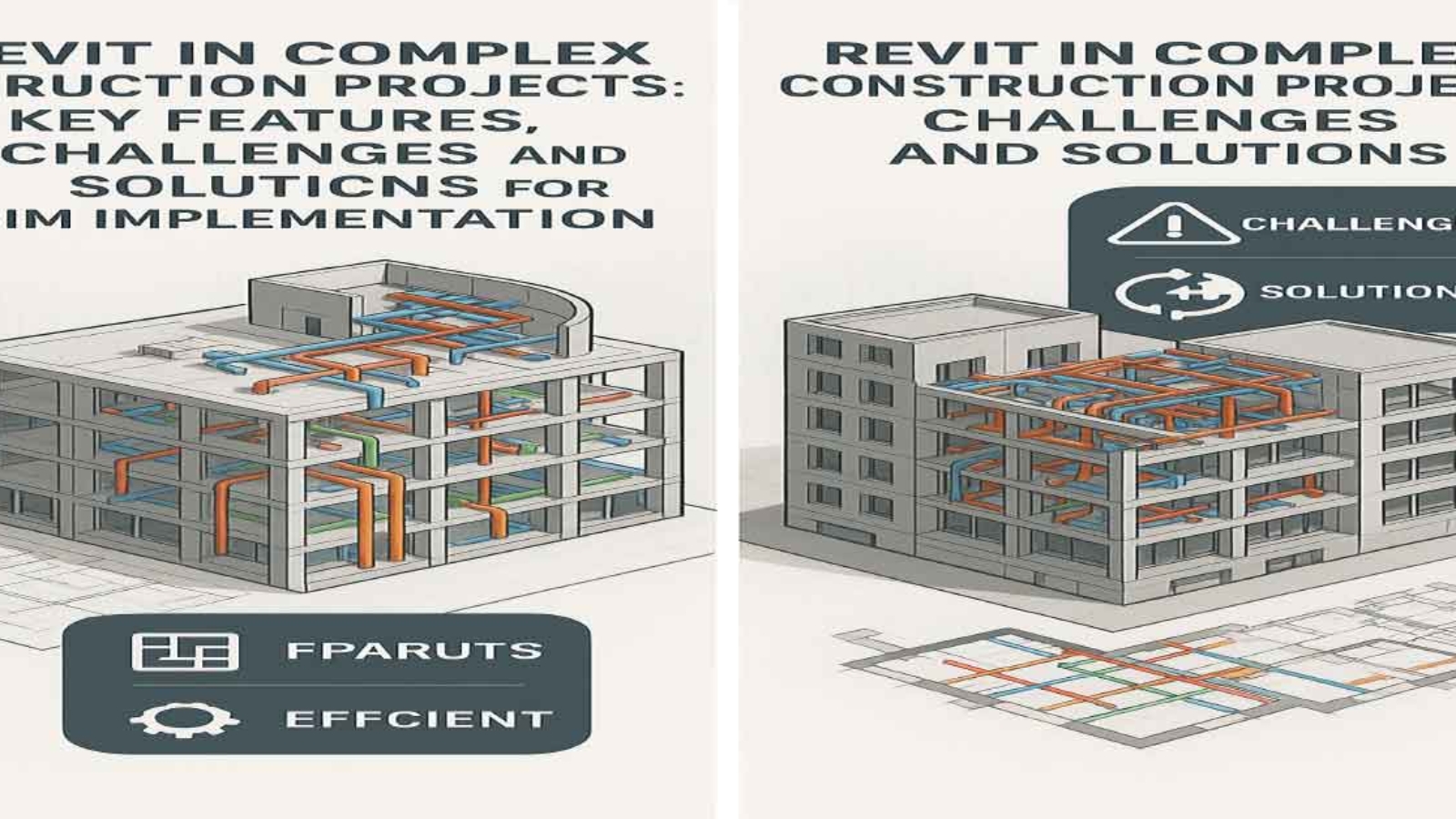
revit

“Revit in Complex Construction Projects: Key Features, Challenges, and Solutions for Effective BIM Implementation”

Estimated Reading Time: 16 minutes

revit

Table of Contents

  1. Introduction
    1.1. Overview of Revit and its Role in Complex Construction Projects
    1.2. Purpose and Scope of the Article
  2. BIM and Revit Overview
    2.1. Definition and Concept of BIM
    2.2. What is Revit?
    2.3. Key Features of Revit in Complex Construction Projects
    – 3D Modeling for Accurate Design
    – Coordination and Collaboration in Real-Time
    – Data Management for Cost, Time, and Quality Control
    – Simulation and Performance Analysis
    – Change Management in Design and Construction
  3. Challenges and Solutions in Using Revit
    3.1. Challenges of Using Revit
    – Need for High-Level Training and Technical Skills
    – High Initial Costs
    – Need for Precise Team Coordination
    – Data and Information Management Challenges
    3.2. Solutions for Overcoming Challenges
    – Training and Skill Enhancement for Teams
    – Use of Cloud-Based Versions
    – Improved Team Coordination Processes
    – Centralized Data Management
  4. Benefits of Revit in Managing Complex Projects
    4.1. Improved Accuracy and Reduced Errors
    4.2. Enhanced Collaboration and Coordination
    4.3. Time and Cost Savings
    4.4. Better Project Outcomes and Quality
  5. Conclusion
    5.1. Summary of Key Insights
    5.2. The Future of Revit in Complex Construction Projects

Feel free to adjust any section titles or str1.1. Definition and Concept of BIM

Building Information Modeling (BIM) refers to the use of 3D digital models for the design, construction, and management of buildings. In this process, all relevant project information, including design details, scheduling, costs, materials, and the performance of various systems, is collected, stored, and updated digitally.

BIM not only involves creating 3D models of buildings but also serves as a comprehensive system for managing information and data throughout all stages of a construction project. These stages include planning, construction, operation, and maintenance of buildings and infrastructures.

In BIM, all project stakeholders, including architects, engineers, contractors, and project managers, can simultaneously and digitally access project data. These models are continuously updated and allow all information, from design details to mechanical, electrical, plumbing (MEP) systems, and even facility maintenance databases, to be centralized and easily shared. This process significantly enhances project efficiency and accuracy, as all information is available in a comprehensive and up-to-date model.

BIM generally has three core functions:

  1. Modeling and Design: Creating a 3D model and digital representation of the building using various data.
  2. Information Management: Storing and updating all project data in a centralized database.
  3. Analysis and Simulation: Simulating building performance in the real world, including energy analysis, structural analysis, and system behaviors.

Ultimately, BIM not only makes the design and construction process more efficient but also aids in managing complex projects, reducing costs and unnecessary delays. Additionally, this technology improves design accuracy, decision-making, and minimizes the need for revisions throughout construction projects.


1.2. What is Revit?

Revit is a BIM software developed by Autodesk. This software is specifically designed for architects, structural engineers, MEP engineers, and contractors, providing them with tools for 3D modeling, structural analysis, project management, and cost control.

The main goal of Revit is to provide an environment for collaboration and coordination among all project team members. Unlike older software, which only focused on 2D drawing, Revit allows users to create accurate and realistic 3D models of building projects. These models not only include architectural designs but also encompass all structural systems, MEP systems, and other project details.

Key features of Revit include:

  • Parametric Modeling: Meaning changes in one part of the model automatically update all related sections.
  • Structural and Energy Analysis: Offering capabilities to analyze the performance of building systems, energy consumption, and structural integrity.
  • Information and Data Management: Revit enables all project data, including plans, cost estimates, and schedules, to be stored and managed in a central model.

Revit also allows real-time collaboration, meaning that project teams can work on a shared model at the same time, keeping everything up-to-date. This feature reduces errors and facilitates the management of complex construction projects. Revit is an indispensable tool for designers, engineers, and project managers, improving collaboration and coordination between different teams while enhancing project accuracy.


1.3. Key Features of Revit in Managing Complex Construction Projects

3D Modeling for More Accurate Design

One of the main features of Revit is its ability to create precise 3D models of buildings and installations. These models include not only architectural designs but also all structural, mechanical, electrical, and plumbing (MEP) systems. This enables all project team members to have a more accurate representation of the project and identify potential issues before they arise.

Real-Time Team Coordination and Collaboration

Revit allows designers, engineers, and contractors to work on a shared model in real time. This feature ensures that all changes are updated instantly, and everyone on the team is aware of the latest information. In complex projects, this real-time collaboration helps prevent errors and ensures the smooth flow of information between all parties involved.

Data Management and Analysis for Cost, Time, and Quality Control

Revit provides tools for data management and analysis, allowing project managers to control costs, schedules, and quality. Features like scheduling tools, cost estimation, and reporting help monitor and manage the project effectively. These capabilities allow project managers to steer the project in the right direction and avoid unnecessary delays or costs.

Simulation and Analysis of Building System Performance

Revit enables users to simulate the performance of different systems within the building, such as energy systems, HVAC, and plumbing systems. This feature helps engineers assess the efficiency of these systems before construction begins and make necessary adjustments to optimize performance and energy use.

Managing Changes in Design and Construction

One of the biggest challenges in complex construction projects is managing changes. Revit is designed to automatically update the entire model whenever changes are made. This ensures that all team members are working with the most current version of the model and that changes are implemented across the project without issues.

By offering these key features, Revit serves as a powerful tool for managing complex construction projects, enabling teams to work more efficiently, reduce errors, and ensure the project stays on schedule and within budget.

1.2. What is Revit?

Revit is a BIM-based (Building Information Modeling) design software developed by Autodesk. This software is specifically designed for architects, structural engineers, MEP (Mechanical, Electrical, and Plumbing) engineers, and contractors, providing tools for 3D modeling, structural analysis, scheduling, project management, and cost control.

The primary goal of Revit is to provide an integrated platform for all project team members to collaborate and coordinate. Unlike older software, which only focused on creating 2D drawings, Revit allows users to create accurate and realistic 3D models of building projects. These models include not just architectural designs but also all structural systems, mechanical, electrical, plumbing (MEP) systems, and other project details. This comprehensive approach enables all project stakeholders to work within a shared model, improving collaboration and coordination.

Revit has several unique features that make it an invaluable tool for teams involved in design, engineering, and construction management. Let’s explore the key features and functionalities of Revit that help streamline the design and construction processes, especially in complex building projects.

Key Features of Revit:

  1. Parametric Modeling:
    One of the most powerful features of Revit is parametric modeling. This means that changes made to one part of the model automatically update all related sections of the model. For example, if you change the dimensions of a wall, all associated views, sections, and drawings are automatically updated. This ensures consistency across the project and reduces errors related to manual updates.
  2. Structural and Energy Analysis:
    Revit provides advanced tools for structural analysis and energy modeling. Engineers can simulate how the building will behave under various loads, such as gravity or wind, and analyze the building’s energy performance. This helps in optimizing the design for energy efficiency, sustainability, and compliance with building codes. Structural engineers can use these tools to test the stability of a building before construction starts, ensuring it will withstand forces and stresses.
  3. Data and Information Management:
    One of the key advantages of Revit is its ability to manage all project data within a central model. This includes drawings, cost estimates, schedules, specifications, and more. Since everything is stored in one place, it is easier for the project team to collaborate, track progress, and ensure everyone is working with the most up-to-date information. This centralization also reduces duplication and errors that can occur when team members work on separate documents.
  4. Simulation and Performance Analysis:
    Revit allows for detailed simulation and performance analysis of different building systems, such as HVAC, electrical, and plumbing systems. This feature enables teams to test how these systems will function in real-world conditions and make any necessary adjustments before construction begins. Energy simulations allow for better energy-efficient designs by testing the building’s energy performance and identifying areas for improvement.
  5. Real-Time Collaboration:
    Revit is designed to allow team members to work on a shared model simultaneously. Changes made by one team member are instantly updated for all other members, ensuring that everyone is working with the latest information. This feature is particularly useful for complex projects where multiple disciplines are involved and real-time communication is essential. It ensures that any design changes, adjustments, or updates are communicated clearly and efficiently, preventing errors that could arise from outdated or conflicting information.
  6. Managing Changes in Design and Construction:
    In large projects, managing changes in the design can be one of the most challenging tasks. Revit addresses this by enabling automatic updates across all related sections of the project when changes are made. This ensures that all project stakeholders are working with the most current version of the design and prevents discrepancies between drawings, models, and specifications. With Revit, the process of updating a project is streamlined, allowing teams to handle design changes efficiently.
  7. Project Management and Scheduling:
    Revit also includes tools for project management and scheduling. It integrates with scheduling software to help teams track project timelines, milestones, and deliverables. By linking the 3D model with time-based data, project managers can visualize the construction process and ensure that the project stays on track. This helps to identify any potential delays early and allows for adjustments to be made before problems arise.

In summary, Revit is not just a tool for creating 3D models but also a comprehensive software suite that helps manage the entire construction process, from design and coordination to project management and cost control. By integrating BIM with features like parametric modeling, real-time collaboration, and structural and energy analysis, Revit has become an indispensable tool for architects, engineers, contractors, and project managers. It enhances collaboration, reduces errors, improves design accuracy, and ultimately contributes to the successful completion of complex building projects.

3.1. Challenges of Using Revit in Complex Projects

The use of Revit in complex construction projects can come with various challenges. While Revit is a powerful BIM (Building Information Modeling) tool offering numerous benefits, there are several obstacles that teams may face when fully utilizing its capabilities. These challenges can stem from technical aspects, costs, coordination issues, and data management. In this section, we will discuss some of the main challenges that arise when using Revit in complex building projects.

1. The Need for High-Level Training and Technical Skills

One of the primary challenges teams face when adopting Revit is the need for specialized skills. Revit is a sophisticated software that requires a deep understanding of 3D modeling, parametric design, and data management. Many teams may be accustomed to older software, like AutoCAD, which focuses mainly on 2D drawings. However, Revit offers a complete shift to 3D modeling, and teams need to adapt to a more integrated approach to design, coordination, and project management.

The parametric nature of Revit means that changes in one part of the model automatically affect other parts. This feature enhances accuracy, but it also requires users to understand the interconnections within the model. Without proper training, teams may struggle with applying these features effectively, leading to inefficiencies and errors. As Revit is an advanced tool, proper training and technical expertise are critical for maximizing its potential and ensuring that all team members are aligned in their use of the software.

2. High Initial Costs

Another significant challenge is the high initial cost associated with purchasing and implementing Revit. For smaller companies or firms with limited budgets, the cost of purchasing software licenses, installing the software, and providing training can be a considerable financial burden. The Revit software itself can be expensive, especially if a company needs to purchase multiple licenses for different team members.

In addition to the cost of the software, companies must also account for training expenses to ensure that all relevant staff members are proficient in using the software. The initial investment can be prohibitive, especially for small and medium-sized enterprises (SMEs) that may not have the same financial flexibility as larger firms. This challenge is particularly relevant for smaller-scale projects, where the return on investment may not be immediately apparent.

3. The Need for Precise Team Coordination

To fully leverage Revit, precise and continuous coordination among project team members is necessary. Revit works best when all stakeholders—architects, engineers, contractors, and other project participants—are working on a single, shared model. In a complex project, many teams must collaborate across various disciplines, including architectural design, structural engineering, and MEP (mechanical, electrical, and plumbing) systems.

If team members do not collaborate effectively or fail to update the model in real time, errors can arise, and discrepancies between the different design elements may occur. Revit allows for real-time updates and changes, but this system only works effectively if there is clear communication and synchronization between all team members. Without proper coordination, the potential for mistakes increases, and project timelines can be affected.

4. Data and Information Management Challenges

Managing the massive amounts of data generated in complex construction projects can also pose a challenge when using Revit. A single project can generate a significant amount of information, such as design documents, cost estimates, schedules, specifications, and other project-related data. Revit stores all this information in one central model, but ensuring that the data is properly managed and regularly updated can become difficult, especially when dealing with larger-scale projects.

Without proper data management practices, projects can suffer from inconsistent information, outdated models, or communication breakdowns. This leads to inefficiencies and potential errors that can affect the overall success of the project. Moreover, managing the flow of information from various sources and ensuring that each team member has access to the correct, up-to-date data is essential for maintaining a smooth workflow.


3.2. Solutions

1. Training and Skill Enhancement for Teams

To make the most out of Revit and BIM (Building Information Modeling), specialized training and advanced courses for project team members are essential. Many of the issues teams face when using Revit stem from a lack of familiarity with the software and its advanced features. Proper training can help teams familiarize themselves with key features such as parametric modeling, real-time collaboration, energy analysis, and data management.

Companies should invest in regular training programs for their staff to ensure that everyone is proficient in using Revit. Continuous education will help the team stay updated on new features and functionalities of the software. Additionally, specialized training for architects, engineers, contractors, and other stakeholders will ensure that they fully understand the capabilities of Revit and how to best apply it in their roles.

2. Use of Cloud-based Versions

One solution to overcome the challenges of cost and data management is the use of cloud-based versions of Revit. Cloud-based Revit versions allow teams to access project data and models remotely, ensuring that all members of the team have real-time access to the most current information. This makes it easier for teams to collaborate, especially when working on large or international projects where team members may be in different locations.

The cloud-based approach also eliminates the need for expensive software installations and maintenance. Teams can access the Revit model from any device with internet access, allowing for greater flexibility and convenience. Cloud-based versions of Revit also provide automatic data synchronization, ensuring that all team members are working with the latest version of the model, thus reducing errors and improving efficiency.

3. Improved Team Coordination Processes

Another solution to enhance the effectiveness of Revit is to improve team coordination processes. Project managers should establish clear guidelines for communication, data sharing, and model updates. Tools like Slack, Microsoft Teams, and Trello can facilitate communication and project management. Additionally, regular coordination meetings should be scheduled to ensure that everyone is on the same page and to address any issues before they become major problems.

Using collaborative tools in conjunction with Revit can help ensure that all stakeholders are aware of the latest updates, changes, and project statuses. Project managers should also implement shared calendars and alert systems to help teams stay on track and meet deadlines.


In conclusion, to make the most of Revit in complex construction projects, addressing challenges such as training, high costs, team coordination, and data management is essential. By investing in specialized training, using cloud-based solutions, and improving team collaboration, companies can overcome these challenges and fully leverage the power of Revit. These strategies will help improve the efficiency, accuracy, and success of complex building projects, leading to more successful project outcomes and better overall management.

Section 3: Challenges and Solutions in Using Revit for Complex Projects

3.1. Challenges of Using Revit

Using Revit in complex construction projects can present several challenges. While Revit is a powerful BIM (Building Information Modeling) tool offering numerous benefits, there are various obstacles that teams may face when fully utilizing its capabilities. These challenges may arise from technical limitations, costs, coordination issues, and data management. In this section, we will discuss some of the main challenges associated with using Revit in complex building projects.

1. The Need for High-Level Training and Technical Skills

One of the most prominent challenges teams face when adopting Revit is the need for specialized skills. Revit is a sophisticated software that requires a deep understanding of 3D modeling, parametric design, and data management. Many teams may be used to older software like AutoCAD, which focuses primarily on 2D drawings. However, Revit introduces a full shift to 3D modeling, requiring a more integrated approach to design, coordination, and project management.

The parametric nature of Revit means that changes made in one part of the model automatically affect other related sections. While this feature increases accuracy, it also requires users to understand the relationships within the model. Without proper training, teams may struggle to effectively utilize these features, leading to inefficiencies and errors. As Revit is an advanced tool, proper training and technical expertise are critical to maximizing its potential and ensuring that all team members are aligned in their use of the software.

2. High Initial Costs

Another significant challenge is the high initial cost of purchasing and implementing Revit. For smaller companies or firms with limited budgets, the costs associated with purchasing software licenses, installing the software, and providing training can be a considerable financial burden. The Revit software itself can be expensive, especially if a company needs to buy multiple licenses for different team members.

In addition to the software cost, companies also need to factor in training expenses to ensure that relevant staff members are proficient in using the software. The initial investment can be prohibitive, particularly for small and medium-sized enterprises (SMEs), which may not have the financial flexibility of larger firms. This challenge is particularly relevant for small-scale projects, where the return on investment may not be immediately apparent.

3. The Need for Precise Team Coordination

To fully leverage Revit, precise and continuous coordination among project team members is necessary. Revit works best when all stakeholders—architects, engineers, contractors, and other project participants—are working on a shared model. In a complex project, multiple teams must collaborate across various disciplines, including architectural design, structural engineering, and MEP (mechanical, electrical, and plumbing) systems.

If team members do not collaborate effectively or fail to update the model in real-time, errors can arise, and discrepancies between design elements may occur. Revit allows for real-time updates and changes, but this system only works effectively if there is clear communication and synchronization between all team members. Without proper coordination, mistakes are more likely, and project timelines can be negatively affected.

4. Data and Information Management Challenges

Managing the massive amounts of data generated in complex construction projects can also pose a challenge when using Revit. A single project can generate significant volumes of information, such as design documents, cost estimates, schedules, specifications, and other project-related data. Revit stores all this information in a central model, but ensuring that the data is properly managed and regularly updated can become difficult, especially when working on larger-scale projects.

Without proper data management practices, projects can suffer from inconsistent information, outdated models, or communication breakdowns. This leads to inefficiencies and potential errors that can affect the overall success of the project. Furthermore, managing the flow of information from various sources and ensuring that each team member has access to the correct, up-to-date data is crucial for maintaining a smooth workflow.


3.2. Solutions

1. Training and Skill Enhancement for Teams

To maximize the potential of Revit and BIM (Building Information Modeling), specialized training and advanced courses for project team members are essential. Many of the issues teams face when using Revit stem from unfamiliarity with the software and its advanced features. Proper training can help teams get acquainted with key features such as parametric modeling, real-time collaboration, energy analysis, and data management.

Companies should invest in regular training programs for their staff to ensure that everyone is proficient in using Revit. Continuous education will help the team stay updated on new features and functionalities of the software. Additionally, specialized training for architects, engineers, contractors, and other stakeholders will ensure they fully understand the capabilities of Revit and how best to apply it in their roles.

2. Use of Cloud-Based Versions

One solution to overcome the challenges of cost and data management is the use of cloud-based versions of Revit. Cloud-based Revit versions allow teams to access project data and models remotely, ensuring that all members of the team have real-time access to the most current information. This makes it easier for teams to collaborate, especially on large or international projects where team members may be in different locations.

The cloud-based approach also eliminates the need for expensive software installations and maintenance. Teams can access the Revit model from any device with internet access, allowing for greater flexibility and convenience. Cloud-based versions of Revit also provide automatic data synchronization, ensuring that all team members are working with the latest version of the model, thus reducing errors and improving efficiency.

3. Improved Team Coordination Processes

Another solution to enhance the effectiveness of Revit is to improve team coordination processes. Project managers should establish clear guidelines for communication, data sharing, and model updates. Tools like Slack, Microsoft Teams, and Trello can facilitate communication and project management. Additionally, regular coordination meetings should be scheduled to ensure everyone is on the same page and to address any issues before they become major problems.

Using collaborative tools in conjunction with Revit can help ensure that all stakeholders are aware of the latest updates, changes, and project statuses. Project managers should also implement shared calendars and alert systems to help teams stay on track and meet deadlines.


In conclusion, to fully take advantage of Revit in complex construction projects, addressing challenges such as training, high costs, team coordination, and data management is essential. By investing in specialized training, using cloud-based solutions, and improving team collaboration, companies can overcome these challenges and fully leverage the power of Revit. These strategies will improve the efficiency, accuracy, and success of complex building projects, leading to better overall management and project outcomes.ucture depending on your actual document content.

Revolutionizing Construction: 7 Powerful Ways AI and BIM Integration Are Transforming the Industry

Revolutionizing Construction: 7 Powerful Ways AI and BIM Integration Are Transforming the Industry

Estimated Reading Time: 10 minutesThis article presents an in-depth exploration of the integration of Artificial Intelligence (AI) and Building Information Modeling (BIM) as a transformative force in the construction industry. It highlights how machine learning algorithms, IoT systems, and generative design are redefining traditional BIM workflows—shifting from static digital modeling to dynamic, predictive, and self-optimizing systems. Key applications include automated clash detection, predictive maintenance, energy efficiency modeling, and real-time construction monitoring using drones and sensors. The paper addresses technical challenges such as data interoperability and workforce upskilling while showcasing global case studies that demonstrate measurable improvements in cost, safety, and operational efficiency. Ultimately, the article argues that AI and BIM integration marks a new paradigm—essential for achieving intelligent infrastructure and competitive advantage in a data-driven construction future.

The Psychology of Rural Event Planning: Challenges and Opportunities

The Psychology of Rural Event Planning: Challenges and Opportunities

Estimated Reading Time: 12 minutes

Events in rural areas face unique conditions that can significantly influence how they are planned, promoted, and perceived by participants. From agricultural fairs to local festivals and community gatherings, rural events reflect the cultural identity, social networks, and resource constraints of each distinct region. This article explores the psychological dimensions behind organizing, hosting, and attending events in rural contexts, highlighting how tight-knit communities, geographic isolation, and shared traditions shape participant motivation and satisfaction. It also uncovers the hurdles event planners often encounter—such as limited infrastructure, smaller audiences, and logistical complexities—and demonstrates how to address them effectively. Through a discussion of real-world examples and information-based strategies, the article offers insights on creating events that resonate with local values, build communal bonds, and stimulate regional development. In concluding, it examines future perspectives on rural event planning in an era of digital connectivity, stressing the need to balance innovation with respect for local heritage.
By Samareh Ghaem Maghami, Cademix Institute of Technology

Introduction

Rural areas around the globe host a wide range of events—community fairs, agricultural exhibitions, cultural festivals, outdoor concerts, and seasonal markets, among others. These gatherings often serve as a nucleus for social engagement, celebrating local traditions and providing vital economic opportunities. While they can be comparable in concept to urban events, the rural context introduces distinct cultural, economic, and psychological factors that influence planning and outcomes.

Event planners accustomed to metropolitan settings may find themselves facing entirely new challenges in rural areas, such as limited transportation infrastructure, smaller participant pools, and tight-knit social networks. Conversely, rural contexts can also grant unique advantages, including a profound sense of community, deep historical ties, and abundant natural beauty. Recognizing and adapting to these elements allows organizers to develop events that have a genuine impact—fostering social ties, stimulating tourism, and preserving or even reviving local culture.

The psychological dimension is central to understanding rural event planning. People living in smaller or more isolated communities often have strong interpersonal bonds, closely held traditions, and a high regard for communal identity. When events reflect these attributes, they can secure a level of buy-in and loyalty that might be harder to achieve in urban contexts. On the other hand, if event organizers fail to align with local values or attempt to impose an “outsider” vision, they can face skepticism or apathy. This article outlines how psychology informs everything from marketing strategies to venue selection, offering a roadmap for planners seeking to create meaningful and enduring engagements in rural settings.


Unique Characteristics of Rural Settings

Community Ties and Trust

One of the defining traits of rural life is the importance of strong interpersonal relationships. Neighbors often know each other well, and multi-generational families may reside within close proximity. Such connections foster an environment where reputations carry substantial weight, and trust is crucial. For event planners, this means word-of-mouth recommendations and personal endorsements may hold more sway than formal advertising campaigns. When influential community members or local institutions support an event, it can rapidly gain credibility among residents. However, violating community trust—perhaps through mismanagement of resources or broken promises—can have long-lasting repercussions.

Physical and Digital Isolation

While many rural regions experience physical isolation due to limited transport networks, digital connectivity remains inconsistent. Broadband services might be less reliable or slower, influencing how news and promotional materials are disseminated. This partial digital isolation can pose challenges for large-scale online marketing or real-time event updates, especially if the community prefers traditional communication channels like flyers, local newspapers, or radio broadcasts. Yet, with the gradual improvement in digital infrastructure, social media platforms and community forums are playing an increasing role in spreading information and bringing people together.

Economic Realities

Rural economies often rely on agriculture, small businesses, or specialized industries such as forestry, mining, or tourism. Disposable income and sponsorship opportunities may be more limited compared to urban centers. Consequently, events need to justify their value both to participants—who might weigh attendance against other priorities—and to potential sponsors, who may be wary of a smaller audience reach. This economic context can lead to a greater emphasis on cost-sharing, volunteer efforts, or community-driven fundraising to keep event ticket prices accessible.

Closeness to Nature

The natural environment is a prized resource in many rural areas. Rolling farmland, forests, or mountainous backdrops can be integral to the event experience, offering scenic value or unique outdoor activities. With this comes an added layer of logistics—weather patterns, wildlife considerations, or environmental regulations may shape the feasibility and timing of events. Yet, the rural setting’s natural beauty can be a powerful draw, particularly for city dwellers seeking a reprieve from urban life. Strategically incorporating natural elements into the program design can enhance the emotional impact and create a memorable experience.

Cultural and Historical Depth

Some rural communities have preserved traditions and lifestyles that trace back decades or even centuries. These historical threads help form the backbone of communal identity. Events can tap into this cultural richness by featuring local crafts, storytelling, folk music, or cuisine. Aligning a festival’s theme with cherished traditions fosters a sense of pride and belonging. At the same time, it is essential to remain sensitive to evolving norms and outside influences—balancing the desire for authenticity with an openness to innovation.


Psychological Factors Influencing Participation

Sense of Belonging and Community Pride

In rural areas, the event experience often goes beyond entertainment; it reaffirms communal bonds. Attending a local festival or fair means supporting friends, neighbors, or local organizations. This sense of belonging can be a powerful motivator, encouraging even those who might have limited disposable income or face logistical barriers to show up. The flip side is that if an event does not resonate with community identity—or worse, appears to undermine local values—residents may reject it outright. Planners need to demonstrate authenticity by involving community stakeholders early on and incorporating local voices in everything from programming to venue decor.

Social Validation and Word-of-Mouth Dynamics

Rural social circles can be tightly interwoven, meaning the perceived success or popularity of an event can hinge on the endorsements of influential individuals. Testimonials, personal invites, and casual conversations over morning coffee can all serve as potent promotional tools. In some cases, the “bandwagon effect” is heightened because people do not want to feel excluded from a shared community experience. By ensuring positive early interactions—perhaps through a pilot event or a small gathering with respected local figures—planners can generate a wave of enthusiasm that reverberates through word-of-mouth channels.

Accessibility and Comfort Zones

Potential attendees might have concerns about accessibility—whether due to physical distance, limited public transportation, or a personal reluctance to venture outside familiar settings. Psychological comfort can be a significant factor, especially if an event aims to introduce innovative ideas or attract external visitors. Some locals may fear that large crowds or unfamiliar entertainment could dilute their community’s identity. Conversely, outsiders might hesitate to travel to a region they perceive as remote or insular. Addressing these concerns openly—through clear directions, group travel options, or reassuring messaging—can reduce anxiety and encourage broader participation.

Nostalgia and Emotional Resonance

Rural events often tap into nostalgia: memories of childhood, family traditions, or simpler times. This emotional resonance can be a key driver of attendance. For example, a harvest festival might remind older residents of past celebrations tied to the farming cycle, while younger generations get a glimpse of their cultural heritage. Planners can leverage this nostalgia by incorporating traditional music, vintage exhibits, or intergenerational activities, all of which anchor the event in collective memory. Yet, it is important to strike a balance with current trends, ensuring the event also appeals to modern tastes and interests.

Perceptions of Safety and Familiarity

Many rural communities place high value on personal safety, closeness, and stability. Large-scale events or those that introduce unfamiliar components—such as exotic food vendors or non-local musical acts—can trigger apprehension. Showcasing safety measures, collaborating with local authorities, and offering “preview” snippets or demos can help ease concerns. Equally significant is the sense of emotional safety. Attendees should feel free to express themselves, explore new ideas, or connect with outside visitors without fear of judgment. When events provide an environment where curiosity and hospitality intersect, they reinforce participants’ psychological comfort and willingness to engage.


Strategies for Effective Event Planning

Inclusive Stakeholder Involvement

Engaging local stakeholders from the outset is crucial. This may include community leaders, business owners, farmers, and residents who can offer valuable perspectives on local norms and logistical constraints. Forming a planning committee that reflects the community’s diversity—age groups, cultural backgrounds, professional sectors—ensures that multiple viewpoints are considered. Including youth representatives, for instance, can bring fresh ideas to a heritage-based festival, helping balance tradition with innovation. Early consultation fosters transparency, mitigating rumors or misunderstandings that can undermine trust.

Contextual Marketing and Promotion

Events in rural areas often rely on personalized, relationship-based promotion. Instead of generic mass advertising, planners might leverage local radio stations, bulletin boards in community centers, or flyers posted in grocery stores and cafes. Social media can still play a role, particularly among younger demographics, but messages should be aligned with local sensibilities. Storytelling approaches—like a short video featuring residents explaining why the event matters—often resonate deeply. Highlighting shared values, communal benefits, and traditions can strengthen emotional connections, whereas overly slick or corporate-style campaigns might raise skepticism.

Leveraging Local Assets

Rural communities can provide planners with unique venues and cultural resources. Barns, town squares, historical churches, or natural landscapes can serve as compelling backdrops for events. Local artisans, bakers, or musicians can contribute authentic touches that align with community pride. Even practical items, like farm equipment or horses, can be incorporated if they fit thematically. These local elements anchor the event experience in something distinctly tied to the region. Building on what is already available—and acknowledging the expertise of local people—also reduces expenses and fosters buy-in.

Cross-Generational Programming

Because rural communities often encompass multiple generations living side by side, event activities should cater to a broad demographic spectrum. Seniors might appreciate lectures or exhibits focusing on local history, while younger attendees gravitate toward interactive games, sports tournaments, or live music. Workshops that bring different age groups together—like a craft session where elders teach traditional skills—can encourage intergenerational bonding. By blending traditional forms of entertainment with contemporary offerings, the event stands a better chance of appealing to families and individuals with diverse interests.

Partnerships and Collaboration

Rural event planners may need to collaborate with local NGOs, governmental agencies, or regional tourism boards to secure funding and logistical support. Many governments and non-profit entities provide grants to initiatives that promote culture, community health, or economic development in rural areas. Partnerships can also extend beyond the local region, particularly if the aim is to attract visitors from nearby cities or other states. Joint marketing campaigns that highlight scenic drives, regional attractions, or culinary tours can entice urban dwellers looking for a different experience. Coordinating with local businesses ensures that attendees have access to amenities like lodging, dining, and transportation, thereby enhancing overall satisfaction.

Sustainability and Environmental Responsibility

Given the close relationship between rural communities and their natural surroundings, demonstrating environmental stewardship can significantly enhance an event’s reputation. Simple measures—like offering recycling stations, using biodegradable packaging, or partnering with local farmers for food supplies—can signal respect for the land and align with eco-conscious values. Some rural areas might also be sensitive ecosystems, so careful planning to minimize ecological impact fosters goodwill with both residents and environmental advocates. Moreover, visitors seeking “green” or low-impact travel may be drawn to events that showcase sustainable best practices.

Contingency Planning

Rural environments are sometimes more vulnerable to weather extremes, road closures, or power outages. Preparing contingency plans—like shifting an outdoor event to a covered barn or arranging generator backups—can save time, money, and community goodwill. Publicizing a clear communication protocol (e.g., local radio updates, text alerts) ensures attendees know what to expect in the event of a sudden change. By proactively addressing these variables, planners can reduce uncertainty and keep participant trust intact.


Measuring Impact and Future Perspectives

Assessing Attendee Satisfaction

Effectively measuring the success of a rural event extends beyond ticket sales or foot traffic. Planners should consider qualitative feedback—such as interviews, focus groups, or surveys—that capture participants’ emotional responses, sense of community pride, and willingness to attend similar events in the future. Online feedback forms can work when community members have reliable internet, but paper surveys or comment boxes at local gatherings may yield higher response rates in regions with limited connectivity. A genuine effort to incorporate this feedback into future planning cycles illustrates accountability and fosters a culture of continuous improvement.

Tracking Economic and Social Benefits

For many rural areas, events serve as catalysts for economic development, injecting revenue into local businesses and providing part-time employment opportunities. Beyond direct income from ticket sales or vendor fees, local shops, accommodation providers, and restaurants benefit when visitors come to town. Additionally, strong events can promote investment in infrastructure (such as improved roads or broadband) that yields lasting benefits. Socially, events might spark new friendships or community initiatives, strengthening local networks. Tracking these broader outcomes requires coordination with local authorities, business associations, and community organizations, but the data can be invaluable in shaping long-term development plans and justifying future funding.

Fostering Community Resilience

In rural settings, a successful event can transcend the immediate occasion, becoming a cornerstone of community identity and resilience. Regular festivals and gatherings cultivate a sense of continuity, helping preserve local traditions through periods of economic or social change. They can also serve as platforms for addressing communal challenges—from mental health awareness to agricultural innovation—by incorporating educational workshops or speaker sessions. Over time, these recurring events can build a reputation that extends beyond local borders, attracting tourism and forging partnerships with regional or even international organizations.

Embracing Digital Innovations

Even in areas with modest internet connectivity, digital tools can augment rural events by offering new forms of engagement. Livestreamed concerts or talks may capture the attention of distant audiences, while online ticketing systems can streamline management and data collection. Hybrid models, featuring on-site festivities combined with digital components for remote participants, can make the event accessible to friends and family who have moved away. Nevertheless, the psychological comfort of local attendees should remain a priority. A careful balance is needed so that digital innovations enhance rather than overshadow the communal atmosphere that is central to rural events.

Evolving Cultural Narratives

Rural communities are not static; they evolve as younger generations introduce new perspectives, and economic or environmental conditions change. Likewise, rural events must adapt to remain relevant. A harvest festival might pivot to highlight sustainable farming practices in response to climate concerns, or a traditional crafts fair could include modern art sections to appeal to youth. The ongoing challenge is to maintain authenticity while embracing growth. Successful planners engage locals in shaping the event’s future direction, ensuring the community feels a sense of ownership and sees the event as reflecting their collective identity rather than an imposed vision.


Conclusion

Event planning in rural areas requires a nuanced understanding of local culture, psychological motivators, and logistical constraints. These communities often prize authenticity, heritage, and interpersonal connections, making the success of an event contingent on its alignment with local values and its ability to foster genuine emotional resonance. Planners who delve into the social and psychological dimensions—by involving community members, leveraging word-of-mouth influence, and offering inclusive and meaningful programming—are better positioned to create experiences that are both memorable and impactful.

At their best, rural events serve as living expressions of a community’s identity and aspirations. They can generate economic opportunity, preserve cultural practices, and strengthen social bonds that define life in less urbanized regions. While challenges like limited infrastructure, isolation, and resource constraints are real, they can also be catalysts for creative solutions that enhance an event’s authenticity and sense of place. In a world that increasingly values connection and authenticity, rural areas have a golden opportunity to showcase their unique charm.

Looking ahead, rural event planners can harness improving digital tools to broaden reach while carefully preserving the intimate, communal essence that sets these gatherings apart. By grounding decisions in ethical principles, cultural respect, and a deep appreciation for local psychology, they can design events that not only succeed in the present but also lay the foundation for a thriving, adaptive future for rural communities. Ultimately, it is this blend of tradition and innovation—rooted in authentic human connection—that empowers rural events to leave a lasting imprint on both the people who call these places home and the visitors who come to learn, celebrate, and connect.

Selecting Contractors and Comparing Renovation Quotations Without Comparing Apples to Oranges

Estimated Reading Time: 20 minutesThe renovation of existing structures presents a unique set of challenges that distinguish it fundamentally from new-build construction. In greenfield projects, the baseline is often defined by clear geometric boundaries, standardized material specifications, and predictable site conditions. The ground is known; the sky is open.…

Using 3D CAD and Digital Twins Before Starting a Home Renovation

Estimated Reading Time: 15 minutesThe landscape of residential renovation is undergoing a fundamental transformation, shifting from an era defined by intuitive guesswork and reactive adjustments to one characterized by precision, predictability, and digital foresight. For property owners, investors, and technical professionals, the traditional reliance on two-dimensional floor plans and…