
Career Pathway: Becoming a Frontend Developer through Progressive Web Apps for SMEs
Editorial Identifier: CM-0030 Category: Web, Mobile & Cyber Technologies Angle: Career Advancement
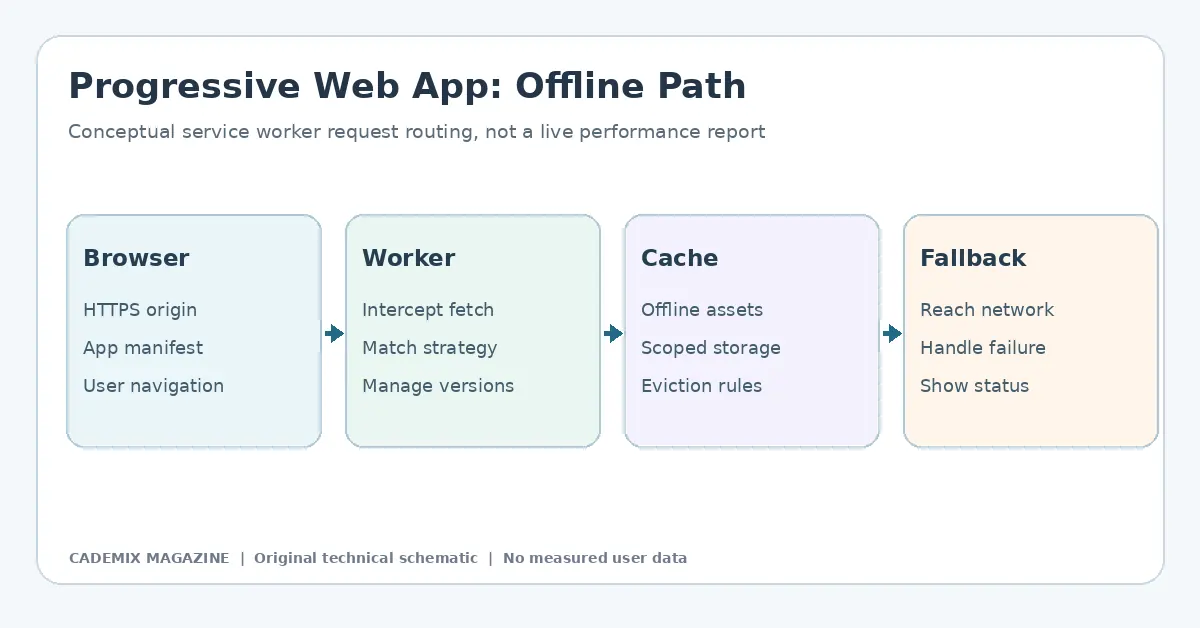
Table of Contents
- The Strategic Value of PWAs for SMEs
- Core Technical Competencies
- 1. Service Worker Architecture and Lifecycle Management
- 2. Performance Optimization and Core Web Vitals
- 3. Security and Privacy Standards
- 4. Framework Integration
- Building a Portfolio That Speaks to Employers
- Project Methodology: The Offline-First Approach
- Documenting the Process
- Navigating Professional Development Routes
- Step 1: Foundational Mastery
- Step 2: Specialized Deep Dives
- Step 3: Real-World Simulation
- Step 4: Continuous Learning
- Employer Expectations and Interview Preparation
- Common Interview Questions
- Soft Skills and Communication
- Caveats and Limitations
- Conclusion
- Further reading: Frontend Developer Through Progressive Web
- External reference for further study

The landscape of frontend development has shifted dramatically over the last decade. For students, recent graduates, and career changers entering the field, the traditional portfolio of static websites or simple JavaScript applications no longer signals readiness for the modern workforce. Employers, particularly those serving Small and Medium-sized Enterprises (SMEs), are increasingly demanding developers who can bridge the gap between web accessibility and native mobile performance. This is where Progressive Web Apps (PWAs) enter the narrative—not merely as a technology stack, but as a strategic career accelerator.
For the aspiring developer, mastering PWAs offers a unique pathway to demonstrate competence in offline functionality, performance optimization, and user experience design. These are high-value skills that directly address the pain points of SMEs, which often lack the budget for separate iOS and Android native app development teams. By positioning oneself as a specialist in PWA implementation for business contexts, a junior developer can differentiate themselves from the saturated market of generalist web coders. This article explores the technical competencies, project methodologies, and professional strategies required to build a career centered on this niche.
The Strategic Value of PWAs for SMEs
To understand why PWA expertise is a career asset, one must first understand the economic reality of the target employer. SMEs operate with constrained resources. They require digital presence solutions that are cost-effective, maintainable, and capable of reaching users across diverse devices without requiring multiple codebases. A native mobile app requires separate development cycles for iOS and Android, ongoing store maintenance, and significant marketing effort to drive downloads. In contrast, a PWA runs in the browser but behaves like an app. It can be installed on a home screen, works offline, and pushes notifications, all while being served from a single URL.
For a developer, this means working within a unified ecosystem. You are not juggling Swift and Kotlin; you are leveraging HTML, CSS, and JavaScript frameworks enhanced by Service Workers and Web App Manifests. However, the complexity lies in the integration. Making a website “installable” is trivial; making it performant under poor network conditions, secure against common vulnerabilities, and accessible to users with disabilities is challenging. This challenge is precisely what creates value. When a candidate demonstrates they have solved these specific problems, they signal to hiring managers that they possess systems-level thinking, not just syntax knowledge.
Core Technical Competencies
A career focused on PWA development requires a layered skill set. While foundational web knowledge is assumed, the following areas represent the specialized depth expected by employers looking for PWA-ready talent.
1. Service Worker Architecture and Lifecycle Management
The heart of any PWA is the Service Worker. Unlike standard JavaScript files, Service Workers run independently of the main thread and act as a proxy between the network and the application. Developers must master the lifecycle events: install, activate, fetch, and push.
It is insufficient to simply copy-paste boilerplate code. Candidates must understand caching strategies such as Cache First, Network First, and Stale-While-Revalidate. Each strategy serves different data types. For example, static assets (CSS, JS bundles) benefit from Cache First to ensure instant load times, while dynamic content (user profiles, inventory levels) may require Network First to ensure freshness. Misapplying these strategies leads to stale data bugs or excessive bandwidth usage—common pitfalls that distinguish novices from competent practitioners.
Furthermore, debugging Service Workers is notoriously difficult due to their asynchronous nature and isolation. Proficiency with Chrome DevTools’ Application tab, specifically the ability to inspect cache storage, unregister workers, and simulate offline states, is a mandatory practical skill.
2. Performance Optimization and Core Web Vitals
SMEs rely on conversion rates, which are heavily influenced by page speed. Google’s Core Web Vitals—Largest Contentful Paint (LCP), First Input Delay (FID), and Cumulative Layout Shift (CLS)—have become key metrics for SEO and user satisfaction. A PWA developer must go beyond basic minification.
This involves implementing lazy loading for images and components, optimizing critical rendering paths, and utilizing HTTP/2 or HTTP/3 protocols effectively. Developers should be familiar with tools like Lighthouse and WebPageTest to audit performance bottlenecks. Crucially, they must understand how to optimize for low-end devices and slow networks, a common scenario for SME customers in emerging markets or rural areas. Techniques such as code splitting, tree shaking, and preloading key resources are essential vocabulary in this domain.
3. Security and Privacy Standards
Because PWAs handle sensitive user data and operate with elevated privileges (such as background sync or geolocation access), security is paramount. Developers must implement HTTPS strictly, as Service Workers cannot function over insecure connections. Understanding Content Security Policy (CSP) headers to mitigate Cross-Site Scripting (XSS) attacks is critical. Additionally, managing permissions requests gracefully—asking for notification or location access only when contextually relevant rather than on page load—is a UX best practice that reduces user friction and improves retention.
4. Framework Integration
While vanilla JavaScript provides the deepest understanding, most commercial projects use frameworks like React, Vue, or Angular. Employers expect candidates to know how to integrate PWA features within these ecosystems. For instance, using workbox libraries to simplify service worker generation in a React application, or configuring vite-plugin-pwa for Vue projects. The ability to abstract PWA logic into reusable hooks or services demonstrates architectural maturity.

Building a Portfolio That Speaks to Employers
Generic portfolios often fail because they showcase visual polish without demonstrating engineering rigor. To stand out, a job seeker should construct a portfolio project that mimics real-world SME constraints. Instead of a weather app or a todo list, consider building a Local Inventory Manager or a Field Service Logbook.
Project Methodology: The Offline-First Approach
When developing a portfolio piece, adopt an “offline-first” mindset. Start by designing the data model assuming no network connection. Use IndexedDB or local storage to persist state. Then, layer in synchronization mechanisms.
- Define the Scope: Choose a small dataset, such as customer orders or equipment checklists.
- Implement Caching: Create a Service Worker that caches the shell of the application (HTML, CSS, JS) immediately upon installation.
- Handle Dynamic Data: Implement a fetch event listener that attempts to retrieve fresh data from the API. If the network fails, serve cached data and queue the change for later synchronization.
- Add Background Sync: Utilize the Background Sync API to process queued actions once connectivity is restored. This feature is highly impressive to employers as it solves a complex reliability problem.
- Installability: Ensure the Web App Manifest includes appropriate icons, theme colors, and display modes so the app prompts the user to install it.
Documenting the Process
The code itself is only half the story. The README file and accompanying blog post or case study are equally important. Do not just list technologies used. Explain why certain decisions were made. For example: “I evaluated a Stale-While-Revalidate strategy for product images, measured cache hit rates and bandwidth in repeatable tests, and documented when cached images became stale.” Do not invent a performance improvement for a portfolio project; show actual test evidence.
Include screenshots of Lighthouse audits showing scores above 90 for Performance and Best Practices. Highlight specific challenges faced, such as handling cache invalidation when new versions are deployed, and explain how they were resolved. This narrative structure transforms a coding exercise into evidence of problem-solving capability.
Navigating Professional Development Routes
Entering the PWA niche does not happen in isolation. It requires a structured approach to learning and networking.
Step 1: Foundational Mastery
Before diving into advanced PWA concepts, ensure proficiency in modern JavaScript (ES6+), asynchronous programming (Promises, Async/Await), and DOM manipulation. Weaknesses here will make Service Worker debugging impossible. Online courses and documentation from MDN Web Docs are primary resources. Focus on understanding the Event Loop and how non-blocking operations affect UI responsiveness.
Step 2: Specialized Deep Dives
Once foundations are solid, engage with specific PWA literature. Follow updates from the W3C regarding new APIs like Web Share Target or Periodic Background Sync. Experiment with these bleeding-edge features in controlled environments. Join communities such as the PWA Slack groups or Discord servers where practitioners discuss edge cases. Reading source code of open-source PWA templates can reveal patterns not documented in tutorials.
Step 3: Real-World Simulation
Seek opportunities to apply skills in semi-realistic scenarios. Volunteer to help a local non-profit or small business migrate their static site to a PWA architecture. Even if the scope is limited, dealing with actual client requirements, legacy code, and deployment pipelines provides invaluable experience. Alternatively, contribute to open-source projects that utilize PWA features. Submitting pull requests that fix caching bugs or improve manifest configurations demonstrates collaborative coding standards.
Step 4: Continuous Learning
Web technologies evolve rapidly. What is best practice today may be deprecated tomorrow. Subscribe to newsletters focused on frontend engineering and web standards. Attend virtual meetups or conferences dedicated to progressive enhancement and mobile web performance. Maintaining a habit of weekly experimentation with new browser features ensures your skills remain current.
Employer Expectations and Interview Preparation
When interviewing for roles involving PWA development, expectations extend beyond technical trivia. Hiring managers look for candidates who understand the business impact of their code.
Common Interview Questions
Expect questions that test conceptual understanding rather than rote memorization: * “How do you handle versioning in a Service Worker to ensure users get the latest update without breaking existing sessions?” * “Describe a scenario where a PWA might be inappropriate compared to a native app.” * “How do you measure the success of a PWA rollout for an e-commerce site?”
Answers should reflect a balance of technical precision and business awareness. For the versioning question, discussing strategies like skipping waiting phases or prompting users to refresh shows depth. For the appropriateness question, acknowledging limitations such as restricted access to certain hardware sensors or platform-specific integrations demonstrates honesty and realistic assessment skills.
Soft Skills and Communication
SMEs often have less formal IT departments. A frontend developer may interact directly with marketing teams or owners. Therefore, the ability to translate technical constraints into business language is crucial. Can you explain why adding a heavy animation library might hurt conversion rates? Can you articulate the ROI of investing time in offline capabilities? Practice explaining complex topics simply. Clear communication builds trust, which is essential for long-term employment.
Caveats and Limitations
While PWAs offer a compelling career path, it is vital to acknowledge their limitations to avoid overpromising. Not every business needs a PWA. Companies requiring heavy augmented reality processing, extensive background battery usage, or deep integration with proprietary OS features may still need native apps. A good developer knows when not to use a PWA.
Additionally, browser support varies. While major browsers support core PWA features, inconsistencies exist in Safari’s implementation of certain APIs compared to Chrome. Developers must account for these differences, often requiring polyfills or graceful degradation. Ignoring cross-browser compatibility can lead to production failures. Always test on actual devices, not just emulators, to catch subtle rendering or permission issues.
Finally, the “install prompt” fatigue is real. Users are wary of installing apps. Success depends on delivering genuine value upfront. If the PWA feels like a repackaged website with no added utility, users will ignore it. Career advancement in this area relies on creating experiences that users actively want to keep on their home screens.
Conclusion
Becoming a frontend developer specializing in Progressive Web Apps for SMEs is a strategic career move that aligns technical depth with market demand. It moves the developer away from commodity coding toward solution architecture. By mastering Service Workers, performance optimization, and security, and by building a portfolio that demonstrates offline resilience and measurable improvements, candidates can prove their worth to employers seeking efficiency and reach.
This pathway requires discipline. It demands continuous learning as web standards evolve and a willingness to tackle the messy realities of production environments. However, the reward is a differentiated profile. In a crowded job market, the developer who can say, “I built a system that kept the store running during a network outage,” stands out far more than the one who can merely style a button. For students and graduates, focusing on the tangible business outcomes of PWA technology transforms coding exercises into career capital. The future of the web is increasingly app-like, and those who learn to navigate this hybrid terrain will find themselves indispensable to the businesses driving digital transformation.
External reference for further study
Technical documentation and web-platform implementation background. See MDN Web Docs. This reference is a starting point, not a citation validating every claim in this article.
Frontend Developer PWA Portfolio Project
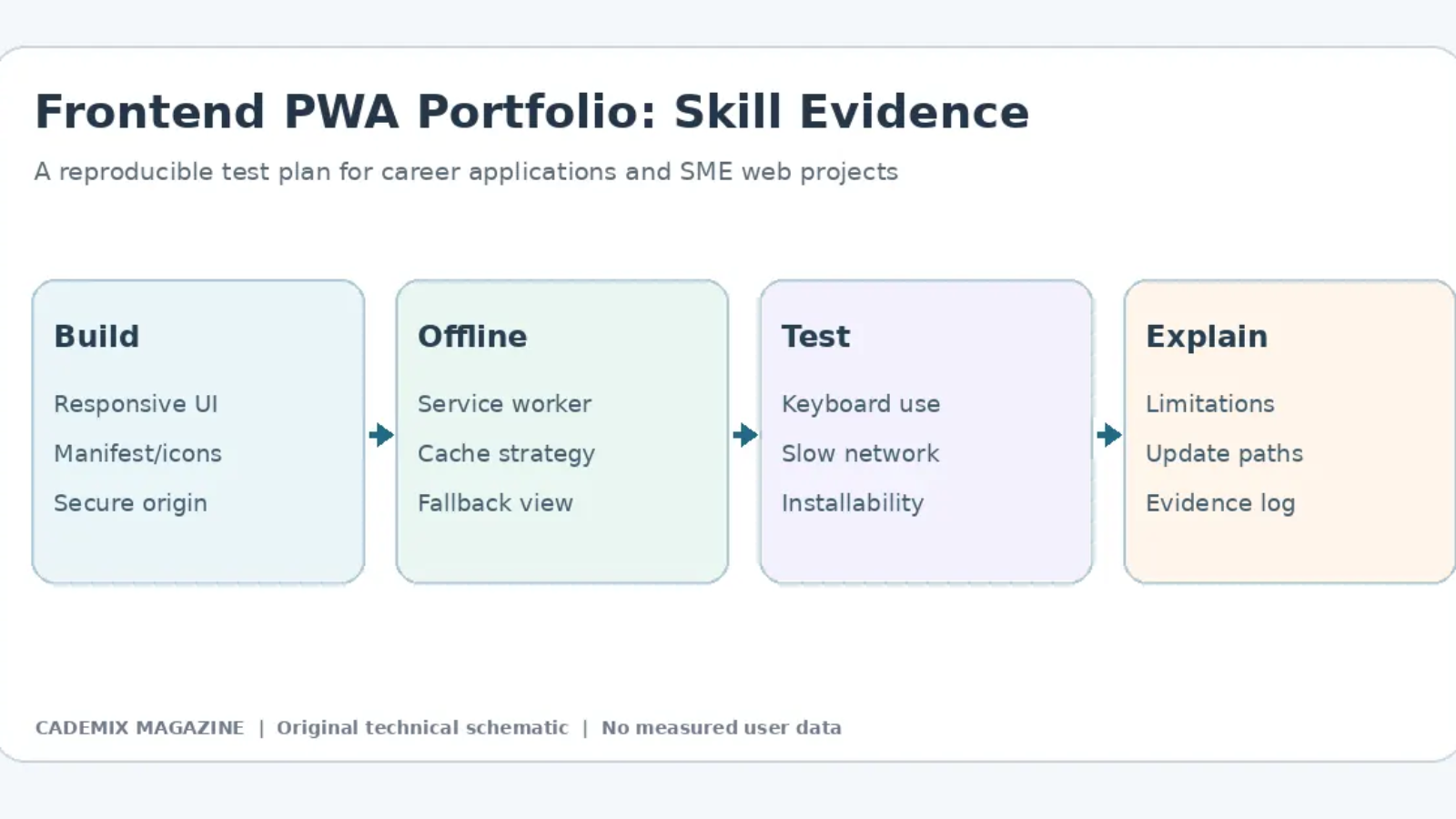
A strong frontend portfolio demonstrates reproducible functionality rather than listing frameworks without evidence. Build a small mobile-friendly web app that solves one practical problem, such as a field checklist or information reference. Document the HTTPS deployment, application manifest, service worker, offline behavior and error messages. Explain why each feature is present, and keep the scope manageable enough for an employer to inspect the code and test it.
Use a test matrix covering installation on supported browsers, refresh after losing network connectivity, returning from an older cached version and data handling when the server becomes reachable again. If the application stores personal information, describe how it is protected and when it is deleted. An offline screen must indicate what was saved locally and what the service has confirmed. Tests should include failure scenarios, not only the successful installation path.
Do not describe a personal prototype as a production deployment. A small application may illustrate relevant skills without demonstrating enterprise-scale reliability. Provide screenshots of actual test conditions only when the screenshots are from your project, and label any mockups or illustrative diagrams. A candid discussion of limitations can be more informative than an unverified claim that the application improved retention, engagement or revenue.
Accessibility, Performance and Communication
Frontend developers should demonstrate keyboard accessibility, usable error states and readable content when the viewport changes. Include a small set of automated and manual checks, and explain what the tools did not verify. For performance, record the browser, device class, measured metric and test environment. Do not compare scores collected under different conditions as if they established causation. Show how you would investigate a regression and document the change that resolved it.
During a technical interview, explain the trade-offs between cache-first, network-first and stale-while-revalidate strategies. Describe when content can safely remain stale and when fresh server information is essential. Use MDN PWA documentation and web.dev’s PWA tutorials to verify terminology and browser behavior. The goal is a portfolio showing informed decisions, working code and honest evaluation—not an unsupported universal statement about the superiority of PWAs.